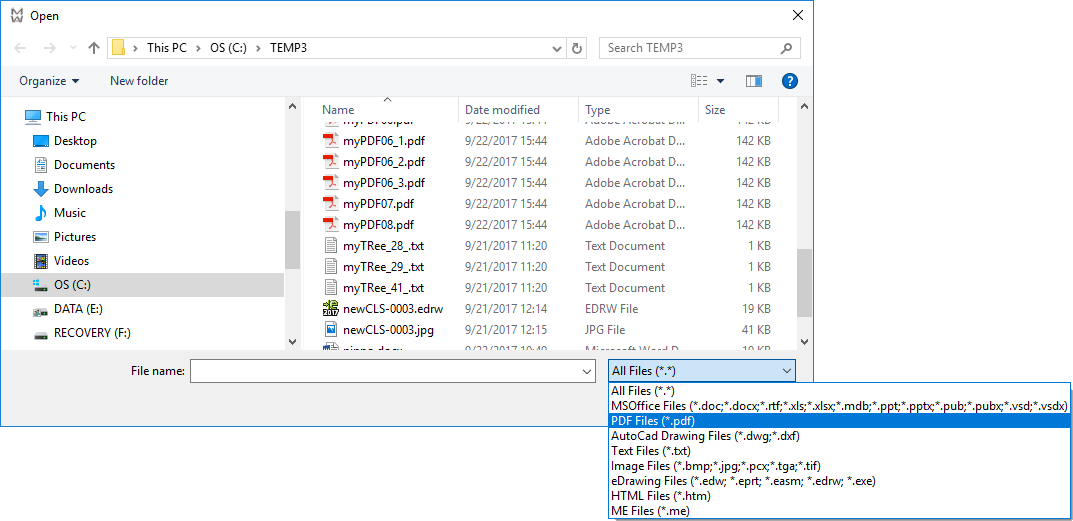
Customization of the Open generic document dialog
MechworksPDM by default sets a certain number of types that are recognizable by the open dialog, while the *.* all files option is active for you to insert any other sort of file. Since MechworksPDM can associate any type of external document to an existing one, you may like to modify the list of recognized file types in order to simplify the insertion of non CAD documents.
MechworksPDM maintains the list of recognizable file types in the text file DBWGEXT.TXT, that you can find in the SCHEMA directory as mapped in the path options.
The format for inserting or modifying the entries is:
<description 1>
*.<ext1>; *.<ext2>; *.<ext3>
<description 2>
*.<ext4>; *.<ext5>; *.<ext6>
as specified in the text file itself.
Example
;===================================================================
; DBWorks (C)MechWorks Generic Document extensions file
;
; Format:
;
; <description 1>
; *.<ext1>; *.<ext2>; *.<ext3>
; <description 2>
; *.<ext4>; *.<ext5>; *.<ext6>
; ....
; ....
; All Files (*.*)
; *.*
;
; 20080708 C.E. Added support for Office 2007 file extensions
;===================================================================
All Files (*.*)
*.*
MSOffice Files (*.doc;*.docx;*.rtf;*.xls;*.xlsx;*.mdb;*.ppt;*.pptx;*.pub;*.pubx;*.vsd;*.vsdx)
*.doc; *.docx; *.rtf; *.xls; *.xlsx; *.mdb; *.ppt; *.pptx; *.pub; *.pubx; *.vsd; *.vsdx
PDF Files (*.pdf)
*.pdf
AutoCad Drawing Files (*.dwg;*.dxf)
*.dwg; *.dxf
Text Files (*.txt)
*.txt
Image Files (*.bmp;*.jpg;*.pcx;*.tga;*.tif)
*.bmp; *.jpg; *.pcx; *.tga; *.tif
eDrawing Files (*.edw; *.eprt; *.easm; *.edrw; *.exe)
*.edw; *.eprt; *.easm; *.edrw; *.exe
HTML Files (*.htm)
*.htm
ME Files (*.me)
*.me
Here is the result: