Custprop.txt file
Description
This file is located in the SCHEMA folder and enabled through the option:
DataInput →  Import custom properties as field values using mapping file SCHEMA/CUSTPROP.TXT
If enabled, MechworksPDM assigns specific fields of the database getting the values from the custom properties of the CAD file.
Excepting for UNICODE supported langauges, all parameters file for MechworksPDM must be ANSI coded.
How this process works
Suppose you have a CAD file (not registered in the database yet) with its own custom properties values that have to be shown in the drawings title blocks. Suppose also that you want to import these data in the MechworksPDM database: you have to define a mapping file between your custom properties names and the names of the fields in the MechworksPDM database where these data are to be stored.
The mapping file (a text file) must be located under the sub-directory pointed by the Options → Path → Schema directory parameter of MechworksPDM, and must have the following structure:
;===================================================================
;
; MechworksPDM (C)MechWorks Custom Properties Mapping file
;
;===================================================================
<database field name> <custom property name>
<database field name> <custom property name>
<database field name> <custom property name>
<database field name> <custom property name>
...
More than one <custom property name> can be mapped to one <database field name>. This allows you to better organize some data scattered in more than one custom properties though containing the same information.
As a further example, suppose you want to import in the database of MechworksPDM the data stored in the custom properties:
"Mat." The material of the part
"Article code" An article code
"Internal code" A proprietary code
The data of "Mat." could be mapped in the existing field MATERIAL of the database and "Article code" could be mapped in the existing field ITEM_CODE of the database; "Internal code", though, requires a new field INTERNAL_CODE that you need to add with DBCustomizer to your database.
After creating the field, you are ready to write the mapping file CUSTPROP.TXT as follows:
;===================================================================
;
; MechworksPDM (C)MechWorks Custom Properties Mapping file
;
; Language: ENGLISH
;
;===================================================================
MATERIAL "Mat."
ITEM_CODE "Article code"
INTERNAL_CODE "Internal code"
Save the text file and start the CAD and the PDM, opening one of the files containing the indicated custom information; save the file in the CAD and in the database record that optionally appears on the screen you can see your custom properties values mapped in the proper fields of the record.
Example
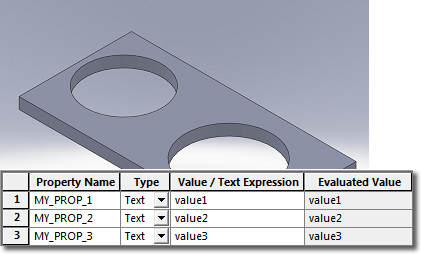
1.Suppose you have a component not yet registered in the database that has its own custom properties already set:
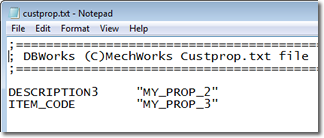
2.When you register the document for the first time in the database, custom properties are read from the file and written in the database fields according to the matches declared in custoprop.txt plus custprop_insert.txt:
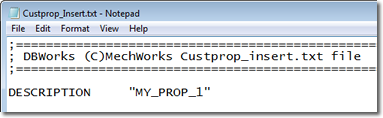 +
+ 
3.The input data form (that has a white background since it's a new record) suggests the values read from the cust properties:
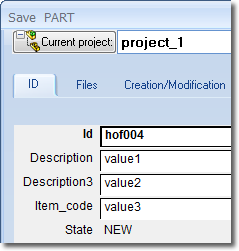
4.Once you click the button in the input data form, the field values are written in the database and all the field database are witten as custom properties back in the file:
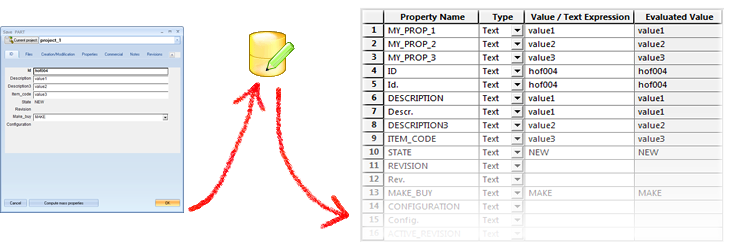
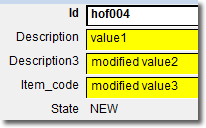
5.When you save the document the following times, the input data form (that has a yellow background since it's an existing record) read the custom properties mapped in the custprop.txt file only.
Suppose if the original values (MY_PROP_*) have changed, only the ones declared in custprop.txt would be suggested in data input form:
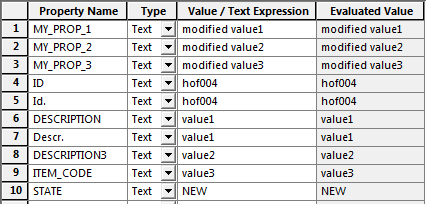 → →
→ → 
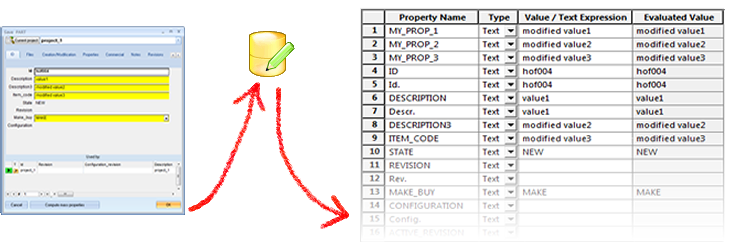
Then, when written back from the database to the custom properties, you'll see the following state:
CustProp_INV.TXT
A file named CUSTPROP_INV.TXT is present under the schema folder. Inventor users have to rename it to CUSTPROP.TXT.
It contains the property labels exposed by Inventor iProperties.
CustProp_SE.TXT
A file named CUSTPROP_SE.TXT is present under the schema folder. Solid Edge users have to rename it to CUSTPROP.TXT.
It contains the property labels exposed by Solid Edge Revision Manager.
Importing properties in environment languages different from English
In order to import properties blonging to the Summary Info and Document Summary Info sections of the Properties, the custProp.txt must be prepared for supporting ALWAYS the English language and the current localized language.
The names of the fields must follow the multiple fields assignment rules, by appending the suffixes @01, @02, @..., to the database field names; here below it's an example with German language:
BENENNUNG "Title"
BENENNUNG@01 "Titel"
and here is another example in Italian:
AUTORE "Author"
AUTORE@01 "Autore"
Calculation of property expressions when importing through the CUSTPROP.TXT
SolidWorks custom properties containing expressions of the type "D1@Base-Extrude" are correctly calculated; their values, and not their definitions as in previous versions of MechworksPDM, are inserted in the mapping database fields. Only property values with formats like "...@..." are considered as expressions to be resolved.
Support for configuration specific attributes
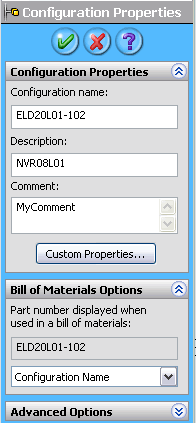
It is possible to map the shown configuration properties into database fields by using the same identifiers available for exporting the database field values into the configuration properties, that is:
SolidWorks@ConfigurationProperty@Description
SolidWorks@ConfigurationProperty@Comment
SolidWorks@ConfigurationProperty@AlternateName
Example
CUSTPROP_INSERT.TXT
;======================================================================
;
; MechworksPDM (C)MechWorks Custprop.txt file created by Regitration Wizard
; Language: no language
;
;=======================================================================
CATEGORY1 "SolidWorks@ConfigurationProperty@Description"
CATEGORY2 "SolidWorks@ConfigurationProperty@Comment"
CATEGORY3 "SolidWorks@ConfigurationProperty@AlternateName"
Summary Info properties
The Summary Info properties can be imported by declaring the following identifiers:
"SW_Title"
"SW_Subject"
"SW_Author"
"SW_KeyWords"
"SW_Comment"
"SW_SavedBy"
"SW_CreateDate"
"SW_SaveDate"
Example
CUSTPROP.TXT
DESCRIPTION "SW_Title"
NOTES "SW_Comment"
CustProp_INSERT.TXT
You can define a list of properties that are imported from the file into the database only when you create a new record, which is when you save the document for the first time or you do a save as.
If you insert a new record in the database for a pre-existing document (as it happens typically when you register an existing archive), MechworksPDM checks for the existence of the file SCHEMA\CUSTPROP_INSERT.TXT .
If this file is found, MechworksPDM applies the mapping defined in the file to the record and the fields enlisted are added to the ones already imported through the standard CUSTPROP.TXT. So, for example, if the CUSTPROP.TXT file contains the mappings for the properties Prop1, Prop2 and Prop3, those properties are always imported in the record; if the CUSTPROP_INSERT.TXT contains the properties Prop4 and Prop5, these are imported only when creating a new record.
Pay attention when using CUSTPROP functionality together with option Environment → Configurations →Save of configuration as distinct records: importing ID field from files, could generate errors due to creation of same ID records, and this could cause data loss.
CustProp_INSERT_GENERIC.TXT
This mapping file is used when registering (with no wizard) generic documents into the database.
Duplication wizard
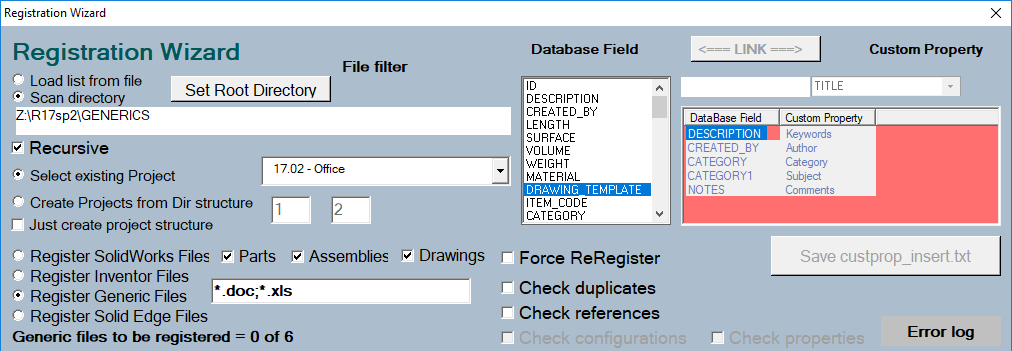
Since the wizard uses the standard MechWorks_Pdm shell for importing custom properties for Office files (Word and Excel), the CUSTPROP_INSERT.TXT is used instead of the CUSTPROP_INSERT_GENERIC.TXT file when registering Office documents. The list of current handled properties is defined the combo selector within the Registration form. The properties that can be handled are fixed in the list
The property names are in English but map to the localized OS.