Configurations Options
 Save configurations as distinct records
If checked, all the configurations of a single document will be saved to different records. For further information, read the topic configurations.
If enabled, the table generated configurations are now recorded as distinct records ( and structures ) in the DBWorks database.
DBInventor users please read
DBSolidEdge users please read
 Save all configurations automatically
If this option and the main option Save different configurations as distinct records are checked, when saving a configured part or assembly, DBWorks asks whether to save automatically as different records all the configurations of the document.
This option has been introduced for registering part libraries based on configurations; if you don't need to save all the configurations of every document, this option should remain unchecked after the registration of the part library has been completed.
If this option is checked, DBWorks asks for saving all the configurations of a document if this is in a CHECKED OUT state and the REFRESH toolbar button is pressed together with the SHIFT key.
DBWorks inserts new (GREEN) records for new configurations; an increment revision state and then a checkout must be executed on the GREEN records to align their state to that of the existing checked out configured records from which they have been derived.
As a secondary option, you can avoid the input on save, which can be annoying if you have many configurations.
File size
SolidWorks tries to save on file the last built configuration bodies; since DBWorks activates each configuration one by one in the process of saving all the configurations automatically, at the end of the process SolidWorks would save (for reuse) the bodies of each configuration on the disk; DBWorks prevents SolidWorks from saving the bodies. As a normal usage, the option to Save all the configurations automatically should be used only in the registration phase of an existing archive; in that case, registering the standard parts, with hundreds of configurations, could lead to an enormous disk usage, expecially when many configurations are pre-defined using an Excel Design Table.
No Input on Save
Save only New Configurations
By default, starting from DBWorks 2007, the application saves only newly created Configurations when the  Save all configurations automatically is checked.
This assure a great performance improvement, avoiding to activate and save every time all the configurations.
To be backward compatible (DBWorks 2006 behavior) with situation where all the configurations need always to be saved (for example because of the editing of their properties through a design table, with the alignment of these properties with the database data through a Custprop.txt being activated), a new option has been introduced, with its default value set to TRUE (checked);by disabling it, DBWorks 2007 will always save every configuration, no matter if new or already existing, so forcing the update of each configuration record.
this option is enable only if the other option Open/Save→Save→ Always calculate mass properties on save is unckecked. This because if you want to always calculate the mass properties for every configuration, you've to save ALL of them rather than only the newer ones.
Update configured brother documents on Checkin
When checked, and when checking in an opened document, DBWorks activates one by one all the configurations of the currently opened document and updates their database structure - if the options for calculating the mass properties at save time or at checkin time are enabled, the mass properties will be updated as well for each configuration - Note: the option impacts on the performance of the checkin operation
Never create 'NULL configuration' record
If checked, and if the Save different configurations as distinct record option is checked, DBWorks doesn't create a record with a null configuration value (empty CONFIGURATION field).
This option is important when lists of configuration names or component names are assigned so to avoid to insert records in some cases.
If the option id left unchecked (default case), when a configuration (or component name) does not match the regular expression specifications of the two lists, it is be stored in a record with a null configuration value, to indicate that this record represents all the cases to discard.
If the option is checked, this record is not created.
The "NULL config record" is created only if the Default/Standard config is discarded, otherwise the Default/Standard config will be taken as referenced for all the discarded configs.
so:
•define config to be discarded → Default is valid → Default
•define config to be discarded → Default is discarded → NULL (blank)
Please note the NULL record itself (so when also Default is discarded) is very ambiguous since it refers to the last saved config (and not always to the same).
This option must never be checked when coming from a database created without the configuration support, otherwise duplicate entries for the already existing 'unconfigured' records are created.
Example
A1 |
|
|---|---|
P1 (c1) |
|
P1 (d2) |
|
P2 (Default) |
P1 has 3 configurations: c1,d2,e3
P2 has the configuration: Default
Filter on configurations: C*
Unconfigured case:
A1 |
||
|---|---|---|
P1 |
qty=2 |
|
P2 |
qty=1 |
Configured case:
Never create 'NULL configuration' records UNCHECKED
A1 |
||
|---|---|---|
P1 (C1) |
qty=1 |
|
P1 |
qty=1 |
|
P2 |
qty=1 |
Never create 'NULL configuration' records CHECKED
A1 |
||
|---|---|---|
P1 (C1) |
qty=1 |
This option is grayed and considered as always active (i.e. never create NULL config record in DBSolidEdge)
Manage 'Add Configuration' event
If checked (default value), DBWorks intercepts the "Add Configuration" and the "Remove Configuration" event of SolidWorks and automatically tries to synchronize the database, adding a new configured record for the added configuration.
Normally it is suggested to have this option checked, but it may be useful to uncheck the same when a DATAENTR.LST is used to generate the part numbers (or other information) for the documents being saved.
Use 'DataEntr.LST' on 'Add Configuration' event
When checked, the LST\DATAENTR.LST script is invoked with @CONTEXT=ADD_CONFIGURATION. See DataEntr.LST topic for further information
Always ask for confirmation when deleting a non referenced Configuration
 Solidworks users only
 Solid Edge users only
When checked, a prompt is displayed before deleting a Configuration Specific database record, if the configuration is not referenced by any other Parent Document - this option is a safeguard againt involuntary deletions of in-memory configurations, that are undoable in the CAD model, but not in the database.
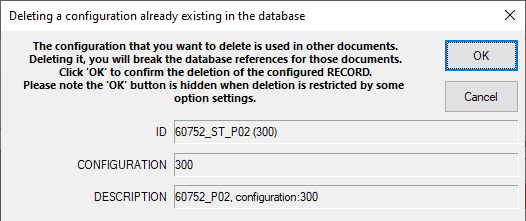
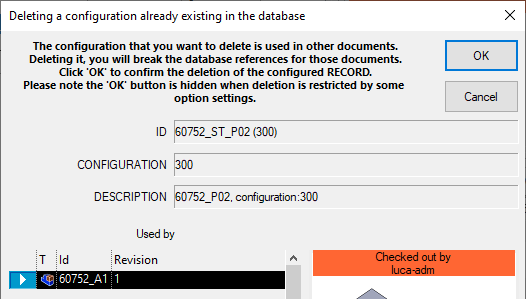
In case the configuration to be removed is referenced by other models, the dialog will be always shown, despite of the option value.
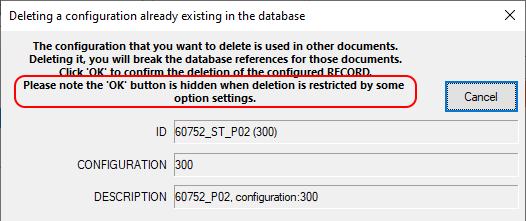
Sometimes, depending on the PDM option/security settings, the record is not removable from the database.
The removal from the CAD is instead not under PDM control, so it will take effect in any case.
To highlight the fact the record will not be deleted, the button is not present in the dialog and the dialog's message informs the user about that:
Manage Revisions of Configurations
The options allows to have separate lifecycle for configurations at record level. Please refer to the topic configurations for further information.
Never align Configuration Revision to File Revision
If checked, for documents with only one configuration, DBWorks does not overwrite the CONFIGURATION_REVISION value with the REVISION value. For documents with two or more configurations, the option is not active, because DBWorks never overwrite the CONFIGURATION_REVISION value in such cases.
Manage State of Configurations
This option allows to declare specific configured records as OBSOLETE.
Such records will have a grey color state (exactly as any obsolete record) even if part of a file that's not completely obsolete.
Its editability will be disabled when other non-obsolete configurations are in NEW or CHECKEDIN state.
If other configurations are CHECKEDOUT, the editability of obsolete record will be still possible.
The database value of field CONFIGURATION_STATE must be manually (or through a custom script) set to OBSOLETE (localized in every language) to enable this behavior.
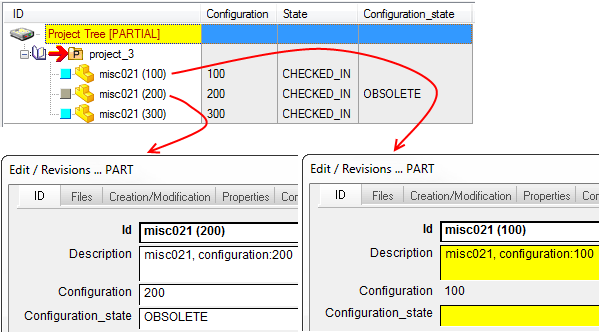
In this example, you can edit the checkedin records (yellow background in datainput form) but you cannot edit the obsolete record (white background in datainput form)
Please note the file state is CHECKED_IN for all three records.
Always consider State of Configurations for approval checks
When checked, and with the Revisions→Approval→ Avoid assembly approval if components not released checked, the check on the components state is made on the field CONFIGURATION_STATE if its content is not null, otherwise the check is performed on the field STATE as usual.
Save only 1st level parent configuration for any Part/Assembly
if the option is checked, no derived configuration will be saved
Example
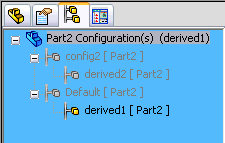
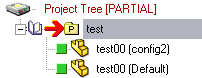
In this case only 2 records will be created
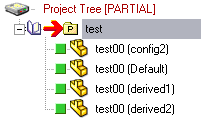
while with the option unchecked, 4 records will be created
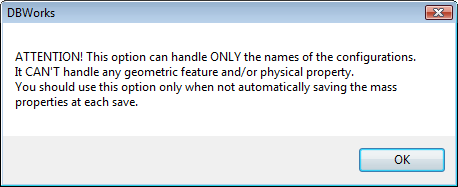
When enabling such option, a message informs you it won't handle geometric features property changes:
Save only parent configurations for drawing models
If checked, DBWorks saves only the top-level parent configurations for the parent-child relationships of the model inserted in a drawing. This helps to maintain the correct parent-child relations between drawings and the drawn models when utility configurations are used for performance reasons.
Example
Consider the following example:
Suppose you have an assembly A1, very complex and with many configurations; if you insert this assembly in a drawing, the drawing will require a very long time to regenerate. You can decide to create an utility configuration eliminating many features of the assembly with the only purpose to have a manageable drawing.
In this case, let's say you have a hierarchical structure as follows:
A1 |
||
|---|---|---|
+ |
RealConfig1 |
|
+ |
UtilityConfig1 |
|
+ |
RealConfig2 |
|
+ |
UtilityConfig2 |
|
If you insert the configurations UtilityConfig1 and UtilityConfig2 of A1 in the drawing D1, the parent-child relations in DBWorks, depending on this option are:
option unchecked |
||
|---|---|---|
D1 |
||
+ |
A1 (UtilityConfig1) |
|
+ |
A1 (UtilityConfig2) |
|
option checked |
||
|---|---|---|
D1 |
||
+ |
A1 (RealConfig1) |
|
+ |
A1 (RealConfig2) |
|
Never update parent structure when saving
When checked, no parent configuration structure update is executed when saving a derived configuration
Only for derived configurations...
 Users only
This option allow to refine the two options above.
Example
Suppose to declare
UtilityConfig - *
as following:
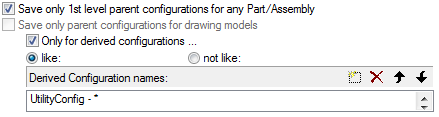
so that if a derived configuration has its name similar to "UtilityConfig - ..." then its top-level parent configuration will be inserted in the DBWorks database.
All the derived configurations that will not match any of the entries in the "Derived Configuration names:" list, will have a distinct record in the DBWorks database.
Always considering the above example, the sample Part "ParentConfigurationsPart1" with configurations:
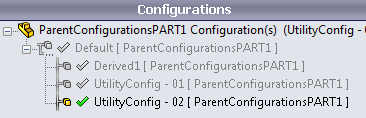
will create only TWO records in the DBWorks Database:
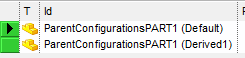
because the two "UtilityConfig*" will reuse the "Default" configuration record (their top-level parent configuration).
At BOM level, this will be applied as well when instantiating derived configurations into assemblies.
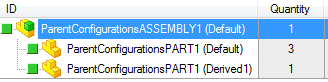
For example, the assembly below:
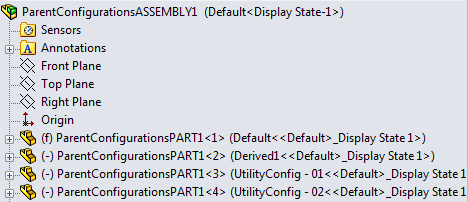
will have a BOM with 3 components with 'Default' configuration, and just one with the 'Derived1':
Open/Show existing Drawings for any Configuration
Usually MechworksPDM open/show ONLY drawing directly linked to the specified configuration.
With this option enabled, EVERY drawing is shown.
It could be useful to show drawings that don't contain specific configuration but that are related to the component.
Example
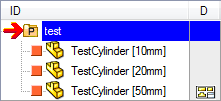
Suppose to have 3 configurations of the same component; suppose the drawing contains only views of one of such configurations.
With the option unchecked you'll see -as usual- the icon only to record that has a PARENT_CHILD direct connection
With the option checked you'll see tree icon and RMB entries also for other related configurations (even if all referring to the same drawing)
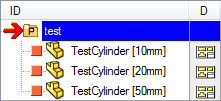
This option provides a way for supporting the opening and showing of the linked drawings for configured records not directly inserted in a tabular drawing.
Only when...
You can set a rule for retrieving drawings following specified criteria
This suboption allows the definition of a matching condition for applying the rule only to a sub-set of brother configurations.
Keep 3D CAD Configuration Properties synchronized
When checked, DBWorks, at each Edit record, updates the SolidWorks Configuration::Description property with the value contained in the DESCRIPTION field, and the SolidWorks Configuration::Comment property with the value @UNIQUE_ID=<unique id>
The action is executed when the SolidWorks model is opened as well as when it is closed.
The automatic assignment is NOT executed if any of the SolidWorks@ConfigurationProperty@Description or SolidWorks@ConfigurationProperty@Comment is imported through the CUSTPROP.TXT
This option is typically used together with the installation of DBTools (please contact Integrated Partner Solutions Inc. (MechWorks US Partner) for more details about DBTools), and together to the setting of both the options Manage 'Add/Remove Configuration' event and Use 'DataEntr.LST' on 'Add Configuration' event
Since of the above settings, when the option is checked, the Dataentr.LST script is also ALWAYS launched even if a specific configuration is not a valid configuration as per the configuration’s filters settings.
This will allow the Dataentr.LST to take control over the name to assign to the newly added configuration, no matter of the configuration' name entered by the user.
Save configurations of components with names like/not like:

If checked, MechworksPDM looks into the list Component names to tell if a component must be saved in a distinct record according to it's configuration or not.
The list Component names must be filled with patterns useful to identify the names of components normally inserted by commercial libraries or for which it is not important to keep track of their life cycle (revisions).
For example, inserting the string *SCREW* in the list, DBWorks will insert as distinct configured records only the components of an assembly with the names containing the string SCREW; the syntax is similar to that of the file system of Windows.
The component list can contain directories specifications in the format <drive>:\... or \\<machine>\... ( ex: C:\MyStandardParts\* or \\128.127.0.29\c\MyStandardParts\* )
Some more examples:
SCREW* |
all components with names starting with SCREW |
|---|---|
*SCREW |
all components with names ending with SCREW |
*SCREW* |
all components with names containing the string SCREW |
SCREW?? |
all components with names of exactly 7 characters and starting with the string SCREW |
SCREW??10* |
all components with names starting with SCREW, with any two characters in the 6th and 7th positions, with a '10' following these two characters, and ending with any string |
SCREW[0-5][7-9][1-2]* |
all components with names starting with SCREW, with a char between 0 and 5 in the 6th position, with a char between 7 and 9 in the 7th position, with a char between 1 and 2 in the 8th position,and ending with any string |
This option is not available in DBSolidEdge (starting from build 20161115) to prevent data inconsistency with existing record related to original asm
Joining multiple conditions with AND/OR logical operator
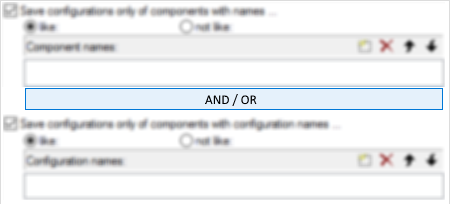
A check box with AND/OR values is available to apply a logical AND or OR of the conditions for filtering the configurations using the component's file name or configuration.
The default value is AND, and it means that if both the conditions are checked, if the first is FALSE, then the second is discarded and the component is considered without configurations. If, on tho other hand, the OR operator is activated and the first condition is false, the component is considered with configurations if the second condition is TRUE.
Example
Component file name: |
Part2.SLDPRT |
|---|---|
Component configuration: |
Cfg1 |
Save configurations only of components with names like: |
*Part1* |
Save configurations only of components with configuration names like: |
*Cfg1* |
AND case: |
Result = FALSE ( it stops after the check on the file name ) |
|---|---|
OR case: |
Result = TRUE ( it continue with the check on the configuration, that is TRUE ) |
Save configurations only of components with configuration names like:

If checked, when working in the Save configurations as distinct records mode, MechworksPDM creates distinct records for the pairs component name <=> configuration name, where configuration name is matched in/against the list Configuration names.
if the option Save configuration only of components with names like: is checked, then the check on the configuration name is subsequent to the check for the component name.
When a configuration is not matched in the assigned list, DBWorks inserts the name Default into the CONFIGURATION field.
Example
•Suppose the part P1 has the configurations C01, C02, C03, C10 and C11.
•Suppose you fill the Configuration names list as:
Configuration names
C0*
The data in the list forces DBWorks to save only the configurations beginning with C0…
When saving automatically all the configurations ( checking the option [X] Save all configurations automatically ), DBWorks creates 4 records:
1.ID CONFIGURATION
2.P1 (C01) C01
3.P1 (C02) C02
4.P1 (C03) C03
5.P1 Default
Both the configurations C10 and C11 (not matching any entry in the list) are mapped in the record P1 Default.
When working with Alternate Assemblies, the existing record related to original asm is always re-used by the first managed configuration, so it's mandatory that the first managed configuration is not discarded by filter criteria.
Use OnConfigurationFilter.LST script
In case other performance impacting options are active, the user will be warned at enabling time: 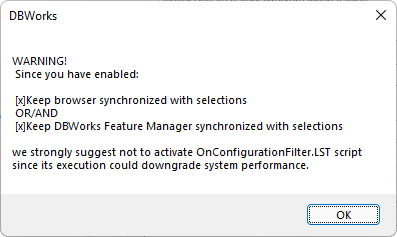
Align fields on configuration checkin
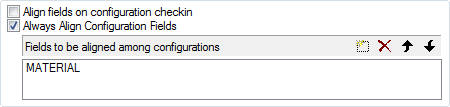
If checked, you have to enlist the fields (of DOCUMENT or REVISIONS table) that must be kept aligned between the configured records for the same file object (ex: MATERIAL).
To select a field, add a new line, then click the [...] button to open a selection dialog.
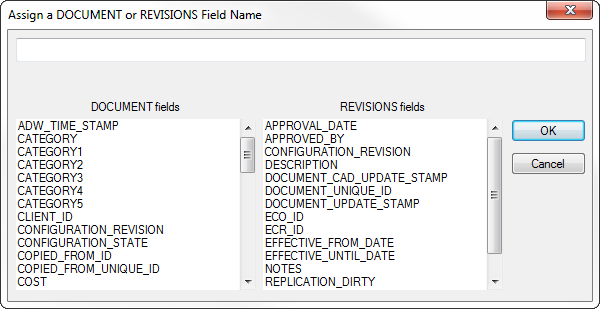
The functionality is backward compatible with field names declared without the "<TABLE NAME>." prefix.
Fields belonging to the REVISIONS table are ignored for any file custom properties alignment.
The fields
•LAST_MODIFIED_DATE
•LAST_MODIFIED_BY
•REPLICATION_DIRTY
•REPLICATION_PARTNERS
(used by Remote Access) are always aligned at check-in for all the configuration records of the same file; so they don't need to be declared in the above dialog.
Always Align Configuration Fields
This option, alternative to the Align Fields on Configuration Checkin, makes DBWorks align all the fields declared in the list across all the configuration records related to the same selected document file.