Revisions Approval Options
To set fields that must be filled on approval see Options→Data Input→Not Null Fields.
 Update drawings on revision approval
If checked at the approval of a release of a drawing MechworksPDM:
1.opens the drawing being approved
2.updates the variant notes
3.closes the drawing and the included document(s).
This option solves the common problem of ensuring that the released drawing contains only up to date information.
It also ensures that the display list is correct and it can be safely used with the open in view-only mode and with the plotting in view-only mode.
Please be aware that the use of this option means that the drawing is reloaded (with the document being drawn) and saved at approval time.
If you do not use variant notes or you do not need any field from the REVISIONS table, you can leave unchecked this option and avoid performing time consuming operations.
Update drawings on revision freeze
When checked, the Drawings are fully updated (Open/Update/Save/Close) when the RMB → Checkout/Checkin → Freeze operation is executed.
 Undo the checkout when no changes in the document on a recursive approve
When checked, MechworksPDM will automatically uncheckout-uncheckin the assembly components that have not been modified while editing the assembly.
In this way, it is possible to checkout the whole assembly (by creating a new revision for each component), and to avoid unnecessary revisions for unmodified components to be approved.
The approval dialog shows the components that have not been modified with a darker background color, and with the revision value displayed in a green color, to indicate that no revision increment will be applied.
Example
Suppose a user checkouts a whole assembly:
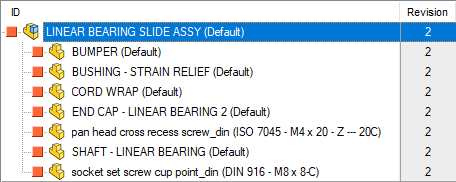
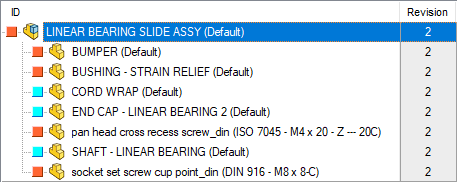
But actually he has modified and checkedin only few components:
When the recursive approval is performed on the main assembly, the dialog shows a darker background and a green revision value (decremented) for such records that do not require approval forward (row 2,3,6 and 8): 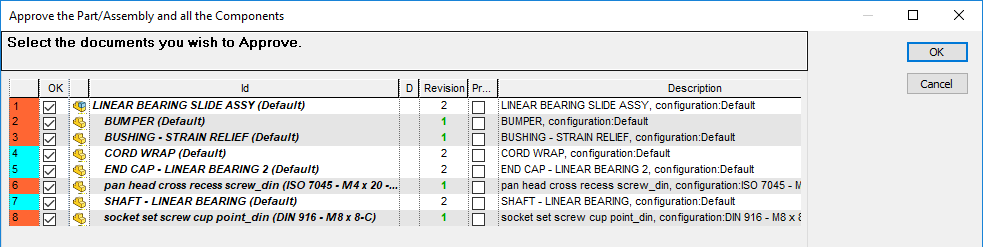
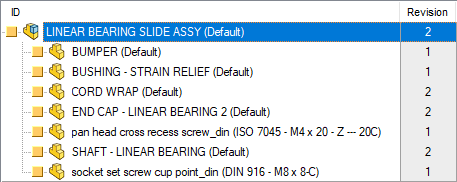
And the final result is like followings:
Except when advancing from a Minor to a Major revision
When checked, when the Advanced Revision Schema is enabled and when the Revisions → Use OnCheckIfMajorRev.LST script is enabled, the PDM looks if the Current Revision is a Major Revision and if the Previously Approved Revision is a Minor Revision, and avoids the Uncheckout operation if such condition is met.
This sub-option is useful for tagging an approved Minor Revision as Major, so just creating a new Major Revision and approving it without any change.
Always Update Assembly Component Positions with Drawing BOM Positions
Automatically aligns the parent-child index positions of the assembly-components with the order of the SW BOM in the drawing, if any, when a drawing is approved.
The drawing is processed if:
•a BOM table is present in the drawing; if the UNIQUE_ID field is present in the BOM table its value is used as unique id of the component, else a lookup ID->UNIQUE_ID is performed
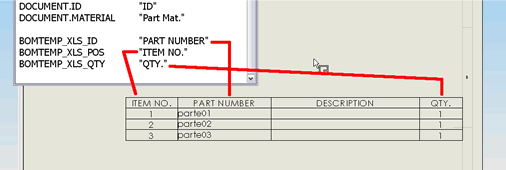
•the the option relative to the usage of BOMTITLE.TXT file has to be enabled and a correspondance has to exist between BOM headers and specified XLS fields(see image below)
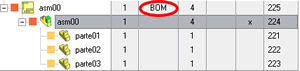
•the record of the drawing has the MAKE_BUY attribute set to "BOM" (language dependent)
This option is in DBWorks independent from the Update variant notes on revision approval and it is therefore usable in installations where the DBWorks variant notes are not used.
Accept approval via Task Manager only
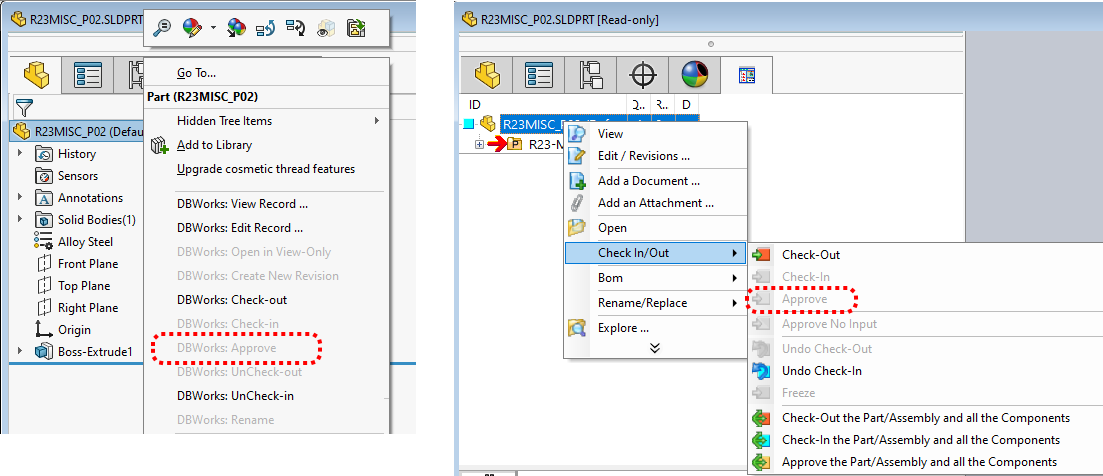
When the option is enabled, the RMB entry of the opened doc is grayed:
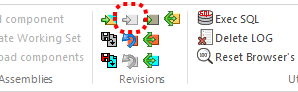
When the option is enabled, the approve button in the ribbon bar is grayed:
Since the direct Approve command is disabled, the user must Approve through the recursive mode;
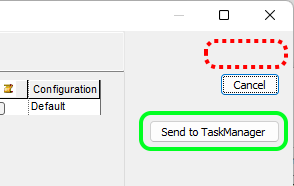
in the selector dialog the button is hidden and the user can only send approval action to the task manager through the button:
Avoid previous revision approval
If checked, when a release is going to be approved, DBWorks does not display the choice Approve changes modifying the last approved revision
Update Previous Revision Record on Previous Revision Approval
When checked, if approving on the Previous Revision, MechworksPDM will update the content of the Previous Revision Record with the current content of the actual revision record
This option is enable if  Avoid previous revision approval is disabled.
Update Approved_By and Approval_Date on Previous Revision Approval
When checked, the APPROVED_BY and APPROVAL_DATE date of the last approved revision are updated by the PDM with the current user and date/time.
This option is enable if both Update Previous Revision Record on Previous Revision Approval and Avoid previous revision approval are disabled.
Avoid same user approval
If checked, MechworksPDM checks if the LAST_MODIFIED_BY and CREATED_BY fields are the same as the current logged in user, and only in this case denies the approval action
Avoid direct approval from checkedout state
self explaining.
Avoid approval if children are Unmanaged
Avoid the approval for assembly that has children with the NO-life-cycle flag set to TRUE (i.e. field DOCUMENT.DBW_NO_LIFE_CYCLE).
Avoid approval if children are not released
If checked, MechworksPDM does not allow to approve an assembly or a part if the components belonging to the first hierarchical level (displayed in the Composed Of grid) are not all in a released state.
Accept approval if children are frozen
If checked, MechworksPDM accepts the approval of a parent document also if some of it's children are in the OBSOLETE state (frozen).
Accept approval if children are Unmanaged
This sub-option allows the approval of assemblies with children components in an 'Unmanaged' status, that is without any life-cycle control.
Under the Workflow module control, a check is made before submitting the assemblies to the Workflow, for preventing that the final approval operation could be denied since of the 'Unmanaged' children.
Accept approval if children are Standard Parts
When checked, assemblies are allowed to be approved even if containing Standard Parts are in new state.
Graphical feedback for Standard Parts:
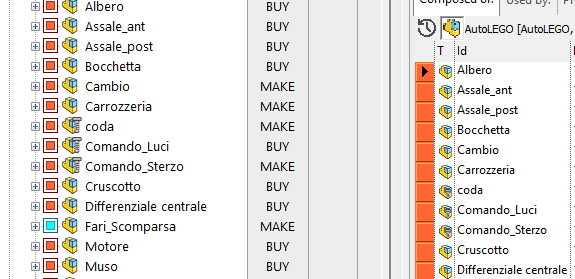
This is a typical scenario where Standard Parts are considered special documents and the fact that they are not in Check In state is not considered a problem.
Normally when this option is enabled users are kept from editing Standard Parts using the option No Updates For Standard Parts. This way, the integrity of the assembly is preserved while leaving the option open for the Administrators to modify a Standard Parts exceptionally or occasionally without stopping the normal revision process. It is clear that if this option is selected it is left to the responsibility the Administrators to make sure that modifications to Standard Parts do not jeopardize the geometrical integrity of the assemblies already in production.
Accept approval if children are in the following directories
self explaining
Accept approval if
When checked, the expression assigned in the <field> = <value> options is evaluated and, if true, it will not stop the approval process. The <field> box can also be assigned as @EXPR; in such case, the <value> can be an expression like
"ID=00*" AND "CONFIGURATION=Pipe"
The syntax of such declaration is ruled by regular expression criteria; every condition must be written between " " chars.
Avoid generic document parent approval if generic document children are not released
If checked, MechworksPDM doesn't to approve a non CAD document until all its children are released.
Include complete assembly tree when Approve the Drawing and the Linked Drawing
In the Approve the Drawing and the Linked Document command, switching from the selected drawing to the 1st level child related document, the option allows to control the level of recursion in the "Approve the Part/Assembly and all the Components" dialog.
Mark as 'dirty' a parent revision on a child new revision approval
If checked, the PDM fills with a character "1" the field DIRTY_REVISION_FLAG of all the parent records, when a child new revision is approved. Searching in the database for all the records with a not null value in this field creates a list of all the parent assemblies/drawings/parts that needs a regeneration, or that may need a revision increment.
This option needs the existance in the database of a text field DIRTY_REVISION_FLAG (language independent).
A simple query that will show what are the documents that needs a regeneration is the following:
SELECT * FROM $(?NAME_DOCUMENT_TABLE) WHERE $(?NAME_FIELD_DIRTY_REVISION_FLAG) IS NOT NULL
You can save this query in the SQL\ sub-directory and recall it or with the Load command of the Query Page, or creating a short-cut in the MechworksPDM Shortcut Bar (using DBCustomizer).
A script CreateWorkingSetOfNewerChildren.vbs is also available to check for WHAT children have invalidated the selected parent. To use the script, copy it in the LST\ sub-directory, select a 'dirty-revision' assembly and launch the script.
Avoid 'mark as dirty' 3D Cad parent models on Generic Document child revision approval
When checked, the approval of a Generic Document will not mark as 'dirty' any 3D CAD parent model (parts/assemblies/drawings)
Avoid 'mark as dirty' 3D Cad parent models when approving a Minor child revision
When checked and with an existing LST\OnCheckIfMajorRev.LST script, any parent document is no longer marked as 'dirty' if the currently approved revision if a Minor Revision.
Mark as 'dirty' 3D Cad parent model when approving sub-components on the previous revisions
self explaining.
Avoid 'Increment revision state' from CHECKED IN to RELEASED
When checked, the RMB Check In/Out, Increment revision state function is disabled when the state of the document is CHECKED IN, so as to avoid a silent approval of checked-in documents
Avoid Custom Properties Update on Revision Approval
When enabled, this option makes MechworksPDM avoiding to update the file custom properties during the state transition from CHECKED-IN to RELEASED, speeding up the process of approval. The performance improvement is expecially noticeable with documents having a large number of configurations (hundreds).
Users that check this option must be aware that any property that may change during the transition (i.e. the STATE field value itself) will not be updated.
Copy document's fields on revision approval
Please note the field association
DOCUMENT::FILE_NAME → REVISIONS::FILE_NAME
is always copied at Approval Time
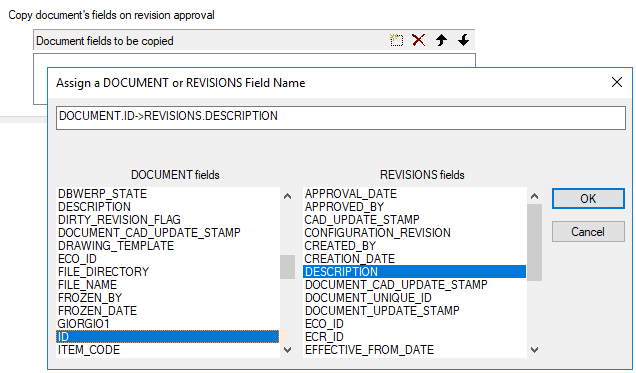
You can declare a list of fields to be automatically copied in the REVISIONS table at the approval of a document.
The functionality is active when approving or restoring previous revisions:
-when approving the fields are copied from the DOCUMENT to the REVISIONS table
-when restoring (undo-checkin, activate a previous revision) the fields are copied from the REVISIONS back to the DOCUMENT table
It is mandatory that the fields are of a compatible type( i.e. numeric with numeric, date with date, text with text )
The reserved fields (STATE, T, FILE_NAME, ...) cannot be overwritten.