Not Null Fields Options
Not null fields:
It is a list of fields that the user must fill before saving the record in the database.
To add a new field, select an empty row of the list, then double-click on the right side of the selected row: a button appears; click it and a dialog pops up with on the left the list of the fields present in the master table Document, and on the right the list of the fields present in the REVISIONS table; double-click any one of them and press OK to confirm; on the top-right side of the list there are also some buttons to move or delete the fields already inserted in the list.
Runtime differentiation of not nullable fields
If the field Category2 is declared as not nullable...

...the field is marked in pale red at edit time, when switching on the tab that contains such field.
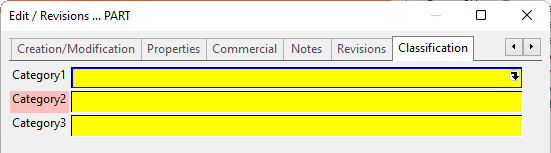
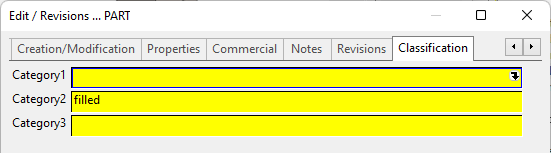
In case the field is already filled, no mark will be applied.
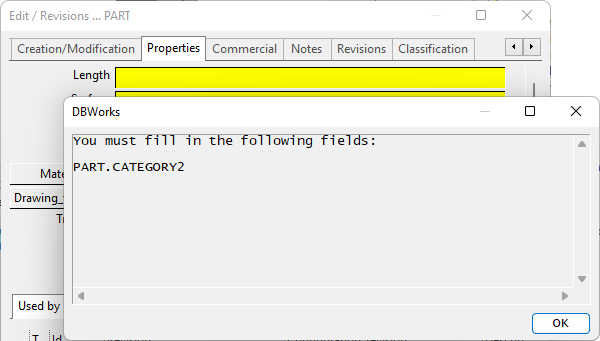
In case you havent filled a not nullable field and you try to click in the edit dialog, a message will inform you of missing required value...
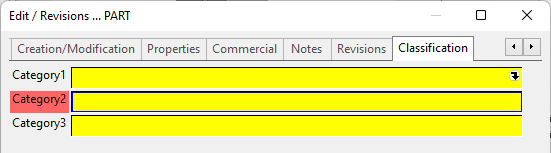
...and the dialog switch automatically on the tab that contains the required field, hilighted now with a stronger red color.
You can manually enter fields of Linked Database Tables too:
<table name>.<field name>
 Check Null fields in REVISIONS table on Save
If enabled, when saving a component, is is checked the Null Fields defined for the REVISIONS table.
If disabled, only the Null Field defined on DOCUMENT table will be checked.
If the option User Interface →  No input when saving
or the option User Interface → No input on save of checked out documents
are enabled, the Null Fields check is not executed neither on DOCUMENT nor on REVISIONS fields.
Not null fields on revision approval
The fields declared in this option list are hilighted with the color of the released records.

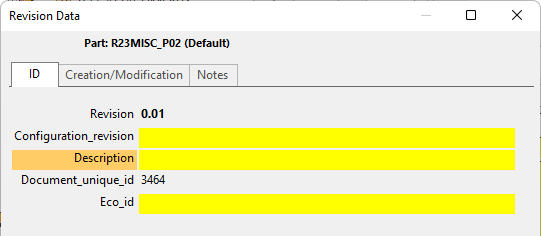
This feature reminds users what fields must be filled. Previously DBWorks used to display a message only after the ok button had been clicked.
Allow NULL fields when …
The option Allow NULL fields when … allows to assign a condition, based on the value of a specific field, that if true allows a record with null fields to be validated for editing or revision approval. In the picture the null fields are allowed if the ITEM_CODE field begins with four any character followed by 0123:

It is possible to specify also more complex expression (see the syntax in the picture):

the syntax of such declaration is ruled by regular expression criteria; every condition must be written between " " chars.
Please note that to be able to filter against the T field you've to make sure the T field is included in database VIEWS.
Not null field conditions
For declaring a condition, a field must be followed by a / (forward slash) char, and by an expression criteria, as for the "Allow NULL fields when" option, when used with the @EXPR key:
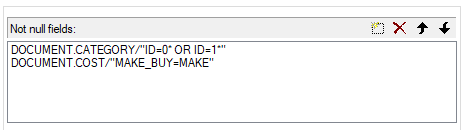
Example
Suppose we want that the field CATEGORY2 can be NULL for Documents where the ID begins with a 0 or a 1.
The standard not NULL field declaration would be:
DOCUMENT.CATEGORY2
With the new feature for supporting conditional expressions, it will become:
DOCUMENT.CATEGORY2/"ID=0*" OR "ID=1*"
Please note:
-the double apex " for enclosing any single criteria.
-MechworksPDM does not support all special characters required for regular expressions; the supported characters are: * ? [ ]
As for the other @EXPR syntax, the supported operators are OR and AND
The condition field (in this example the ID) must belong to the same database VIEW where the not null field ( in this example CATEGORY2 ) belongs to. When used with the REVISIONS table, the condition field must belong to the REVISIONS table as well. Conditional checks between the DOCUMENT and the REVISIONS table are not supported. With the above settings, when used in the "Not null fields on revision approval:", for the following documents:
ID
00000000
11111111
22222222
it will cause the 00000000 and 11111111 to be approved, while the 22222222 will have its approval denied.
Allow Null Fields in REVISIONS Table if First Revision Record
When ticked, the check for any null field in the REVISIONS table record is skipped if the revision is the initial revision. This allows to start the life cycle of a document in a pain-less way, without worrying about missing data in the initial revision record. A typical case is a document registered for the first time in the database of DBWorks, and put in state RELEASED.