Data input Options
 Avoid duplicated IDs
When checked, MechworksPDM checks for a duplicated ID in the database when inserting a new record. This option should normally be used together with the equivalent option of the DBCustomizer, so as to have a stronger check for duplications.
 Except when ...

This sub option allows to assign a condition, based on the value of a specific field, that if true allows a record with a duplicated ID to be inserted. In the image a duplicated ID is allowed if the FILE_NAME field contains the character #
You can also assign a simple logical expression by entering the keyword @EXPR as namefield and expression criteria as value:

In the above example you choose to allow duplicated ID only when ID is XX and CATEGORY field value is Cutlist
Avoid duplicated IDs across Parts and Assemblies
When checked, the ID is checked across Part and Assembly documents in order to avoid any duplication.
For example, with the option unchecked, a part with a specific ID can exists together with an assembly with the same ID; with the option checked, a part can never have the same ID of an assembly.
Always allow Edit Material
If checked it allows the editing of the Material field every time the record is edited. Of course, when the model is not opened, DBWorks won't update the density of the model.
This option is disregarded for generic documents when the field material has been added to the related view in the database.
In this case it is possible to edit the material for generic documents, typically for a legacy 2D drawing
Hide 'Used By' Grid in Data Input Form
When checked, the Used By grid is no more displayed in the Data Input Form
Make read-only the fields with a .LST defined
If checked, if a field in the standard data input mask has an associated .LST file in the LST\... directory, MechworksPDM makes not editable the field document.
Make read-only the fields with a .SPT defined
If checked, MechworksPDM makes read-only the fields with an associated .SPT file.
Always show SPT buttons
If checked, all the SPT defined buttons are visible also when in View mode.
Displayed date format [Empty=Standard format]
With this option it is possible to control the displayed format of the dates in the Input Forms for both the Document and the Revisions tables.
The default value is EMPTY, which means that the Standard Format (YYYY/MM/DD) is used for all the dates in the forms.
Long date formats, with the HH:MM:SS hour/mins/secs displayed, are managed automatically.
Use the following elements to build a format string. If you use spaces to separate the elements in the format string, these will appear in the same location in the output string.Characters in the format string that are enclosed in single quotation marks will appear in the same location and unchanged in the output string.
The definitions are case sensitive, as shown in the table below (for example "MM" is different from "mm").
Format |
Meaning |
Example |
|---|---|---|
d |
Day of month as digits with no leading zero for single-digit days. |
7 |
dd |
Day of month as digits with leading zero for single-digit days. |
07 |
ddd |
Day of week as a three-letter abbreviation |
Wed |
dddd |
Day of week as its full name |
Wednesday |
M |
Month as digits with no leading zero for single-digit months |
3 |
MM |
Month as digits with leading zero for single-digit months. |
03 |
MMM |
Month as a three-letter abbreviation |
Jan |
MMMM |
Month as its full name |
January |
y |
Year as last two digits, but with no leading zero for years less than 10. |
8 |
yy |
Year as last two digits, but with leading zero for years less than 10. |
08 |
yyyy |
Year represented by full four digits. |
2008 |
h |
hours (no zero leading) |
5 |
hh |
hours (zero leading) |
05 |
H |
hours (24h format, no zero leading) |
5 |
HH |
hours (24h format, zero leading) |
05 |
m |
minutes (no zero leading) |
4 |
mm |
minutes (zero leading) |
04 |
s |
seconds (no zero leading) |
3 |
ss |
seconds (zero leading) |
03 |
Example
to get the date string
Thu, Mar 13, 2008
use the following format string:
ddd',' MMM dd',' yyyy
The specified date format will be show in every grid:
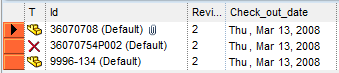
Expected Date Time format
The following formats are considered standard from the PDM;
YYYYMMDD
YYYYDDMM
YYYY/MM/DD
YYYY/DD/MM
DD/MM/YYYY
MM/DD/YYYY
YYYY-MM-DD
YYYY-DD-MM
DD-MM-YYYY
MM-DD-YYYY
DD.MM.YYYY
MM.DD.YYYY
DD-MMM-YY
DD-MMM-YYYY
HH:MM:SS
HH MM SS
HH.MM.SS
YYYYMMDD HH:MM:SS
YYYY/MM/DD HH:MM:SS
DD/MM/YYYY HH:MM:SS
YYYY-MM-DD HH:MM:SS
DD-MM-YYYY HH:MM:SS
In case the user entered a format not included in such list, it will be used as well but a message will inform about:
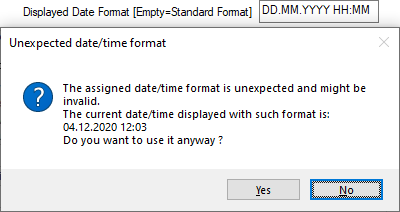
Write only Properties defined in SCHEMA/BOMTITLE.TXT
If this option is checked (default: not checked), DBWorks writes in the file properties only the record and revision fields defined in the output mapping file SCHEMA\BOMTITLE.TXT, where available.
This option removes and clears all the default properties written by MechworksPDM, if any.
Practically only properties named as database fields.
To rewrite them, uncheck this option and check-out/check-in or save the file. For organizations where the file properties must have specific values because of existing drawing templates, and where there is no need to use the default properties written by MechworksPDM, this option can avoid to write hundreds of unnecessary properties to the files.
This technique can be used also for writing specific file properties, simply declaring mappings with the same database field names in the SCHEMA\BOMTITLE.TXT, as in the following example, where only the two defined properties are written:
;
; BOMTITLE.TXT
;
ID "ID"
DESCRIPTION "DESCRIPTION"
Please note that the _RXX_... type properties, written when the Revisions, SMax.Number of Revision Records to write as Properties is greater than 0, must also be mapped in the SCHEMA\BOMTITLE.TXT, in order to have them written:
;
; BOMTITLE.TXT
;
ID "ID"
DESCRIPTION "DESCRIPTION"
_R00_REVISION "_R00_REVISION"
_R00_ECO_ID "_R00_ECO_ID"
_R01_REVISION "_R01_REVISION"
_R01_ECO_ID "_R01_ECO_ID"
_R02_REVISION "_R02_REVISION"
_R02_ECO_ID "_R02_ECO_ID"
Import custom properties as field values using mapping file SCHEMA/CUSTPROP.TXT
If checked, MechworksPDM assigns specific fields of the database getting the values from the custom properties of the CAD file.
Use only mapping file SCHEMA\CUSTPROP_INSERT.TXT for new Documents
If enabled, at first savetime the mapping will be performed considering the content of CUSTPROP_INSERT.TXT only instead of merging the content of CUSTPROP.TXT and of the CUSTPROP_INSERT.TXT file as default.
Import also for child components
If checked, MechworksPDM uses the CUSTPROP.TXT file also when recording the sub-components of a main assembly.
Since this option affects the performance of the save operation, it is suggested to uncheck it after finishing to import a legacy archive into MechworksPDM.
Never overwrite imported custom properties
The option Never overwrite imported custom properties avoids to overwrite any custom property already declared in the CUSTPROP.TXT.
The custom properties defined in the document file and declared in the MechworksPDM parameter file CUSTPROP.TXT become as a matter of fact read only for MechworksPDM. It will be the database that is filled according to the file properties and never the other way round.
This option has been introduced to preserve original data when they are considered as valid archived information and to better handle errors that may be due to bad configuration sections.
Import Custom Properties if
When checked (default: not checked), MechworksPDM imports the Custom Properties of the file only if the condition, assigned in the two edit boxes below the option is true.
The match is intended to be between a custom property and a its value; it's not natively intended between a database field and its value.
Of course it is possible to implement a workaround to match even with database fields values, see how here below:
The database administrator creates a new field in the database exposed to any of the document specific database views (ASSEMBLY, PART, DRAWING, GENERIC), for importing the [field name] property itself:
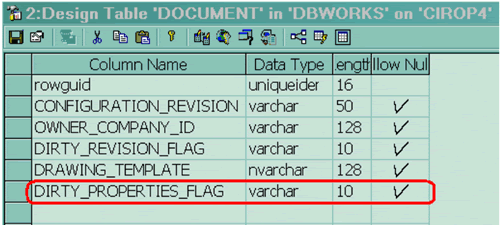
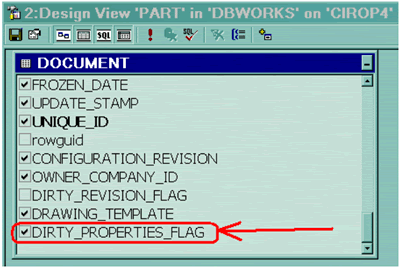
This option is useful for managing the Custom Properties with external tools, that can edit the properties and set the "dirty" property to "1", so instructing MechworksPDM that the properties can be imported.
The files CUSTPROP.TXT and BOMTITLE.TXT must be prepared consequently, with the proper property names being listed.
Example
Original File Custom Properties:
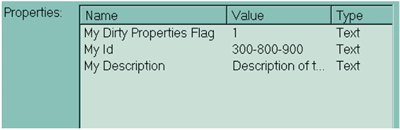
DBWorks Data Input options:

CUSTPROP.TXT file:
DIRTY_PROPERTIES_FLAG |
"My Dirty Properties Flag" |
|---|---|
ID |
"My Id" |
DESCRIPTION |
"My Description" |
BOMTITLE.TXT file:
DIRTY_PROPERTIES_FLAG |
"My Dirty Properties Flag" |
|---|---|
ID |
"My Id" |
DESCRIPTION |
"My Description" |
When loading the file and saving it with DBWorks, the input form is populated in accordance with the CUSTPROP.TXT and BOMTITLE.TXT files settings:
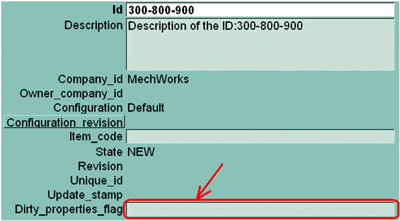
Please note how the Dirty_properties_flag field, that hosts the properties dirty flag, is cleared by DBWorks.
As a consequence of the BOMTITLE.TXT setting, the property in the file is cleared as well:
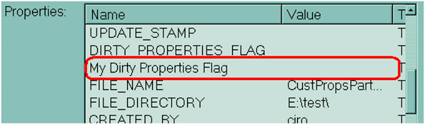
This way the properties will not be imported the next time that the file is loaded and saved:

Special case @FILE_DIRECTORY
To meet the most common usage of this option, the match against FILE_DIRECTORY field has been implemented natively, so with no need of the workaround explained above.
The keyword has to be localized for each language (@FILE_DIRECTORY, @DATEI_VERZEICHNIS, @DIRETTORIO_FILE, ...) and a list of "|" (pipe) separated paths as field value, with the same syntax as for the
General→ Manage as 'Standard Parts' components with ... option
Example
this string includes more than one path:
M:\MyToolBoxParts\*|Z:\MyOldToolBoxParts\

Macro definition for imported empty IDs
It allows to assign a macro to be executed when the custom property to be imported as ID field has a NULL value.
The rules for the macro definitions are fully supported, and so a .VBSCRIPT can be executed if needed.
Use Alternate Name for configured record ID
If checked, DBWorks uses the SolidWorks Configuration, Properties, Bill Of Material Options→User Specified Name as ID of the record specific for the configuration.
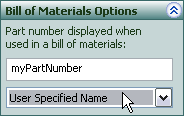
It works only with the User Specified Name choice.
Macro definition for configured record ID and DESCRIPTION
These two options permit to assign an implicit definition for the fields ID and the DESCRIPTION fields at the save of a record with the configuration option active.
The default is an empty string for both the options, which triggers the default behaviour of DBWorks, explained hereafter.
By default DBWorks when saving a document (suppose Part1) with configuration C1, builds the values for ID and DESCRIPTION as follows:
ID=Part1(C1)
DESCRIPTION=Part1 Configuration:C1
It is possible to define how to build the ID and the DESCRIPTION using the macros:
$(FILE_NAME) that expands in the base file name of the document being saved
$(CONFIGURATION) that expands in the configuration of the document being saved
$(CONFIGURATION_DESCRIPTION) that expands in the configuration description of the document being saved
Example
Using the Part1.SLDPRT document with configuration C1:
The macro: $(FILE_NAME)-$(CONFIGURATION) expands into: Part1-C1
The macro: $(FILE_NAME) [$(CONFIGURATION)] expands into: Part1 [C1]
The macro: $(CONFIGURATION)-$(FILE_NAME) expands into: C1-Part1
The macro: Description: $(FILE_NAME), Configuration: $(CONFIGURATION), Id:$(FILE_NAME)-$(CONFIGURATION) expands into: Description: Part1, Configuration: C1, Id: Part1-C1
Script to assign ID and DESCRIPTION to a configured record
It is possible to execute a script for building the ID and the DESCRIPTION of a configured record, at the first save of the same.
The script name must be declared, with the prefix .VBSCRIPT, in the body of a macro of the Data Input Options Macro definition for configured record ID/DESCRIPTION.
The value returned back from the script is concatenated to other macros declared in the option.
Input
@DOCUMENT_FILE_NAME |
the file name without extension |
|---|---|
@DOCUMENT_FILE_DIRECTORY |
the file folder name |
@DOCUMENT_FILE_EXTENSION |
the file extension with dot (ex. .SLDPRT .SLDASM) |
@DOCUMENT_CONFIGURATION |
the configuration |
@DOCUMENT_UNIQUE_ID |
the unique id of the document |
Output
@TEXT |
the mandatory text to be inserted in the ID or DESCRIPTION field |
Example
Data Input option page:
Macro definition for configured record ID:
$(.VBSCRIPT myScript.LST)
The following example of myScript.LST shows how, depending from the first letter of the file name, the ID contains or not a prefix:
.VBSCRIPT
sub main()
fileName = DBWInput("@DOCUMENT_FILE_NAME")
configuration = DBWInput("@DOCUMENT_CONFIGURATION")
directory = DBWInput("@DOCUMENT_FILE_DIRECTORY")
extension = DBWInput("@DOCUMENT_FILE_EXTENSION")
uniqueId = DBWInput("@DOCUMENT_UNIQUE_ID")
MsgBox "File name: " & fileName & vbcrlf &_
"Configuration: " & configuration & vbcrlf &_
"Directory: " & directory & vbcrlf &_
"Extension: " & extension & vbcrlf &_
"Unique ID: " & uniqueId
if left(fileName,1)="A" then
DBWOutput "@TEXT", "01234" & fileName & " (" & configuration & ")",ForWriting
else
DBWOutput "@TEXT", fileName & " (" & configuration & ")",ForWriting
end if
end sub
Example
.VBSCRIPT
sub main()
DBWInit(TRUE)
fileName = DBWInput("@DOCUMENT_FILE_NAME")
myConfig = DBWInput("@DOCUMENT_CONFIGURATION")
set Part = DBWApp.ActiveDoc
set cfg = Part.GetConfigurationByName( myConfig )
myDesc = cfg.Description
if myDesc = "" then
myDesc = fileName
end if
DBWOutput "@TEXT", myDesc, ForWriting
end sub
Example
How to retrieve Dataentr.LST generated fields and use them for generating record ID
.VBSCRIPT
sub main()
DBWInit(TRUE)
...
'example of importing dataentr.lst generated additional values
category1 = privateDBWI( "CATEGORY1", "\DBWSCRIPTTEMPDIR\dbwscrpt.out" )
category2 = privateDBWI( "CATEGORY2", "\DBWSCRIPTTEMPDIR\dbwscrpt.out" )
category3 = privateDBWI( "CATEGORY3", "\DBWSCRIPTTEMPDIR\dbwscrpt.out" )
DBWMsgBox "category=" & category1 & "-" & category2 & "-" & category3
...
end sub
Support for line escape sequence in definitions of macros for configured record ID and DESCRIPTION
The use of macros allows to display information on multiple lines and configuration-related.
Example
The macro
Description: $(FILE_NAME)\nConfiguration: $(CONFIGURATION)\nId:$(FILE_NAME)-$(CONFIGURATION)
sets a description field value split on three lines
Default ID for non CAD documents
Maintaining the fact that you can intervene with this option set and assign the ID also for non CAD documents, by default DBWorks assigns an Id that is the file name of the document excluding the file extension.
Use OnEdit.LST script when opening the input form
Use OnOk.LST script when pressing OK
Execute for every changed child component
This check allows the execution of the OnOK.LST for every changed child component of an assembly; this option permits to apply any custom logic for populating the database record fields on parts/sub-assemblies edited in the context of a top assembly.