Automatic Field Population Options
Expression → Field List
This option allows to define rules to automatically populate specific fields in Data Input Form
Any entry in the list has the syntax:
[@<filter@>]<expression> -> [@separator@]<field>
[@<filter@>] |
Optional. This condition can be applied BEFORE executing the <expression> |
|---|---|
<expression> |
it is a valid Variant Note expression |
[@separator@] |
Optional. This paramenteris considered only for expressions of type SELECT, and allows to insert the value calculated by the SELECT expression in APPEND to the existing value of the <field>, preceded by the string declared as @separator@. <original field value><separator><new SELECT evaluated value> |
<field> |
it is a DOCUMENT table field name |
The expressions are resolved in a top-down order, so the expressions at lower levels may override the values written by the expressions at higher levels.
The input to the scripts (defined with a .VBSCRIPT-type expression) is the SAME of the OnOK.LST script.
Example1
suppose to define following rules:
.VBSCRIPT MyscriptForDescription.LST->DESCRIPTION
SELECT $LASTREV(APPROVED_BY)->@ Last Approver:@NOTES
let's write the script MyscriptForDescription.LST as follows:
'.x64
.VBSCRIPT
Sub Main()
DBWInit(TRUE)
state = DBWInput("STATE")
if State="RELEASED" then
DBWOutput "DESCRIPTION", "This is a RELEASED document" ,ForWriting
DBWOutput "NOTES","" ,ForAppending
elseif State="OBSOLETE" then
DBWOutput "DESCRIPTION","This is an OBSOLETE document" ,ForWriting
DBWOutput "NOTES","Please don't use this document in production !" ,ForAppending
else
DBWOutput "DESCRIPTION","This document is still NOT APPROVED" ,ForWriting
DBWOutput "NOTES","Please don't use this document in production !" ,ForAppending
end if
End sub
The intent of such script is to automatically populate the fields DESCRIPTION and NOTES based on the value of the STATE field.
The effect will be (starting from a RELEASED document):
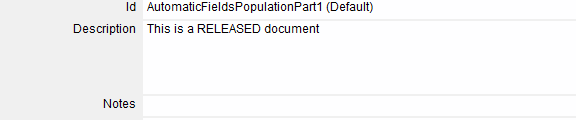
after the creation of a new revision:
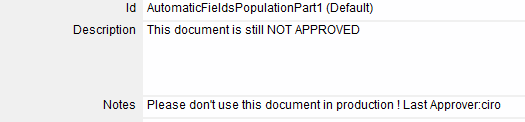
and when freezing the document:
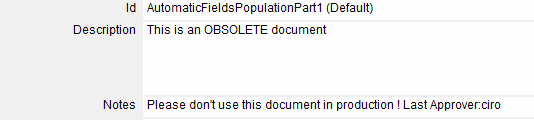
Example2
Only for assembly documents, calculate the SUM of all the 1st level child components weights and put the value into the WEIGHT field:
@T=A@select sum(weight) from document join parent_child on (unique_id=child_unique_id and T='P' and parent_unique_id=$(UNIQUE_ID))->WEIGHT