Derived parts options
 Track derived parts
If checked, DBWorks stores into the database the PART PART relationships and PART↔IN CONTEXT ASSEMBLY⇔COMPONENT relationship.
The information can be hierarchically displayed in the children tree of the assembly.
Track Configurations of Derived Parts
When checked, DBWorks registers the configurations of the derived parts.
This option can affect the save/checkin time, so it is suggested to keep it unchecked, unless you really need to keep track of configurations in the base parts
Example
BasePart1 has two configurations: bpcfg1 and bpcfg2
DerPart1 is derived from BasePart1/bpcfg1
DerPart2 is derived from BasePart1/bpcfg2
DBWorks displays correctly:
DerPart1
+ BasePart1(bpcfg1)
DerPart2
+ BasePart1(bpcfg2)
As a prerequisite the referenced models need to be loaded in memory at save time; this means that the SolidWorks option Tools→Options→External References→Load referenced documents must be set to All.

If the options is not set to All, DBWorks ignores the configurations of the base parts.
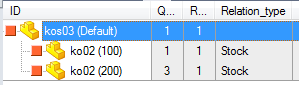
It's possible to properly track different configurations of the same base part:
As prerequisite for this feature, both options Environment→Derived Parts→Track Configurations of Derived Parts and Environment→Configurations→Save configurations as distinct records must be enabled.
To avoid the tracking of detailed derived parts BOMs, you can disable this option together with Solidworks option
Tools→External References→Load referenced documents: None
Track only out-of-context 'base part->derived part' relations
If checked, DBWorks will not track any in-assembly-context part-to-part relation, tracking only the base part->derived part relations.
A positive performance issue is that when enabling this sub-option, DBWorks will avoid to resolve the light-weight components on save.
 Skip features
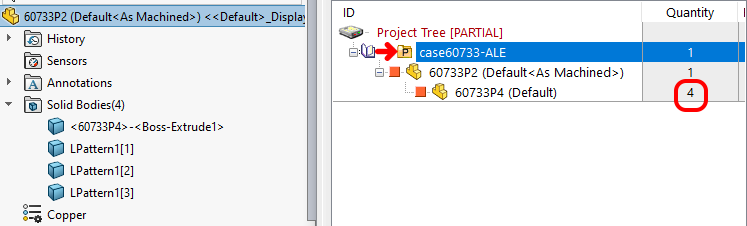
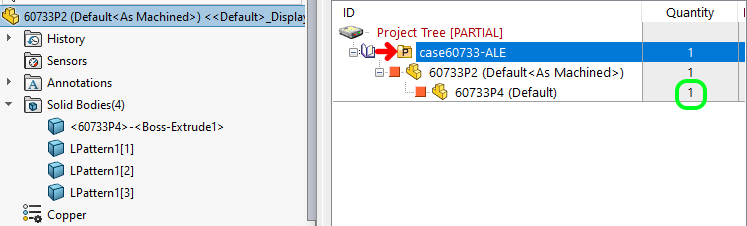
This option controls whether the Derived Parts BOM count should condider or not consider any feature like Patterns, Mirrors, etc. - useful if you like to insert only the instances of true bodies - in order to get a correct quantity when multiple bodies are required, they must be inserted separately one-by-one and not using any pattern feature.
Please note this option matters if considering patterns feature:
Skip Features (option disabled): all the bodies are counted
Skip Features (option enabled): all the bodies are skipped
Skip Mirrored Stocks
By checking this option, any Part inserted into another Part and mirrored, will not be considered as Base Part for the Derived Part, and consequently no "Mirror Stock"-type relation will be created in the PARENT_CHILD table.
Use only External References relations
Through this option it is possible to force the use of the External References relations only when calculating the part-to-part relations.
The part-to-part relations are calculated evaluating the Features of the Part (that provides a more detailed capacity for calculating Bill of Materials in complex configured part-to-part structures).
However, this calculation may have, in some cases, broken some user's workflow, so by checking this new option, DBWorks will calculate the part-to-part relations using only the External References files information.
Count stock features from inserted parts even with no physical quantity (derived parts only)
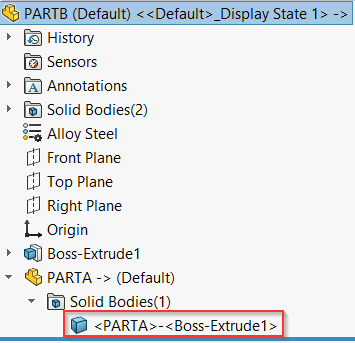
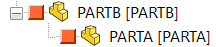
The default behavior of MechworksPDM is to save a derived parts as parent only if the derived part has solid bodies.
Solid bodies:
 →
→ 
No solid bodies:
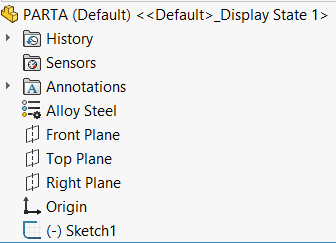 →
→ 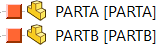
by enablig this option the parent-child relation is created even if no solid body is present
→
The above described behavior has nothing to do with saving in the context of Assemblies.