The BomTitle.txt file
Definition Multiple assignment of properties
SolidWorks default entries in the BOM tables
_Rxx_ properties
User initials rather than full user name
Definition
The BomTitle.txt file defines a mapping between the Mechworks PDM fields in the PDM database and custom properties of the CAD file.
You can find the file BomTitle.txt in the SCHEMA folder as mapped in the path options.
Inventor version of BOMTITLE is distributed in the SCHEMA folder as BOMTITLE_INV.TXT.
Since only BOMTITLE.TXT file is run, Inventor users have to rename the BOMTITLE_INV.TXT to BOMTITLE.TXT in order to enable the copy mechanism.
Solidedge version of BOMTITLE is distributed in the SCHEMA folder as BOMTITLE_SE.TXT.
Since only BOMTITLE.TXT file is run, Solidedge users have to rename the BOMTITLE_SE.TXT to BOMTITLE.TXT in order to enable the copy mechanism.
Excepting for UNICODE supported languages, all parameters file for MechworksPDM must be ANSI coded.
Let's see in detail how the mapping takes place from an example.
Suppose to have this content of BomTitle.txt:
;===================================================================
;
; DBWorks (C)MechWorks BOM titles file
;
; Language: ENGLISH
;
;===================================================================
;
ID "Id."
DESCRIPTION "Descr."
CONFIGURATION "Config."
CREATED_BY "Author"
CREATION_DATE "Creation date"
CLIENT_NAME "Client"
REVISION "Revision"
MATERIAL "Mat."
BOMTEMP_XLS_ID "PART NUMBER"
BOMTEMP_XLS_POS "ITEM NO."
BOMTEMP_XLS_QTY "QTY"
Each row not starting with a ";" defines a mapping where the first string is the name of MechworksPDM field and the second the name of a title as defined in the headers of the BOM tables of the CAD.
In this case the MechworksPDM field DESCRIPTION is mapped to the CAD custom property "Desc."
Multiple assignment of properties
This behavior is valid for custprop.txt, custpropr_insert.txt and bomtitle.txt.
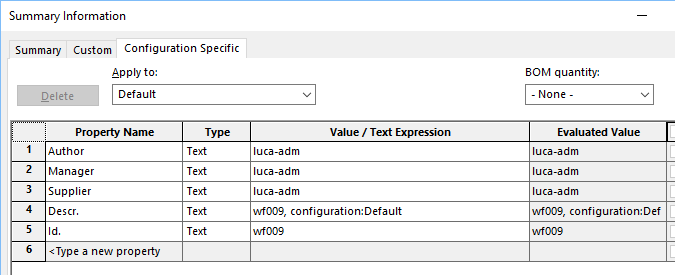
It's possible to assign the same field value to more than one property in the CAD file; the syntax il like followings:
ID "Id."
DESCRIPTION "Descr."
CREATED_BY "Author"
CREATED_BY@01 "Manager"
CREATED_BY@02 "Supplier"
Suppose the current user is luca-adm, the result would like this:
A maximum of 10 duplicated values are supported.
_Rxx_ properties
Starting from R17 there's no need to declare revision fields of the format _RXX_ anymore, (see option Revisions →Max num of Revision records to write as properties (0=None)) since such properties are automatically written as File Properties.
Some iProperties are only readable, for example those one present in the Summary tab of the iProperties dialog (Title, Subject, Author, Manager, Company, Category, Keywords, Comments)
This means that you cannot insert them in BOMTITLE.TXT file.
See specific topic about Inventor Design Tracking Properties and their usage.
These contents are obsolete and are reported only for reference purpose.
The suggested way to do mapping with Solidworks BOM is to create a SolidWorks Excel BOM that's linked directly to SW file custom properties.
If you want to add a PDM field to the BOM header of the columns in SolidWorks BOM tables, you need to add the mapping row to the BomTitle.txt file.
Let's say you want to add the "Overall cost" entry to the SolidWorks BOM and link its value to a DBWorks field. Then you need to add the mentioned "Overall cost" to the BOM table and a mapping to link the new entry to an existing DBWorks field in the BomTitle.txt file.
The line you must eventually add to the BomTitle.txt file is
COST "Overall cost"
Note that the field CONFIGURATION (localized where applicable) must be always added to the file as the information is saved into the configuration specific properties section of the file properties.
|
An entry has been added to the file BOMTITLE.TXT: DOKUMENT.NR "Teil Ben." BOMTEMP_XLS_ID "BENENNUNG" |

SolidWorks default entries in the BOM tables
The default value of the BOM column headers in SolidWorks are:
BOMTEMP_XLS_ID |
the column header corresponding to the ID field (localized in every language) |
|---|---|
BOMTEMP_XLS_CONFIGURATION |
|
BOMTEMP_XLS_POS |
the column header with the position in the BOM, specific to the table |
BOMTEMP_XLS_QTY |
the column header with the quantity of the item in the BOM, specific to the table |
Special codes for managing SolidWorks Configurations Properties
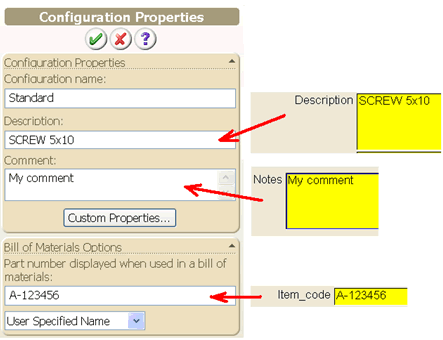
The following special codes can be declared:
"SolidWorks@ConfigurationProperty@Description"
"SolidWorks@ConfigurationProperty@Comment"
"SolidWorks@ConfigurationProperty@AlternateName"
Their purpose is to map a database field into a Configuration specific property.
Note: to have the Alternate Name property correcly assigned, the Configurations Bill of Materials options must be set as User Specified Name
Example
Suppose we want to set the Configuration's Description with the content of the database field DESCRIPTION, the Configuration's Comment with the database field NOTES and the Configuration's Alternate Name with the database field ITEM_CODE. The BomTitle.txt will be written as follows:
...
DESCRIPTION "SolidWorks@ConfigurationProperty@Description"
NOTES "SolidWorks@ConfigurationProperty@Comment"
ITEM_CODE "SolidWorks@ConfigurationProperty@AlternateName"
..
Configurations support in BOM of drawings
BOM of assemblies with configured components are correctly handled by DBWorks with the contextual menu command Bom on a selected drawing.
To enable the support:
1.The option Environment→Configurations→ Save configurations as distinct records must be checked.
2.The file SCHEMA\BOMTITLE.TXT must have the new following entry:
BOMTEMP_XLS_CONFIGURATION <name of column CONFIGURATION in BOM table>
3.The SolidWorks BOM table must include the column CONFIGURATION, named as the DBWorks field CONFIGURATION (localized where necessary).
Consider the following sample:
DBWORKS DATABASE |
|||
|---|---|---|---|
T |
ID |
CONFIGURATION |
DESCRIPTION |
P |
p1cfg |
c1 |
p1cfg, configuration: c1 |
P |
p1cfg |
c2 |
p1cfg, configuration: c2 |
P |
p1 |
Default |
p1 |
Suppose now to have the assembly:
CfgAssem1 |
|
|---|---|
+ |
p1cfg(c1) |
+ |
p1cfg(c1) |
+ |
p1cfg(c2) |
+ |
p1cfg(c2) |
+ |
p1cfg(c2) |
+ |
p1 |
Suppose to have a drawing of this assembly, with a BOM of inserted; the headers of the BOM table have been modified so that the column CONFIGURATION is added and refers to the custom property CONFIGURATION:
ITEM NO. |
QTY. |
PART NO. |
CONFIGURATION |
DESCRIPTION |
In the drawing, the BOM will appear as:
ITEM NO. |
QTY. |
PART NO. |
CONFIGURATION |
DESCRIPTION |
|---|---|---|---|---|
1 |
2 |
p1cfg |
c1 |
p1cfg, configuration: c1 |
2 |
3 |
p1cfg |
c2 |
p1cfg, configuration: c2 |
3 |
1 |
p1 |
Default |
p1 |
Now, executing the BOM of this drawing from the browser of DBWorks, depending from the state of the option DBWorks->Options->Configurations->[X] Save configurations as distinct records, the following outputs is generated:
[ ] Save configurations as distinct records UNCHECKED |
|||||
|---|---|---|---|---|---|
POS |
ID |
DESCRIPTION |
CNT |
||
1 |
p1cfg |
configuration :c2 |
2 |
WRONG! The description in not correct. |
|
2 |
p1cfg |
configuration :c2 |
3 |
||
3 |
p1 |
p1 |
1 |
||
[X] Save configurations as distinct records CHECKED |
|||||
|---|---|---|---|---|---|
POS |
ID |
DESCRIPTION |
CNT |
||
1 |
p1cfg |
configuration :c1 |
2 |
CORRECT! |
|
2 |
p1cfg |
configuration :c2 |
3 |
||
3 |
p1 |
p1 |
1 |
||
User initials rather than full user name
This feature requires a field named INITIALS in the DBWORKS_USERS table.
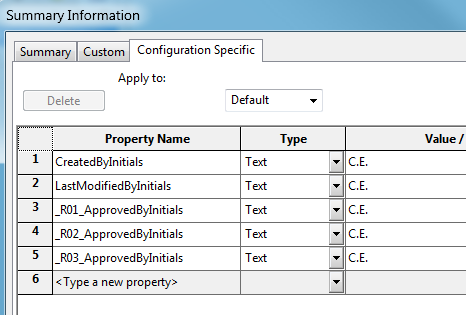
MechWorksPDM can create special File Properties with the value of the User Initials.
The UserInitials@ prefix is available in the BomTitle.txt for declaring Property Names to be filled with the INITIALS value.
Example
...
CREATED_BY "UserInitials@CreatedByInitials"
LAST_MODIFIED_BY "UserInitials@LastModifiedByInitials"
_R01_APPROVED_BY "UserInitials@_R01_ApprovedByInitials"
_R02_APPROVED_BY "UserInitials@_R02_ApprovedByInitials"
_R03_APPROVED_BY "UserInitials@_R03_ApprovedByInitials"
...
In the above example:
1.the INITIALS of the User whose name is in the CREATED_BY database field is mapped into the File Property "CreatedByInitials"
2.the INITIALS of the User whose name is in the LAST_MODIFIED_BY database field is mapped into the File Property "LastModifiedByInitials"
3.the INITIALS of the Users whose names are in the _Rxx_APPROVED_BY automatically generated Properties are mapped into the File Properties "_Rxx_ApprovedByInitials"
The result (writing only the BomTitle.txt defined Properties) is as follows