Unicode secondary language support
Mechworks PDM can manage an additional language (Unicode Secondary Language) in Unicode format (Chinese, Japanese, etc.)
The Unicode Secondary Language is used for displaying in Unicode format most of User Interface elements like:
•displaying Menus
•displaying Dialog Texts
•displaying Messages
•writing Variant Notes
•writing File Properties
See also Multi language mapping using unicode secondary language support
Related Options
The support is controlled by a set of options in the General Options tab.
Enable Unicode Secondary Language it is the main option to enable the Secondary Language Support; it loads specific dictionaries on memory.
Language specifies the dictionary to load.
MechworksPDM will look for specific files into the sub-folder LANG\UNICODE.
These files are:
<Secondary Language Identifier>.UMSG
Specific messages file name are of the format <Secondary Language Identifier>.UMSG
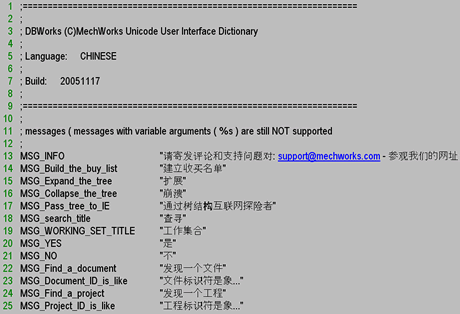
Messages files are Unicode Text files, containing the dictionary of each User Interface element of MechworksPDM.
Example
CHINESE.UMSG
<Secondary Language Identifier>.UDBWUI
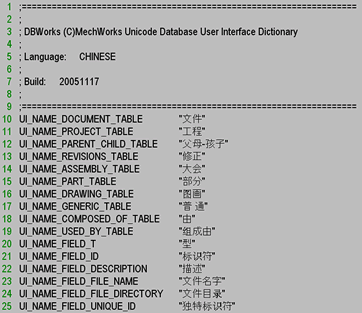
It is a Unicode Text file, containing the list of the UI_<field name> fields, exactly like the DBWUI.MSG file, used for the User Interface localization.
CHINESE.UDBWUI
Requirements
Depending on your needs, you can set different levels of Secondary Language interface:
What to see |
Requirement |
|---|---|
Menu and RMB menu |
must exist LANG\UNICODE\<LANG_NAME>.UMSG |
Field Names |
must exist LANG\UNICODE\<LANG_NAME>.UDBWUI |
Variant Notes support |
must exist DBW_UNICODE_MAPPING_TABLE table in database (see following topic) |
Database structure requirements
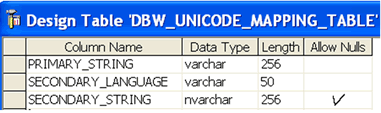
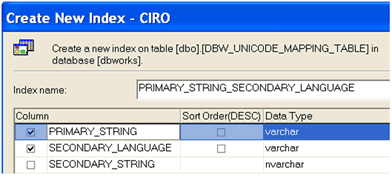
A table named DBW_UNICODE_MAPPING_TABLE is necessary for mapping generic strings in the Primary Language to generic strings in the Secondary Language.
The structure of the table is the following. Please note the NVARCHAR type of the SECONDARY_STRING, needed since it is a UNICODE string.
Variant notes support
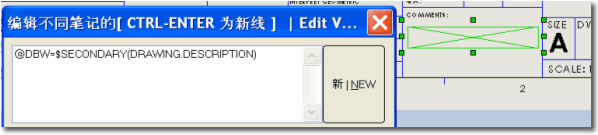
The special macro $SECONDARY() is supported by the variant notes, as wrapper of a standard variant note.
A mapping is then applied with the result of the query as executed with the Primary Language interface.
Example
Suppose that the mapping table contains the three records:
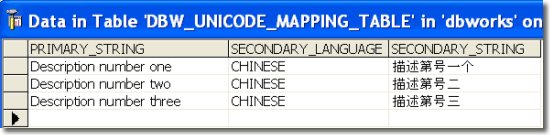
Suppose now that you are inserting/updating a document in the database, with DESCRIPTION="Description number one". Insert into your drawing a variant note as follows:
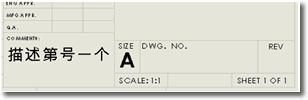
The variant note will be resolved against the Unicode Mapping table and displayed as:
File Properties support through the SCHEMA\BOMTITLE.TXT file
The special tag "UnicodeSecondaryLanguage@" is intercepted for mapping the content of the current property into its Unicode mapping found in the DBW_UNICODE_MAPPING_TABLE.
Example
To understand the behavior, look at the following example of BOMTITLE.TXT:
;===================================================================
; DBWorks (C)MechWorks BOM titles file
; Language: ENGLISH
;===================================================================
ID "Id"
DESCRIPTION "UnicodeSecondaryLanguage@DescrChinese"
...
Every time the Property DESCRIPTION will be written into the File Properties, DBWorks will look for a matching record in the DBW_UNICODE_MAPPING_TABLE, and, if found, it will create a new Property, whose name is assigned after the @ character, with the Unicode content.
With the above BOMTITLE.TXT example, suppose that the mapping table contains the three records:
Suppose now that you are inserting/updating a document in the database, with DESCRIPTION="Description number one". Since DESCRIPTION is declared in the BOMTITLE.TXT, a mapping will be created.
DBWorks will look into the DBW_UNICODE_MAPPING_TABLE for a record where PRIMARY_STRING='Description number one' and SECONDARY_LANGUAGE='CHINESE', and it will find

The Property name, after the @, is 'DescrChinese', so the following File Property will be created:

Starting from build 20061009 and thanks to a fixed SPR in SolidWorks 2007 sp1.0 ( 282302 - Support Asian characters in custom properties dialog using Microsoft Input Method Editors (IMEs) on English OS ), the DBWorks feature File Properties support through the SCHEMA\BOMTITLE.TXT file is properly working with SolidWorks.
Remarks
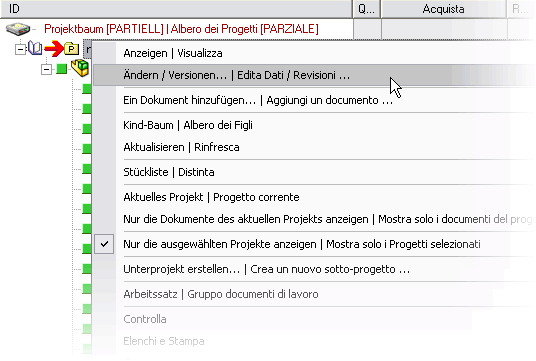
Even if Unicode Secondary Language support has been thought for languages that needs Unicode, it is possible to set it for using also with non-Unicode-only languages.
In this example you can see an German-Italian interface:
Multiple Unicode Language support for custom properties
The SCHEMA\BomTitle.txt custom properties mapping definition file supports now definitions like the following:
...
...
CHINESE_DESCRIPTION "UnicodeSecondaryLanguage@CHINESE@Description"
RUSSIAN_DESCRIPTION "UnicodeSecondaryLanguage@RUSSIAN@Description"
JAPANESE_DESCRIPTION "UnicodeSecondaryLanguage@JAPANESE@Description"
...
...
where the Unicode Language can be assigned in the BomTitle definition itself through the above syntax.
Of course, expressions without the Unicode Language defined are still supported:
UNICODE_DESCRIPTION "UnicodeSecondaryLanguage@Description"
In this case, the language is got from the current General→Language option.