DBWCONN.PAR file
The DBWCONN.PAR file determines the properties of the MechworksPDM connection to the data sources. The file can be found in the global parameters path (GPP), usually shared on a server or locally on the same workstation, accordingly to the installation type (local or client+server).
Topics:
ODBC parameters General parameters License Manager parameters BOM parameters Encryption parameters UI parameters DBWACL parameters Performance Email Logging DBWARM Plotting Scripting
ODBC parameters
DBWORKS_DSN
Determines the DSN connection to the main MechworksPDM database as specified in the ODBC control panel.
This value is available to scripting through the constant DBWorksConnectionDSN
DBWCUST_DSN
Determines the DSN connection to the categories database as specified in the ODBC control panel.
This value is available to scripting through the constant DBWorksConnectionDBWCustDSN
DBWMAT_DSN
Determines the DSN connection to the materials database as specified in the ODBC control panel.
DBWEXCEL_DSN
Obsolete. Determines the output DSN connection to the DBWEXCEL sheets as specified in the ODBC control panel.
DBWORKS_UID
Determines the user id when connecting to the main database.
This value is available to scripting through the constant DBWorksConnectionUID.
DBWORKS_PWD
Determines the password when connecting to the main database.
This value is available to scripting through the constant DBWorksConnectionPWD
DBWORKS_INSTALL_DATA_SOURCE
The application automatically creates the data source where necessary.
SKIP_CREATION_BRIEFCASE_DSN
The application avoids the creation -at startup- of MDB datasources required for Briefcase functionality.
Example
SKIP_CREATION_BRIEFCASE_DSN 1
General parameters
DBWORKS_DYNAMIC_REFRESHING_TIME
Determines the period in milliseconds of the browser refreshing cycle
Please note it's simply a user interface task, not related to any component RELOAD action.
This means that every nnnn milliseconds MechworksPDM requeries the database and refreshes the interface. Obviously a frequent refreshing may slow down the performance of the PDM;
For this performances reason the default value is set to 0
DBWORKS_JET_CACHE_UPDATE_TIME
Obsolete. To be used with MDB database only.
System setting for database response time to queries and modifications. Modifying this parameter may result in malfunctioning and display of incorrect information. If you modify this parameter you do it under your responsibility.
DBWORKS_CRITICAL_NUMBER_OF_RECORDS 5000
This option controls the upper limit of the records loaded by the browser over which an alert message is emitted to avoid unwanted loading of huge amount of datas.
The typical case where this option can be useful is when the last time the browser was closed the option 'Show only current project document's only' was cleared; when opening again the browser you may not want to load all the records of the database.
The default internal value is of 5000 records.
Setting a value of 0 (zero) will fully disable the check.
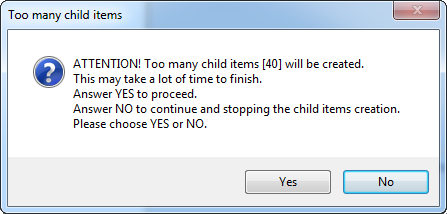
DBWORKS_CRITICAL_NUMBER_OF_CHILDREN
If the number of children -while loading a tree structure- is greater than the fixed value, a warning message will be shown to let the user choosing to continue loading or to interrupt the task.
DBWORKS_MESSAGE_POLLING_TIME
This parameter (default value 10000) controls the polling interval, in milliseconds, with which MechworksPDM checks for messages from other MechworksPDM workstations in the network.
An example of these messages are the check for $COMMAND.$$$ or $$RELOAD.$$$ messages. The $REFRESH.$$$ message is controlled by its own parameter DBWORKS_DYNAMIC_REFRESHING_TIME.
The default value (10 secs) is normally fine, but if you feel to have network bottlenecks problems, you can increase the value.
DBWORKS_UI_FILE_STATE_UPDATE_POLLING_TIME
The parameter assigns the number of milliseconds between consecutive checks for the checked-out state of a file.
The default value is 3000 (3 seconds); it can be increased when experiencing performance bottlenecks on the file system; it is highly suggested not to assign values greater than 6-7 seconds.
DBWORKS_DATABASE_CONNECTIVITY_FAILURE_RETRIES
This parameter sets the number of attempts to perform when attempting to reconnect to the database after an interruption to the connection was identified.
If used together with the OnDatabaseConnectivityFailure.LST script, it is useful to inform the administrator about a database connectivity failure. Starting from R15, the default value has been changed from 0 to 1 to allow the Reconnect functionality.
DBWORKS_MAX_TREE_NESTING_CHECK_VALUE
This parameters assigns the maximum value for a Tree child recursion and its purpose is to prevent the crash of the system in the case of erroneus recursions introduces in the PARENT_CHILD table.
Its default value is 30.
DBWORKS_MINIMUM_TIME_INTERVAL_BETWEEN_RELOAD_NOTIFICATIONS
It changes the reload notification time interval (in minutes) of the concurrent engineering notifications.
A value of 0 (zero) will avoid any reload notification message to be displayed.
Examples
Set the time interval to 5 minutes:
DBWORKS_MINIMUM_TIME_INTERVAL_BETWEEN_RELOAD_NOTIFICATIONS 5
Avoid all reload notification messages:
DBWORKS_MINIMUM_TIME_INTERVAL_BETWEEN_RELOAD_NOTIFICATIONS 0
SQL_TRANSACTION_ISOLATION_LEVEL_READ_COMMITTED
It allows to work in READ COMMITTED mode when querying SQLServer.
This feature is needed for being able to use the OLTP feature of SQLServer 2014 Enterprise.
Example
SQL_TRANSACTION_ISOLATION_LEVEL_READ_COMMITTED 1
DBWORKS_OK_DELETE_REMOTE_ACCESS_LOG_ENTRIES_OLDER_THAN_ONE_YEAR
This parameter causes the MechWorks PDM client to delete any entry in the DBW_REMOTE_ACCESS_LOG table older than one year - default value is 0 (no action)
It is active only when the logged in user is a DBWArm "DBWorks Admin" user.
When the option has 0 value (the default), a message in the Activity Console is displayed for the admin when the number of records is larger than 100000 records:
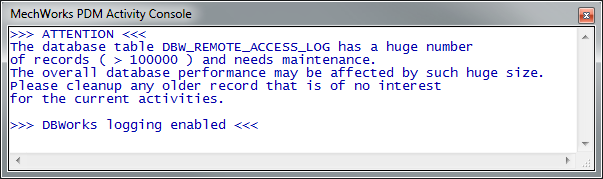
At that point, the MechWorks PDM Administrator can cleanup the table (typically during the week-end or when no database activity is needed for at least one day) manually, using SQL Server Management Studio, or by temporarily changing the DBWORKS_OK_DELETE_REMOTE_ACCESS_LOG_ENTRIES_OLDER_THAN_ONE_YEAR value to 1, temporarily saving the DBWCONN.PAR, starting a MechWorks PDM client, waiting for the cleanup, then removing once again the new value in the DBWCONN.PAR
Example
DBWORKS_OK_DELETE_REMOTE_ACCESS_LOG_ENTRIES_OLDER_THAN_ONE_YEAR 1
DBWORKS_NEVER_UPDATE_PARENT_CHILD_AND_REVISION_REPLICATION_DIRTY
This controls whether the PDM should update the REPLICATION_DIRTY field for both the PARENT_CHILD and REVISIONS table (default behavior, even if this parameter is not listed in the DBWCONN.PAR), or not (by setting it to 1)
The parameter may be useful (by setting it to 1) for specific partial SQL Server replication environments, where SQL Server partitions are involved with the replication.
Example
DBWORKS_NEVER_UPDATE_PARENT_CHILD_AND_REVISION_REPLICATION_DIRTY 1
DBWORKS_SEARCH_LIKE_OPERATOR
Restore the old behavior (previous to R17) of the search queries, in case the COLLATE SQL_Latin1_General_CP1_CI_AS directive is conflicting with other procedures.
In facts, in order to improve the performance of the Search Queries, starting from R17 the LIKE operator is by default prefixed with a COLLATE SQL_Latin1_General_CP1_CI_AS directive.
Example
DBWORKS_SEARCH_LIKE_OPERATOR LIKE
License Manager parameters
MWLICENSEMGR_SERVER_NAME
MWLICENSEMGR_SERVER_PORT
These parameters are used to enable the License Manager on the clients: they specify the server name (or IP) and the port to connected to.
See specific documentation provided together with licsense manager package.
Example
MWLICENSEMGR_SERVER_NAME <name_of_the_Server>
MWLICENSEMGR_SERVER_PORT 11000
MW_LICENSE_INTERNET_PROXY_NAME
MW_LICENSE_INTERNET_PROXY_USERNAME
MW_LICENSE_INTERNET_PROXY_PASSWORD
These parameters are necessary to connect to a server that's protected by a proxy server:
Example
MW_LICENSE_INTERNET_PROXY_NAME http://<IP address of the Proxy Server>:<port number>
MW_LICENSE_INTERNET_PROXY_USERNAME <username for the Proxy>
MW_LICENSE_INTERNET_PROXY_PASSWORD <password for the Proxy>
please note these parameters don't affect the license manager management; they're for core check only
DBWORKS_MAX_IDLE_TIME_BEFORE_FLOATING_LICENSE_RELEASE
It sets a maximum idle time before closing/unloading the current application so to make available the amount of Floating License to other workstations.
Please note that if more than one application is active, it sets the release time for all of them.
Example
Set the time interval to 15 minutes:
DBWORKS_MAX_IDLE_TIME_BEFORE_FLOATING_LICENSE_RELEASE 15
With the following parameters you can set the maximum idle time (in minutes) according to the running application:
DBWORKS_MAX_IDLE_TIME_BEFORE_FLOATING_LICENSE_RELEASE_SW
DBWORKS_MAX_IDLE_TIME_BEFORE_FLOATING_LICENSE_RELEASE_SE
DBWORKS_MAX_IDLE_TIME_BEFORE_FLOATING_LICENSE_RELEASE_INV
DBWORKS_MAX_IDLE_TIME_BEFORE_FLOATING_LICENSE_RELEASE_ALONE
Example
DBWORKS_MAX_IDLE_TIME_BEFORE_FLOATING_LICENSE_RELEASE 15
DBWORKS_MAX_IDLE_TIME_BEFORE_FLOATING_LICENSE_RELEASE_ALONE 30
Here the maximum idle time is redefined only for StandAlone (30 minutes), any other application (DBWorks, DBSolidEdge and DBInventor) refers to generic idle time value (15 minutes).
Questions & Answers
Q If the SolidWorks license times out prior to MechWorks PDM, does the MechWorks license time out as well?
A No, the MechWorks license timeout doesn't depend on the SolidWorks license timeout.
In particular, the SolidWorks license timeout is application driven while the MechWorks license timeout is machine driven.
I mean, the MechWorks license timeout requires no activities at machine level (not only at MechworksPDM level).
Q Prior versions of MechWorks required that you manually killed the license that was in use, or the user would end up utilizing two licenses upon the next login. Is this still the case?
A Only MWPDM administrator may kill a license and this action is not reversible.
Q If SolidWorks and Mechworks times out, does the license automatically retry until both it is able to verify a SW license was obtained, and then obtain a MechWorks license when available?
A No, the reconnection is managed differently: the MechWorks license reconnection is performed automatically when resuming activities (at machine level) while the SW license reconnect is application driven and, for example, it is automatically performed in sw save command execution.
Q What happens with the standalone, if the idle time runs out? Will it be closed?
A No, it will be grayed. So not closed but inactive.
Reconnect after timeout
Using floating licenses with the DBWORKS_MAX_IDLE_TIME_BEFORE_FLOATING_LICENSE_RELEASE parameter (and/or its specializations), it is possible to reconnect the MWPDM when the countdown finishes.
Then, if there are no activities and the countdown finishes, the MWPDM license becomes free and all MWPDM functions are disabled for the running application. Resuming activities, the MWPDM will reconnect automatically getting the involved license and enabling all MWPDM functions.
If there are no available licenses when resuming activities, a message is provided in the ActivityConsole and the reconnect will be automatically repeated.
DBWORKS_MAX_COUNTDOWN_SECONDS
This parameter determines the duration (in seconds) of the countdown that it's performed before the release of a floating license.
DBWORKS_MAX_COUNTDOWN_SECONDS 8
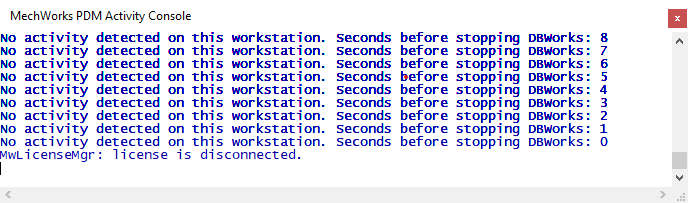
Default value is 30" for StandaloneClient and 300" for integrated addins.
MWLICENSEMGR_CLIENT_TIMEOUT
This parameter allows to define the timeout in msec for send/receive client/server comunications.
The default value is 1000.
MWLICENSEMGR_CLIENT_FREQUENCY
This parameter allows to specify the rate of the "pinging of the license server" from the client.
The default is one ping every 10 seconds (max value is 59).
MWLICENSEMGR_SERVER_SNCODE
For specific custom installations only.
BOM parameters
DBWORKS_MAX_BOM_POS_INDEX_VALUE [9999]
This parameter sets the upper limit for bom position value;
Application core limit for the valule is anyway [1-99999].
DBWORKS_MAX_BOM_QUANTITY_VALUE [999]
This parameter sets the upper limit for bom quantity value;
Application core limit is anyway [1-9999].
Encrypted shared DBWCONN.PAR
By using the utility BIN\DBWEncryptScript.exe, it is possible to encrypt also the shared DBWCONN.PAR parameter file.
The resulting file will be named DBWCONN###.PAR.
In such way it is possible to hide any private information ( like the datasource name and/or the username/password ) for accessing the main Mechworks PDM database.
If DBWArm is active, the DBWArm.exe editor version 2.2 is required for accessing the encrypted DBWCONN.PAR
User Interface parameters
DBWORKS_FORCE_HIGH_DPI_MODE
With this parameter it is possible to force the High DPI mode (setting the value to 1) or the Low DPI mode (setting the value to 0) of the MechWorks PDM User Interface.
When such parameter is not declared, the PDM will continue to automatically detect when using the High or Low DPI mode.
DBWORKS_FORCE_HIGH_DPI_TEXT_RATIO
When set to 1 and the automatic scaling of texts is not good, it is possible to force the scale ratio by assigning this parameter; a typical value is in the range [1.2-1.8]
DBWORKS_FORCE_HIGH_DPI_ICON_RATIO
When set to 1 and the automatic scaling of icons is not good, it is possible to force the scale ratio by assigning this parameter; a typical value is in the range [1.2-1.8]
DBWORKS_MAX_FEATURE_MANAGER_SYNCH_NESTING
applies to DBSolidEdge and DBInventor only
applies to DBSolidEdge and DBInventor only
When working with the Options → DB Feature Manager →  Keep DBWorks Feature Manager synchronized with selections, it defines the max hierarchy level to be processed for synchronizing the selections in the Browser with the currently opened Assembly components (default: 0 → no limit)
Example
DBWORKS_MAX_FEATURE_MANAGER_SYNCH_NESTING 1
DBWORKS_MINIMUM_NUMBER_OF_ELEMENTS_FOR_DISPLAYING_WAIT_DIALOG
When assigned, it controls when to display the Progress Bar while updating the Custom Properties for related documents (configurations or drawings) - default value: 1 when running with the configurations being activated, 5 when not.
Example
DBWORKS_MINIMUM_NUMBER_OF_ELEMENTS_FOR_DISPLAYING_WAIT_DIALOG 50
USE_EDRAWING_FOR_INVENTOR_FILES_FULLPREVIEW
If 1, MechworksPDM uses eDrawings to perform the Full Preview of an Autodesk Inventor file (ipt, iam). If 0, MechworksPDM will trust on Autodesk Inventor Viewer (if installed).
Example
USE_EDRAWING_FOR_INVENTOR_FILES_FULLPREVIEW 1
DISABLE_FULLPREVIEW_FOR_SOLIDEDGE_FILES
If 1, MechworksPDM avoids the FullPreview visualization for Solid Edge files.
Example
DISABLE_FULLPREVIEW_FOR_SOLIDEDGE_FILES 1
FORCE_UI_LEGACY_STYLE
If 1, MechworksPDM shows legacy R17 font on DocumentPage grid titles, TreePage Preview Tab title and TreePage Full Preview Tab title.
Example
FORCE_UI_LEGACY_STYLE 1
DBWACL
DBWACLCLIENT_LOG
If 1, this parameter controls the generation of the DBWACLClient log file.
By specifying 0 as value, it is now possible to disable the generation of the file.
Sometimes there could be a delay between DBWACL command execution on server side and its effects visible on the invoking client. The PDM has a policy to manage those delays in order to detect whether they are normal or not. The following parameters are used to redefine this policy.
Here is an example on how it works DBWACL when checking out a file:
1.the user performs a checkout
2.DBWAclClient sends a request to the server about setting a write right on the file
3.DBWAclServer receives the request and executes it and replies back synchronously
4.DBWAclClient receives the positive answer
5.[Here there could be a time delay before the file is actually writeable]
6.A waiting cycle loops up to this to happen (max 100 cycles of 250msec each)
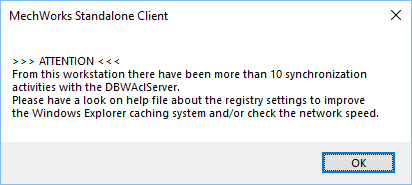
Delays greater than 10 cycles are considered as marker for networks latency issue.
When more than 10 marks are reported, a message about network latency issue is shown to the user
SYNCHRONIZATION_CYCLES_TO_CONSIDER_SLOW
This parameter defines the number of wait cycles beyond which the synchronizations is considered slow.
Every cycle lasts 250 msec and you can have 100 cycles maximum.
Default value is 10.
SYNCHRONIZATION_TIMES_LIMIT
This parameter defines the number of latency event beyond which the connection have to be considered slow.
Default value is 10.
Performance
ENABLE_UI_SCRIPT_FILES_EXISTENCE_CACHE
When declared as 0 it disables the internal caching about file existence when building the RMB popup menu.
Example
ENABLE_UI_SCRIPT_FILES_EXISTENCE_CACHE 0
ENABLE_UI_CONTROL_QUERIES_CACHE
When declared as 0 it disables the specific bottleneck optimization in repainting actions.
Example
ENABLE_UI_CONTROL_QUERIES_CACHE 0
DBWORKS_AVOID_DATA_PRELOAD_IN_GRIDS
If 0, the grids preload all the results If 1, [default] the grids will never preload all the records in memory
For a common usage, expecially related to the search performance, we suggest not to set such parameter to 0.
DBWORKS_CONFIGURATION_FILTER_CACHE_UPDATE_TIME
It's the time in millisec (default 1000) of the update time of the configuration cache.
By design, the configuration values cache is maintained internally by PDM for performance purpose (managed in case of no ‘@NOCACHE’ parameter specification) and it is updated periodically. This parameter controls the update interval with which PDM needs to regenerate map values, so the script OnConfigurationFilter.LST is highly affected by it.
In case of scripting with high degree of stability in configuration recognition and if you experiment a delay in script management (it is always highly recommended to keep it simple and with no database access at all), you can increase its value.
DBWORKS_WORKFLOW_EMAIL_SMTP_SERVER
DBWORKS_WORKFLOW_EMAIL_LOGIN_USER
DBWORKS_WORKFLOW_EMAIL_LOGIN_PASSWORD
DBWORKS_WORKFLOW_EMAIL_ADDRESS
Logging
DBWORKS_OK_DELETE_REMOTE_ACCESS_LOG_ENTRIES_OLDER_THAN_ONE_YEAR
This parameter causes the MechWorksPDM client to delete any entry in the DBW_REMOTE_ACCESS_LOG table older than one year - default value is 0 (no action);
It is active only when the current user is a DBWARM DBWorks Admin user.
When the option has 0 value, a message in the Activity Console is displayed for the admin when the number of records is larger than 100000 records: 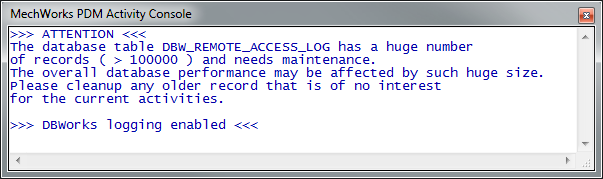
At that point, the MechWorksPDM Administrator can cleanup the table (typically during the week-end or when no database activity is needed for at least one day) manually, using SQL Server Management Studio, or by:
1.temporarily changing the parameter value to 1
2.temporarily saving the DBWCONN.PAR
3.starting a MechWorksPDM client
4.waiting for the cleanup
5.closing the MechWorksPDM client
6.removing once again the new value in the DBWCONN.PAR
DBWARM
DBWARM_NEW_ACTIVE_DIRECTORY_USERS_AUTOMATIC_LOGIN
If set to 1, when the login value is not alredy existing in the DBWORKS_USERS table, it will be inserted beloging to the group specified in the option:
Environment → DBWARM → Default Group for New Users
Plotting
FORCE_INVENTOR_PLOT_A3_PAPER_SIZE
For Inventor users only, if set to 1, it actively forces A3 Paper Size dimensions when plotting documents with default A3 dimension.
FORCE_SOLIDWORKS_PLOT_PAPER_SIZE
For Solidworks users only, when plotting in A3 format, the action of this parameter is equivalent to explicitly forcing the height and width of the A3 format through SolidWorks API right before calling the print. If the parameter equals 1, the DBW_PlotDocument_<DATE>_<TIME>.LOG file shows a new line:
Forced A3 dimensions (length: 4200, width: 2970) with LANDSCAPE/PORTRAIT orientation.
Scripting
SCRIPT_PYTHON_VERSION
It must specify the version of Python engine installed.
please note only the major has to be specified.
For example, if the currently installed engine version is 3.12.4, the parameter has to be specified as follows:
SCRIPT_PYTHON_VERSION 3.12