Drawings options
 Use DBWorks variant notes
If unchecked, it keeps DBWorks from resolving its proprietary format variant notes (@DBW=) in the drawings.
In order to resolve its variant notes, DBWorks must switch the drawing in edit sheet format mode and then back in edit sheet mode, and since this operation can be very slow in SolidWorks for large drawings, unchecking the option can save time when saving the drawings with DBWorks active.
[dd-MM-yyyy] Date format for variant texts
It indicates the format for dates included in variant texts.
Use the d (lowercase) character for the day digits, the M (uppercase) character for the month digits and the y (lowercase) character for the year digits; as separator, you can use any character.
Example
for the date 1999/04/09 ( 9th April 1999 ):
dd-MM-yyyy |
→ |
09-04-2004 |
|---|---|---|
dd/MM/yyyy |
→ |
09/04/2004 |
dd/MMM/yyyy |
→ |
09/Apr/2004 |
dd.MM.yy |
→ |
09.04.04 |
MM/dd/yy |
→ |
04/09/04 |
Max. Widths (in characters) of Custom Properties
The option contains a list composed of tokens like <property name>:<max width>;
it allows to define the maximum length for properties that typically are linked to notes in a drawing's title block.
this feature works only for SW properties (properties with format $PRP...) DBWorks inserts a <CR><LF> sequence in the property text in order to have it be displayed on two or more lines when needed.
On the right side there is a button that, when pressed, shows a dialog that allows to input the needed <property name>:<max width> token:
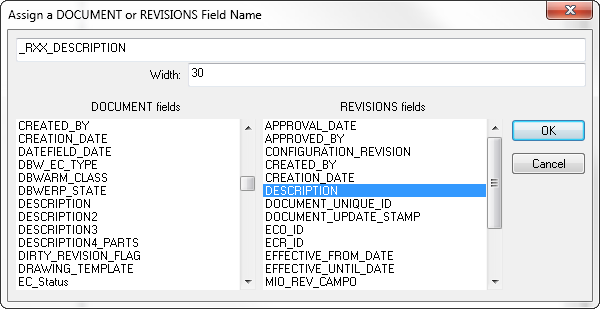
When you select a field from the REVISIONS fields list, the property identifier is built as _RXX_<property name>, indicating that every property similar to _R01_...,_R02_...,etc. is catched and wrapped when needed. Please mind that properties like _R01_...,_R02_...,etc. are created when the option Revisions->Max Number of Revision Records to Write as Properties is activated.
Any additional property mapped in the BOMTITLE.TXT doesn't need to be listed in the option.
We recommend to enlist in the option only the properties that really need a text wrapping filter.
Separator Characters for Custom Properties Text Wrapping
The option contains a string made of the characters that break the line when the text wrapping is active.
The space character (' ') is always considered as separator in the text wrapping, and so it needn't be listed.
A typical string is the following:
+-/,
Example for both the options above
Suppose the field DESCRIPTION contains the text:
Part built to demonstrate the Custom Properties Text Wrapping, ID: 12989890-890-739
With a parameter set as:
DESCRIPTION:20
the Custom Property DESCRIPTION then contains:
Part built to demonstrate<cr><lf>the Custom Properties<cr><lf>Text Wrapping, ID: 12989890-<cr><lf>890-739
and is displayed in a note of a drawing linked to the property DESCRIPTION as:
Part built to demonstrate
the Custom Properties
Text Wrapping, ID: 12989890-
890-739
Use OnUpdateVariantNotes.LST to resolve the variant notes
Please refer to specific topic about Drawing BOM options.
 Display Detached Drawing Symbol in the User Interface
This option allows to visualize or avoid visualization of the symbols for Detached Drawings in the User Interface. If enabled, such feature requires a physical access to the Drawing File for getting the detached drawing info.

On the left the option is disabled, on the right the option is enabled and icons + text are visible.
In slow network environments it can cause big delays when displaying Drawing Documents.