Units Options
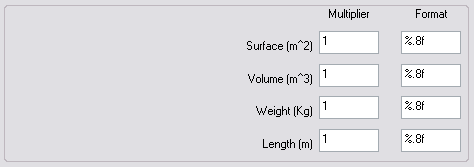
 Use internal CAD system units for calculation
If checked, MechworksPDM will rely entirely on the CAD for units calculations;
if unchecked you may decide to specify multipliers for units as well as printing format in standard C format.
In the latter case, format of strings like %.<number of decimals>f can create 0 as result of a surface/volume/weight/length calculation.
Please note if a 0 result is calculated for any of the above calculations, the format string is automatically changed to %.<number of decimals>g, so changing the type identifier from f to g, that will create a formatted value with at least the desired number of non-zero decimals.
Example
Consider a format string %.2f is assigned for the Weight calculation. With the following weight values:
0.01957794710 kg
0.01639712710 kg
0.00016186700 kg
15.70000000000
288.27084000000
the result using %.2f as format would be:
0.01957794710 kg → 0.02
0.01639712710 kg → 0.02
0.00016186700 kg → 0
15.70000000000 kg → 15.7
288.27084000000 kg → 288.27
so the 3rd value would be 0.
With this behavior change the result will be:
0.01957794710 kg → 0.02 (%.2f used because not 0 result)
0.01639712710 kg → 0.02 (%.2f used because not 0 result )
0.00016186700 kg → 0.00016 (%.2g used because 0 result with %.2f)
15.70000000000 kg → 15.7 (%.2f used because not 0 result )
288.27084000000 kg → 288.27 (%.2f used because not 0 result )
Write Units in the Database
When this option is checked, MechworksPDM looks for the presence of three new fields in the database, named:
UML |
Unit of measure for Lengths |
|---|---|
UMA |
Unit of measure for Angles |
UMM |
Unit of measure for Mass |
and fills them with the identifiers of the Unit of Measures currently used by the CAD system when the Mass Property was calculated with MechworksPDM.
The new fields must be declared:
•in the DOCUMENT table
•in the PART and ASSEMBLY database views
•in the SCHEMA\DataEntr2.TXT input form
The LANG\<language>\DBFields.MSG file contains the definition of all three new fields, so allowing for any redefinition of their appearance in the Data Input Form, by means of the DBUI.MSG file.
The files UMM.LST, UMA.LST, UML.LST are distributed with default values for masses, angles and lengths measurement units.