The Tree window
The tree window displays the hierarchical structure of the database given a root document.
There are two possible views available as a tree structure: the child tree and the parent tree.
The available information
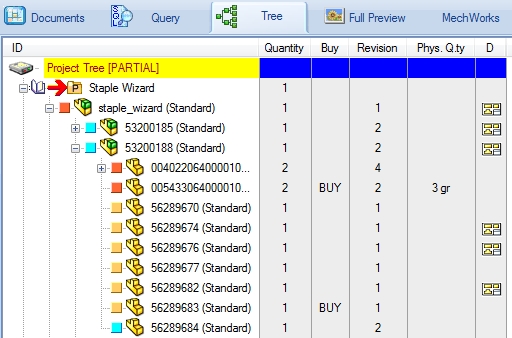
In the ID column you can read:
•the state of the document from the color
•the type of document from the icon
•the ID of the document
The 'Buy' column display information related to the BOM that indicates if the component is bought, purchased or must not appear in the BOM.
The 'Revision' column displays the revision number, where applicable.
Optionally you can display in the 'D' column an x that indicates that a drawing exists for the given item.
The 'COMPANY_ID' column displays the ownership of the component in case MechworksPDM is shared as a remote database.
Display of advanced features
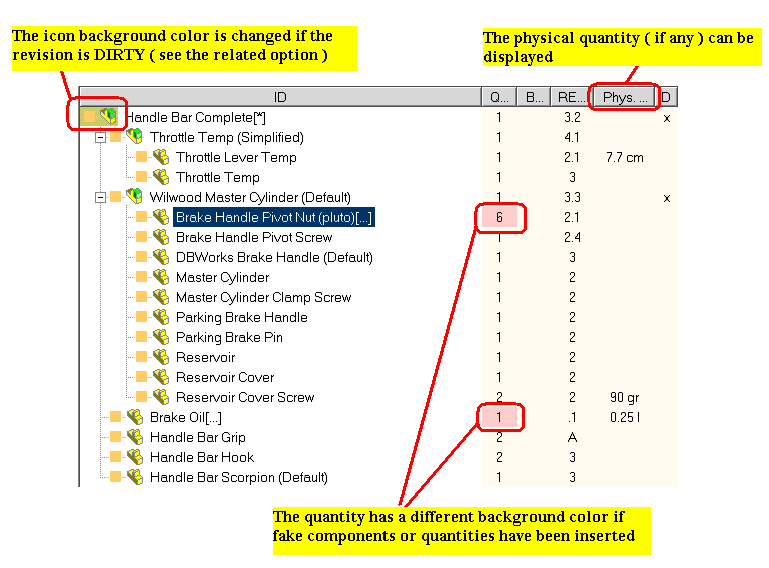
Optionally, you can enable advanced feature like physical quantities for the BOM items and dirty flags for the revisions. In this case, the display changes as follows:
Drag&Drop support in Trees
As for the Project Tree in DocumentPage (and for all the trees structures) you can perform drag&drop actions on projects, also dragging a project on another one to create/remove indentation levels.
Keeping a printed copy as a reference
To print the tree structure, create an html output of it clicking the button  and then print the result from your browser. All the nodes can be collapsed or expanded so that only the relevant information is displayed both on the screen and in the printed version.