Starting with an example
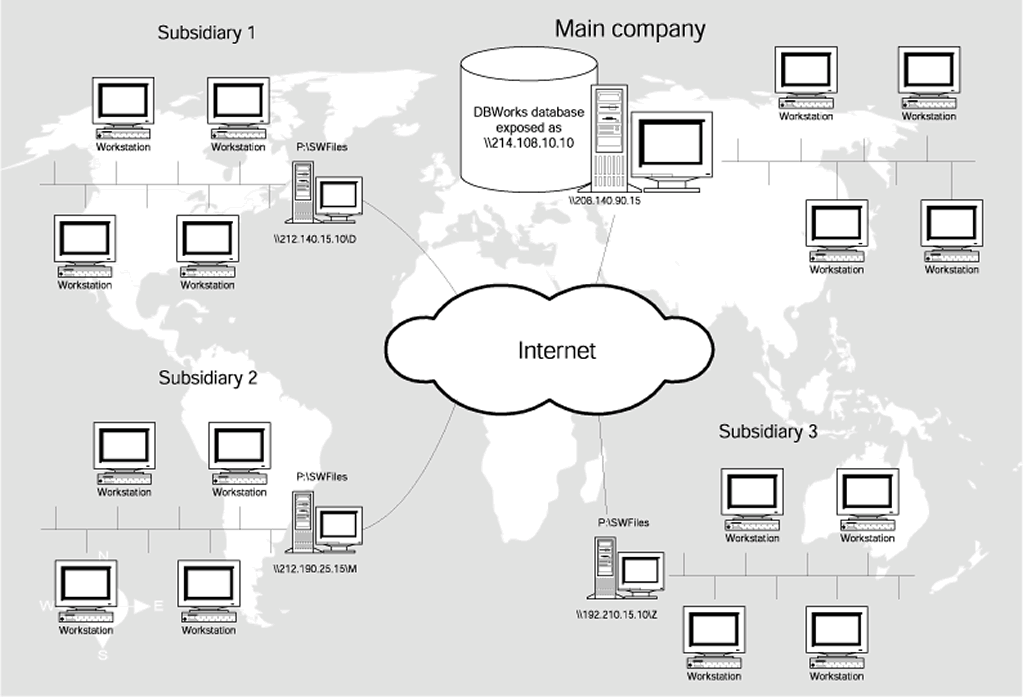
The proposed model is composed of many MS SQL Server 2000 databases, one for each company, replicating one another through the standard replication services of MS SQL Server 2000 or better, and many shared file archives, one for each company, visible from any other company through an Internet link, and mappable as logical unit from each other company.
This topic contains only a brief introduction to give you an overview of the model and doesn't go into technical details. More in-depth information can be found in the the speficic help topic Geographically Distributed Environment.
The concept of ownership
The philosophy that lies beneath the implementation is that every document or project belongs to at least one of the companies (subsidiaries/departments).
While the owner is allowed to work locally as in every MechworksPDM installation, the users belonging to a foreign company cannot modify the document unless they request and obtain the ownership of the document. Until then, they are allowed to view it and use it (i.e. a part inside an assembly) and also to keep up to date with the remote document, but cannot bring about any modification.
For remote installations, MechworksPDM takes care of downloading the component, managing the rights correctly and updating the component when requested to do so.
As of now MechworksPDM does not send notifications that your version of a document is not aligned with the original remotely stored unless a new version of the component is approved.
Deletion of foreign documents
As an exception to the ownership concept, the deletion of foreign documents is allowed to users belonging to the DBWArm Admin group
Shared projects
A project can be declared as shared among all the companies if its COMPANY_ID contains the sub-string “SHARED” (Example: MECHWORKS_SHARED). A shared project can contain documents added from any company.
If a project is declared as shared, it will be visible in the ProjectTree even if the entry RMB→Show foreign Projects is not set.
It's useful when you want to hide every foreign projects but you need a (few) project shared to all users.
Limitations and specifications
All the companies must use the same localization of the database; it is not possible to have more than one language in the same database
Example: if an English company has a subsidiary in Germany, the German company must use the same database in English language).
More, the TranferOwnershop command is effective only between workstations that belongs to the same domain.
Every company must be provided a COMPANY_ID, that is a unique identifier assigned by the Mechworks PDM manager.
Every company has the same directory structure with the same network logical units.
Every company has a SHARED_PATH, that is a shared resource available from the network and containing the components to be shared across the company group; it should be the same server machine used as file server, or a mirror of this last; this information must be stored in the table DBW_COMPANY_INFO of the Mechworks PDM database as follows:
DBW_COMPANY_INFO |
||
|---|---|---|
Field name |
Data type |
Allow nulls |
COMPANY_ID |
varchar(50) |
|
SHARED_PATH |
varchar(256) |
|
NETWORK_DRIVE |
varchar(2) |
|
DBWSTDALONE_SERVER_PATH |
varchar(255) |
|
DBW_TIME_ZONE_OFFSET |
varchar(10) |
|
OFF_LINE |
varchar(1) |
|
LOCAL_SERVER_NAME |
varchar(50) |
|
REPLICATION_PARTNERS |
varchar(128) |
|

Starting from R17, the REPLICATION_PARTNERS field value is forced to be the same among all the brother configuration records. as effect of this (if not already declared) it is automatically added to option Environment → Configuration→Fields to be aligned among configurations.
OFF_LINE field
When this field is set to "1", allows to declare a remote server as "off-line".
In it's initial implementation, when a remote server is off-line, DBWorks will avoid to delete all the existing remote server file copies when a proprietary file is deleted. ( There is also a performance benefit for declaring if a Remote Server is off or on line. This because a simple check for the remote server file existance causes a network performance bottleneck, due to the default Windows Network delays and retries operated when a network path is not connected to the LAN )
A typical usage case is when the Remote Access mode, together with the Database Replication, is used for autosynchronize a laptop computer, for working at home. The laptop computer user will, through a script, set/reset the value of the OFF_LINE field corresponding to the COMPANY_ID associated to the laptop computer.
Manage multiple drives mappings on network shares
The related option to be checked is the Options → Environment → Remote Access → Use Multiple Network Drives (the option is activated only if the new field exists in the DBW_COMPANY_INFO table).
Without this support, you can have in the database only files archived on one network drive while with this option set, you can use as many network drives as you want (we advice against using more than three), having the DBW_COMPANY_INFO the necessary records, one for each network drive used.
For example, suppose your files are archived on the network drives M: and Z:.
For each of them, the other companies must have a share exposed on the WAN.
A typical table could look like the following:
DBW_COMPANY_INFO |
||
|---|---|---|
COMPANY_ID |
SHARED_PATH |
NETWORK_DRIVE |
MechWorks |
\80.198.36.128\M |
M: |
MechWorks |
\80.198.36.128\Z |
Z: |
DDG |
\67.127.45.62\M |
M: |
DDG |
\67.127.45.62\Z |
Z: |
Note: When the Use Multiple Network Drives option is enabled, the NETWORK_DRIVE field must be assigned even if only ONE drive letter is used.
Remote Access Mode and the briefcase
When the Remote Access Mode is enabled, optionally you can transfer documents also using cds, which can be a lot quicker if you have to transfer a large amount of data. For more information, refer to the briefcase topic.
Example of correct database content
With reference to the graphic above, here's a valid example of database content in the tables DBW_COMPANY_INFO and DOCUMENT. This is a reference content of interest for administrators; as an average user you are not requested to go into such details to be able to use MechworksPDM in a geographically distributed installation.
Company: Main Company |
|
|---|---|
COMPANY_ID |
Main Company |
SHARED_PATH |
\\206.140.90.15\C |
SW files stored in |
P:\SWFiles |
Company: Subsidiary1 |
|
|---|---|
COMPANY_ID |
Subsidiary1 |
SHARED_PATH |
\\212.140.15.10\D |
SW files stored in |
P:\SWFiles |
Company: Subsidiary2 |
|
|---|---|
COMPANY_ID |
Subsidiary2 |
SHARED_PATH |
\\212.190.25.15\M |
SW files stored in |
P:\SWFiles |
Company: Subsidiary3 |
|
|---|---|
COMPANY_ID |
Subsidiary3 |
SHARED_PATH |
\\212.115.10.16\Z |
SW files stored in |
P:\SWFiles |
Table DBW_COMPANY_INFO
COMPANY_ID |
SHARED_PATH |
|---|---|
Main Company |
\\206.140.90.15\C |
Subsidiary3 |
\\212.140.15.10\D |
Subsidiary3 |
\\212.190\25.15\M |
Subsidiary3 |
\\212.115.10.16\Z |
Filtering in Data Replication
MechworksPDM handles replication filtering smoothly, allowing to select only the documents that really need to be replicated across the databases.
For this goal, special fields for the replication tasks need to be added: REPLICATION_DIRTY for invalidating all the records and forcing the refresh of the Merge Agents, TO_BE_REPLICATED (0, 1) to assist in the filtering of documents for the replication.
Data replication support
Support for replication of the following tables:
Main tables |
|---|
DOCUMENT |
REVISIONS |
PARENT_CHILD |
DBWArm tables |
|---|
DBWARM |
DBWORKS_USERS |
DBW_PROJECT_USER |
Remote Access tables |
|---|
DBW_COMPANY_INFO |
Integrated Workflow tables |
|---|
DBW_WORKFLOW |
DBW_WORKFLOW_EVENT_LOG |
Integrated Workflow Sample ECO table |
|---|
DBW_WORKFLOW_ECO |
The above tables can be declared in the list of ARTICLES to be replicated in SQL Server, Enterprise Manager, Replication, Publications, Properties.
Every remote access action triggers the script OnRemoteAccessAction.LST (where available). Please read the scripting section for more details.
Remote Access and 'replace references' command
The Replace References command is allowed also if the documents marked for the replacement were belonging to a different COMPANY_ID.
Script for supporting file replication without the admin login
The script LST\SYSTEM\replicate_batch_2006_no_login.vbs allows to support file replication without the admin login on the server where Standalone Client for replicated environments is installed. The script does not show the progress bar and the log file at the end of the process.
Requirements
1.Mechworks Standalone Client SP 3.1
2.Mapped drives declared in the DBW_COMPANY_INFO table
Since no mapped network drives are available to the script the valid network drives must be declared in the DBW_COMPANY_INFO table .
DBW_COMPANY_INFO |
||
|---|---|---|
COMPANY_ID |
SHARED_PATH |
NETWORK_DRIVE |
MechWorks2 |
\\Xp1_eng_sw\Subst_K |
K: |
DDG |
\\Xp3_eng_sw\Subst_K |
K: |
DDG |
\\Xp3_eng_sw\Subst_J |
J: |
The script can be used with user interface changing the value of the variable
Const ShowProgressBar=True
With this setting the admin must login to the server .