Briefcase in 64-bit mode
Through MechworksPDM it is possible to read and write Briefcase files directly from the 64-bit applications. This is useful especially in environments in which Standalone client X64 is the main or the only standalone application available
The support is not provided out-of-the-box, being it dependent from the presence of the 64-bit Microsoft Access Driver.
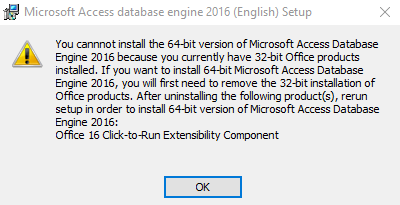
Please note that if a 32-bit Office is installed, it must be uninstalled and installed in its 64-bit version, otherwise the installation of the 64-bit MSAccess driver will cause setup issues to the existing 32-bit Office.
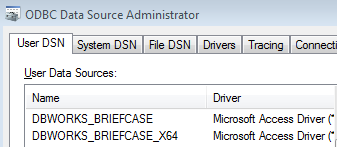
When the 64-bit is correctly installed (see below for how to install), MechworksPDM creates a new ODBC datasource for the 64-bit briefcase support, named DBWORKS_BRIEFCASE_X64:
Automatic driver installation
Starting from R20sp1, the MechworksPDM installer detects the MDB x64 driver on the workstation: if missing, it installs such driver by downloading from Microsoft website.
If MSOffice x86 is already installed on the workstation, no x64 MDB driver will be installed during the setup procedure.
Manual driver installation
If you don't have Office 64-bit installed on your workstation, the 64-bit Microsoft Access Driver can be downloaded from: http://www.microsoft.com/en-us/download/details.aspx?id=54920 choosing the AccessDatabaseEngine_x64.exe download.
To install the driver, please run the following command from a Console Window:
AccessDatabaseEngine_x64.exe /passive
If MSOffice x86 is already installed on the workstation, in the manual installation a warning message will be shown and the procedure will be halted: