Description
It is executed when MechworksPDM checks for the NOT NULL fields.
Activation
Options→Data Input→Not Null Fields
At least one field must be declared in the Not Null fields options section (Not Null Fields and Not Null Fields on revision approval to make this script running in those contexts.
Input
@PREVIEW_MODE |
1: invoked when displaying the field in the Input Form with the "not null" color; when preview_mode=1 the color is a light red, while the other (preview_mode=0 so normal_mode) the color is a strong red |
|---|---|
@TABLE_NAME |
(localized for every language) |
@REVISION_PHASE |
this variable is passed if not null only; Remarks
|
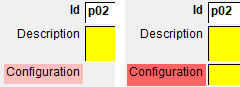
 →
→  @REVISION_PHASE=CHECKIN
 →
→  →
→ Output
@OKCHECK |
1: give OK to the check (the script will not provide any action/color on the datainput) |
|---|---|
@AVOIDDIALOG |
0: show the dialog
|
<ANY_NULL_FIELD> |
Every field that should be checked has to declared with value "0" as output (despite of the field declared in the options). Since the context is provided by the @TABLE_NAME content, the field name must not be prefixed by the table name (as it is in the options);e.g. DESCRIPTION is accepted while DOCUMENT.DESCRIPTION is not. |
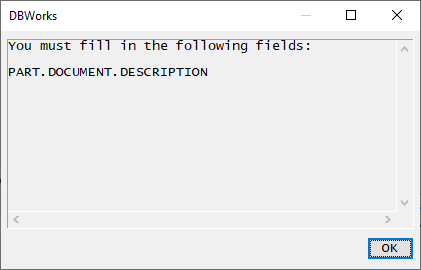
Remarks
MechworksPDM delegates to this script the decision whether marking or not the fields as red (both at each edit and when approving a revision). The script allows more sophisticated control on the validation of the fields.
The script must read the checked fields (via DBWInput) for deciding about their validation.
Example
when @TABLE_NAME="PART" the DBWinput("DESCRIPTION") instruction will refer to DOCUMENT.DESCRIPTION field;
when @TABLE_NAME="REVISIONS" the DBWinput("DESCRIPTION") instruction will refer to REVISIONS.DESCRIPTION field;
Example
.VBSCRIPT
sub main()
previewMode = DBWInput("@PREVIEW_MODE")
tableName = DBWInput("@TABLE_NAME")
descrField = "DESCRIPTION"
revision = DBWInput("REVISION")
okCheck = 1
if tableName = "PART" then
descrValue = DBWInput(descrField)
if descrValue = "" then
DBWOutput descrField,"",ForAppending 'this makes the DESCRIPTION field red
okCheck = 0
end if
end if
if okCheck = 0 then
DBWMsgBox "You need to fill some mandatory field"
DBWOutput "@AVOIDDIALOG",1,ForAppending 'this doesn't show the dialog enlisting the missing fields
end if
DBWOutput "@OKCHECK",okCheck,ForAppending
end sub
This is an example that checks the field DOCUMENT.ITEM_CODE and REVISIONS.NOTES
.VBSCRIPT
sub main()
DBWinit(true)
previewMode = DBWInput("@PREVIEW_MODE")
tableName = DBWInput("@TABLE_NAME")
mandatoryDOCField = "ITEM_CODE" 'ex. DOCUMENT.ITEM_CODE
mandatoryREVField = "NOTES" 'ex. REVISIONS.NOTES
if previewMode = 1 then
exit sub 'exiting now avoids actions in preview mode such as pink highlight of the not null fields
end if
okCheck = "1"
mandatoryDOCvalue = DBWInput(mandatoryDOCField)
mandatoryREVvalue = DBWInput(mandatoryREVField)
if tableName = "REVISIONS" then 'REVISIONS context
if mandatoryREVvalue = "" then
DBWOutput mandatoryREVField, "", ForAppending
okCheck = "0"
end if
Else 'DOCUMENT context
if mandatoryDOCvalue = "" then
DBWOutput mandatoryDOCField, "", ForAppending
okCheck = "0"
end if
End if
DBWOutput "@OKCHECK", okCheck, ForAppending
DBWOutput "@AVOIDDIALOG","1", ForAppending
end sub
Another more complex example is available as OnCheckForNotNullFields_sample.vbs under the LST\DEMO_LST folder.