Description
This script is invoked whenever a UI command is executed from the PDM.
Activation
It is executed if existing in the LST folder
Input
@CONTEXT |
the context in which the UI action is executed - the available contexts are listed here |
|---|---|
@IS_POST_EVENT |
0: when the script is invoked before the UI action |
@COMMAND_ID |
the command ID for the UI action being executed - the available command ids are listed here |
Output
Only when invoked with @IS_POST_EVENT=0 (pre-event), the script can output the parameter:
@OKCOMMAND |
0: the command will not be executed |
Remarks
For DBSolidEdge and DBInventor, not all the started-from-CAD UI actions are supported
Example
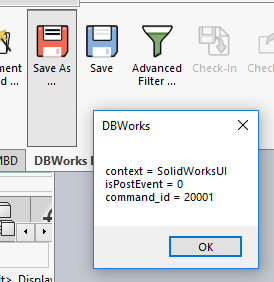
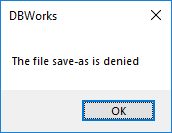
When executing the below script, and pressing the DBWSaveAs button in the toolbar, 2 message boxes are shown:
.vbscript
'.x64
Sub main()
DBWInit(TRUE)
context = DBWInput("@CONTEXT")
isPostEvent = DBWInput("@IS_POST_EVENT")
command_id = DBWInput("@COMMAND_ID")
DBWMsgBox "context = " & context & vbcrlf & "isPostEvent = " & isPostEvent & vbcrlf & "command_id = " & command_id
If isPostEvent = "0" Then
If command_id = CStr(DBW_CMD_FILE_SAVE_AS) Then
DBWMsgBox("The file save-as is denied")
DBWOutput "@OKCOMMAND","0",ForWriting
ElseIf command_id = CStr(DBW_CMD_APPROVE_TREE) Then
DBWMsgBox("The recursive Approve is denied")
DBWOutput "@OKCOMMAND","0",ForWriting
Else
DBWOutput "@OKCOMMAND","1",ForWriting
End If
End if
End Sub