Description
If existing in the LST directory, this script is invoked by MechworksPDM when showing the About ... menu entry.
It is also invoked from the TreePage, when clicking the LOGO in the bottom bar.
The script can show up to 10 lines information.
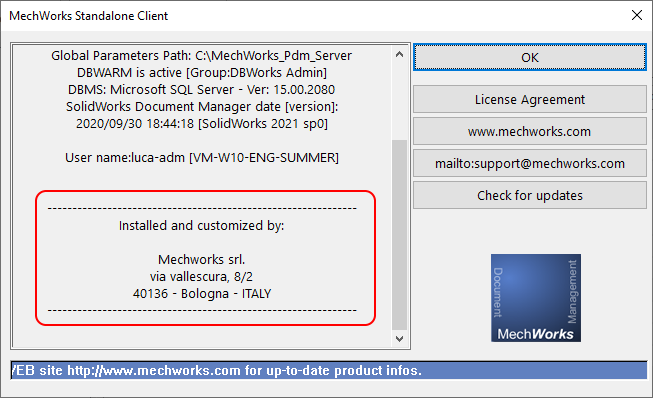
Output
TEXT1 |
Data to show in the 1st row |
|---|---|
TEXT2 |
Data to show in the 2nd row |
... |
|
TEXT10 |
Data to show in the 10th row |
Remarks
Please note the scrollbar on the right side of the dialog text area: if required it's activated to let the user scroll down to see even exceeding lines
See also
ShowAboutInfo command
Example
.VBSCRIPT
Sub Main()
DBWInit(TRUE)
DBWOutput "TEXT1", "", ForWriting
DBWend subOutput "TEXT2", "", ForAppending
DBWOutput "TEXT3", "--------------------------------------------------------------", ForAppending
DBWOutput "TEXT4", "Installed and customized by:", ForAppending
DBWOutput "TEXT5", "", ForAppending
DBWOutput "TEXT6", "Integrated Partner Solutions, Inc.", ForAppending
DBWOutput "TEXT7", "PO Box 277", ForAppending
DBWOutput "TEXT8", "Hammond, WI 54015 USA", ForAppending
DBWOutput "TEXT9", "--------------------------------------------------------------", ForAppending
End Sub