available from build: 20040429
Description
It is placed in the DBWorks\LST directory and invoked by the Multiple Approval functionality
(RMB→CheckIn/Out→Approve the Part/Assembly/Drawing and all its components ).
Input
@DOCUMENT_UNIQUE_ID |
the Document Unique Id |
|---|---|
@VIEW_NAME |
the name of the database view currently processed ( DRAWING,PART,…) |
@FIELD_NAME |
the name of the field to be validated |
@FIELD_VALUE |
the value of the field to be validated |
@IS_PREVIOUS_REVISION_APPROVAL |
0:if the approval is on a new revision index |
@IS_FIRST_REVISION |
0:if it's the first approval |
Output
@OKVALIDATE |
0: fail |
Remarks
Starting from build 20050627, this script supports the .UIvbs script version: DBWorks checks first for the existence of the LST\OnValidateNotNullFieldsBeforeApprove.LST script and, if not found, then it checks for the existence of the LST\OnValidateNotNullFieldsBeforeApprove.UIvbs.
Take a look to the specific help topic for further information.
Starting from build 20050623, the field values that did not pass the check made with this script are not displayed in the warning dialog, so that it is easier to understand if the fields were null or were not null but not validated
Example
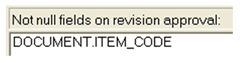
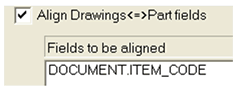
This sample looks for the ITEM_CODE field values and validated them only if they begin with the string "123". To have the sample working the following options must be set:
Data Input→Not Null Fields→
Environment→Link Mode→
.VBSCRIPT
sub main()
DBWInit(TRUE)
uid = DBWInput("@DOCUMENT_UNIQUE_ID")
viewName = DBWInput("@VIEW_NAME")
field = DBWInput("@FIELD_NAME")
value = DBWInput("@FIELD_VALUE")
okValidate = 1
if ( viewName = "DRAWING" or _
viewName = "PART" or _
viewName = "ASSEMBLY" ) and _
field = "ITEM_CODE" _
then
if left(value,3)<>"123" then
okValidate = 0
end if
end if
DBWOutput "@OKVALIDATE",okValidate,ForWriting
end sub