Starting from R26 this topic has been declared as obsolete and replaced by RMB MenuState implementation
Description
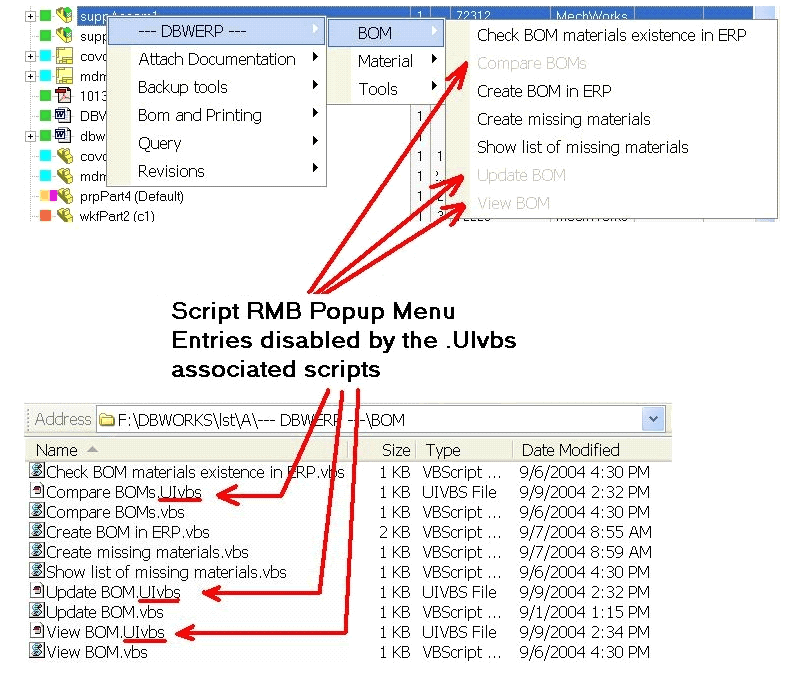
Scripts with .UIvbs extension (User Interface for Visual Basic Script) allow the User Interface designer to decide when a particular script menu entry can be enabled or not.
Remarks
The .UIvbs scripts are executed at every RMB click, just before displaying the script menus, so their execution speed is very important for avoiding delays in showing the RMB popup menus.
For this purpose, a special basic script library, named DBWSCRPT.UILIB, must be installed in the MechworksPDM installation directory, aside to the DBWSCRPT.LIB.
The DBWSCRPT.UILIB contains the very basic functionalities typically needed for enabling/disabling script functionalities. In particular, the message mapping functions are not available ( like the DBWLookUp()) since they take a considerable amount of time in loading the message dictionary and mapping it.
Before displaying a script RMB popup menu, MechworksPDM checks for the existence of a file with the same name, in the same directory, but with extension .UIvbs.
For example, for the script:
LST\A\MyScript.VBS
the UIvbs file will be:
LST\A\MyScript.UIvbs
If this file exists, the enabled/disabled state of the menu entry "MyScript" depends on a particular result, named @SCRIPT_ENABLED, returned by the MyScript.UIvbs.
Return values
@SCRIPT_ENABLED |
if 1 (default): the menu entry will be enabled |
See also
Script order sequence and separators in RMB pop-up menu
Example
Sub Main()
DBWInit(TRUE)
DBWShell("CurrentDocument")
if( okDBW = false ) then exit sub
docUid = DBWResult("@DOCUMENT_UNIQUE_ID")
state = DBWQueryByUid( docUid, "STATE" ) 'please note here that we cannot use the DBWLookUp...
if state = "BEING_MODIFIED" then
enabled = 1
else
enabled = 0
end if
DBWOutput "@SCRIPT_ENABLED",enabled,ForWriting
end Sub
Example2 (.NET API)
This script named Have_I_children.uivbs is enabled if the current record has at least one child
'.x64
Sub main()
Set pDBWInit = CreateObject("MwPDMApi.Initialize")
Set pDBWAppl = pDBWInit.StartConnection(DBWorksApplicationName)
docUId = ""
Set res = pDBWAppl.Selection.CurrentDocument(docUId)
'pDBWAppl.UserInterface.MsgBox("DOCUMENT UID: " & docUId )
Set pDB = pDBWAppl.Database
hasChildren = pDB.GetChildren(docUId, childList, "")
'pDBWAppl.UserInterface.MsgBox("DOCUMENT UID: " & docUId & " num_children = " & hasChildren)
if hasChildren > 0 then
enabled = 1
else
enabled = 0
end if
DBWOutput "@SCRIPT_ENABLED",enabled,ForWriting
pDBWInit.EndConnection
End Sub
On the left, a part with no children (script disabled); on the right a part with a derived part (script enabled)
