Description
It's a vbs file associated to an icon in the toolbar
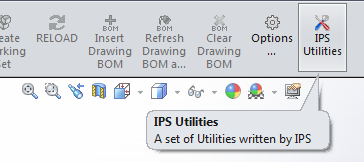
Input
@CONTEXT |
The context of the button pressing |
Output
@NAME |
The name of the 3rd party tool to be shown in the toolbar |
|---|---|
@DESCRIPTION |
A short description of the tool |
@DISABLED |
1: the toolbar button is disabled |
for the EXECUTE context no output is needed
Remarks
It must be placed in the LST\ folder (as declared in DBWAPP.PAR file).
The script must manage two contexts:
•request of info
•execute
The script can also invoke a C#/VB.NET utility class if the development is done using .NET.
If existing is run when starting the PDM so you need to differentiate the context to avoid unwanted execution; see the following example
sub main
context = DBWInput("@CONTEXT")
dbwmsgbox context
if context="GET_CUSTOM_TOOLS_INFO" then
dbwmsgbox "executed at PDM start"
'...
else
dbwmsgbox "executed on button click"
'...
end if
end sub
Example 1
This is an example of an OnCustomTools.vbs file. It starts the Mechworks PDM Database Analysis Utility.
Sub main
DBWInit(TRUE)
context = DBWInput("@CONTEXT")
If context = "GET_CUSTOM_TOOLS_INFO" Then
DBWOutput "@NAME", "IPS Utilities", ForWriting
DBWOutput "@DESCRIPTION", "A set of Utilities written by IPS", ForAppending
If DBWIsSuperAdmin() = 0 Then
DBWOutput "@DISABLED", "1", ForAppending
End if
Exit sub
End If
listOfTools = "Database Analysis" & vbCRLF & "Reload Lookup Tables" & vbCRLF & "Unconfigure Documents"
title = "Select the tool"
default_value = 0
ok = DBWList( listOfTools, title, default_value, resp)
if ok then
If resp = "Database Analysis" Then
Set WSHShell = CreateObject("WScript.Shell")
cmdline = Chr(34) & "C:\Program Files (x86)\Common Files\Mechworks\Shared\Mechworks PDM Database Analysis Utility.exe" & Chr(34)
WshShell.Run cmdline,1,true
ElseIf resp = "Reload Lookup Tables" Then
DBWShell("ExecScript ReloadLookUpTables.vbs")
ElseIf resp = "Unconfigure Documents" Then
DBWShell("ExecScript Unconfigure.vbs")
End if
end if
End Sub
Example 2
This is an example of an OnCustomTools.vbs file that performs an Edit Data/Revision action on the currently open file in the CAD, with no need to open the browser.
sub main
DBWInit(TRUE)
context = DBWInput("@CONTEXT")
DBWOutput "@NAME", "Edit record", ForWriting
DBWOutput "@DESCRIPTION", "Edit the record of the currently open doc in the CAD", ForAppending
DBWOutput "@DISABLED", "0", ForAppending
if context<>"GET_CUSTOM_TOOLS_INFO" then
DBWShell("GetActiveDocUniqueId")
docUID = DBWResult("@DOCUMENT_UNIQUE_ID")
DBWShell("EditRecord " & docUID)
end if
end sub
Example 3
This last example shows the association of the button to the Open for Updating functionality, that's not implemented as toolbar button in Solidworks.
sub main
context = DBWInput("@CONTEXT")
if context="GET_CUSTOM_TOOLS_INFO" then
'executed at PDM start
else
'executed on button click
call DBWShell("CloseSheet")
call DBWShell("OpenForUpdating")
end if
end Sub