Description
This script is launched from the search button in the Create a New BOM Item dialog.
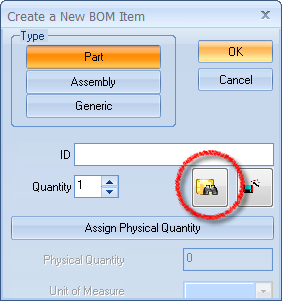
Activation
It is executed if existing in the LST folder
To make the Search dialog appearing when pressing the button in the above dialog, the script file OnSearchBOMItems.lst must exist in LST folder.
Input
@DOCUMENT_TYPE |
The file extension requested for the BOM item |
Output
@DOCUMENT_UNIQUE_ID |
The unique id of the created record |
See also
GetComponentFileNameFromSearchDialog command
Create new BOM item topic in the main help
Example
.VBSCRIPT
sub main()
DBWInit(TRUE)
requestedExtension = ucase(DBWInput("@DOCUMENT_TYPE"))
DBWShell("GetComponentFileNameFromSearchDialog")
uid = DBWResult("@DOCUMENT_UNIQUE_ID")
fileName = DBWQueryByUid( uid, DBWLookUp("NAME_FIELD_FILE_NAME") )
docExtension = ucase("." & DBWExtFromFileName(fileName))
if docExtension <> requestedExtension then
DBWMsgBox "Please select a document of type '" & requestedExtension & "'"
exit sub
end if
DBWOutput DBWLookUp("NAME_FIELD_UNIQUE_ID"),uid,ForWriting
end sub