Description
It allows to customize the text that is displayed in the label of the Preview window of a document.
The purpose of this script is to provide a visual feedback on the intermediate releases of a document, and on any useful information that may help to better understand the correct state of a document.
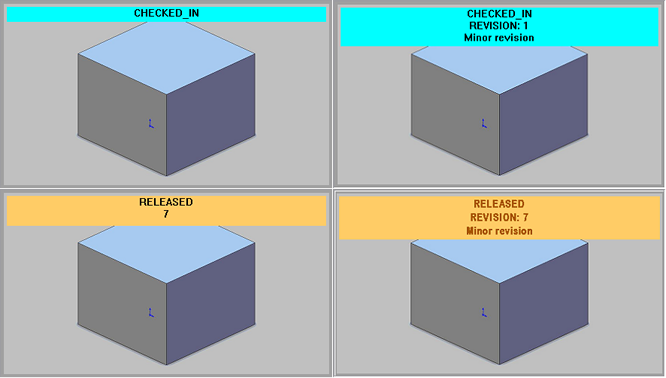
Here it is an example of standard labels (left) and customized ones (right)
Location
LST folder
Activation
Options→User Interface→Preview
Please note the activation of the script from the options may need the restart of the application to take effect.
Input
@DOCUMENT_UNIQUE_ID |
the document's unique id |
|---|---|
TEXT1 |
The text currently displayed in the 1st row of the preview label |
TEXT2 |
The text currently displayed in the 2nd row of the preview label (available only in state of CHECKEDOUT or RELEASED) |
@TEXT_COLOR |
The text color currently displayed |
@BACK_COLOR |
The background color currently displayed |
Output
TEXT1 |
the text that will be displayed in the 1st row of the preview |
|---|---|
TEXT2 |
the text that will be displayed in the 2nd row of the preview |
... |
... |
TEXT10 |
the text that will be displayed in the 10th row of the preview |
@TEXT_COLOR |
The text color to be displayed |
@BACK_COLOR |
The background color to be displayed |
@BOLD |
the value of this output is not relevant; if present, the @BOLD output will display the text with a bold face type |
Example
The following example shows how to display always 3 lines for the RELEASED and CHECKED-IN states of a document.
.VBSCRIPT
Sub Main
DBWInit(TRUE)
color_co = rgb(255,102,51) 'CHECKEDOUT
color_ci = rgb(0,255,255) 'CHECKEDIN
color_new = rgb(51,204,51) 'NEW
color_rel = rgb(256,204,102) 'RELEASED
color_brown = rgb(104,38,24)
If DBWLoadScript("OnNewRev.LIB") = False Then
DBWMsgBox "Script not found: OnNewRev.lib or error in script"
Exit Sub
End If
initGlobals
read_revisions_parameter_file()
if GlobaleError=1 then
exit sub
end if
docUid = DBWInput("@DOCUMENT_UNIQUE_ID")
actualLabelRow1 = DBWInput("TEXT1")
actualLabelRow2 = DBWInput("TEXT2")
currentBackColor = DBWInput("@BACK_COLOR")
currentTextColor = DBWInput("@TEXT_COLOR")
revision = DBWQueryByUid(docUid,DBWLookUp("NAME_FIELD_REVISION"))
docState = DBWQueryByUid(docUid,DBWLookUp("NAME_FIELD_STATE"))
bold = false
back_color = currentBackColor
text_color = currentTextColor
actualLabelRow3 = ""
if revision<>"" then
if ReleaseIsMajor(revision)=True then
revType="Major"
elseif ReleaseIsPreRelease(revision)=True then
revType="PreRelease"
else
revType="Minor"
end if
if docState = DBWLookUp("NAME_STATE_RELEASED_STRING") or docState = DBWLookUp("NAME_STATE_CHECKED_IN_STRING") then
actualLabelRow2 = DBWLookUp("NAME_FIELD_REVISION") & ": " & revision
actualLabelRow3 = revType & " revision"
end if
if docState = DBWLookUp("NAME_STATE_RELEASED_STRING") then
bold = true
text_color = color_brown
end if
end if
DBWOutput "TEXT1",actualLabelRow1,ForWriting
DBWOutput "TEXT2",actualLabelRow2,ForAppending
DBWOutput "TEXT3",actualLabelRow3,ForAppending
if bold then
DBWOutput "@BOLD",1,ForAppending
end if
if text_color<>-1 then
DBWOutput "@TEXT_COLOR",text_color,ForAppending
DBWOutput "@BACK_COLOR",back_color,ForAppending
end if
end sub