The RMB pop-up menu
When RMB on a document in CHECKED_IN state, the Workflow popup menu will be displayed.
If the document is still not assigned to any workflow process, only the following entry will be displayed:
Submit to Workflow for the Approval
The execution of this function will launch the routine ECA() of the LST\system\workflow.vbs script (see above).
After the document has been successfully assigned to a Workflow Process, a little yellow circle will be displayed near the ID of the document:

This circle is also displayed in any Tree showing the same document:
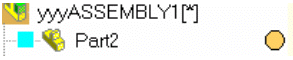
or in the Preview Window of the Browser:
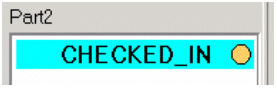
This little gold circle means that the Workflow Process of the document is in a WAIT condition, and it needs that the Workflow State must be promoted to the Next State in the Process, or demoted to the Previous State in the Process.
Once the document has been assigned to a Workflow Process (see later in the DBWorkFlowDef.txt description for understanding how to assign a class of documents to a Workflow Process), the document can never have it's DBWorks state (BEING_MODIFIED, CHECKED_IN, RELEASED, OBSOLETE) being modified without the completion of the Workflow Process for the document.
When RMB on a document just assigned to a Workflow Process, and with the Workflow Process in WAIT state, it will be shown a popup menu like the following:
|
|
The rightmost list (Process states:) shows the list of all the states in the document's Workflow Process and, checked, the actual state.
The actions availables from the current state are shown in the leftmost rows of the popup menu, and are always a promotion of the document to the next process state, or a demotion to the previous process state.
If any attachment is provided with the document in the actual state, it can be opened directly from the popup menu, that will present an additional entry, just below the send forward/back actions.
In the case that the current workflow state be the first state, the demotion to the previous process state means to send the document to the built-in BEGIN state, so REJECTING the approval of the document.
In the case that the current workflow state be the last state, the promotion to the next process state means to send the document to the built-in END state, so APPROVING the document.
It is possible to define JUMPS in the Workflow Definition File, so to can have a non-sequential flow from one state to other states.
A typical use of a JUMP is to allow, from any state after the first, a jump to the BEGIN state, so aborting the Workflow Process.
When a document finally reaches the END state, so being approved, the Workflow Integrated Module will check the Workflow State of all the documents with the same ECO_ID, and if all the documents have reached the END state ( so being approved ), the Workflow Module will change their Workflow Process state from WAIT to OK. This changement will be reflected in the UI of the Browser as a green circle aside of the ID of the approved documents:

On the other side, when a document will be rejected for the approval, it's Process State will be changed as KO, and displayed in the UI of the Browser as a red circle aside of the ID:

•Once the document has reached the END state ( Workflow Approved ), it can be physically approved using the standard methods of DBWorks: Edit/Revisions …->Approve or Increment Revision State.
•Once the document has reached the BEGIN state ( Workflow Rejected ), it can be physically checked-out/checked-in again so to re-submit it, or the checkin can be undone ( un-checkin ) so to reset the document to it's initial state before any new revision's modification.