The scripting engine
Scripting features
From inside a scripting you can:
•command the 3D CAD or any other application that exposes itself as a COM object, including Excel or Explorer
•command MechworksPDM itself
•read the current MechworksPDM record and modify its fields' values
•allow automatic recalculation of secondary fields each time you edit a primary field (i.e. recalculate automatically each time you edit some other property)
•call the SaveWizard any time you think that an information should be categorized to ease data input and/or retrieval
•read or write external files or have full access to the window registry
MechworksPDM exposes most of its features as scripting commands, so that you can create your own macros and send commands to perform any sort of actions that makes sense to you: you may regenerate and display a new Bom as an internet html page or Excel sheet each time you change your assembly and if you like, share it on your intranet or print it.
Scripting events
There are three events that you can intercept in order to start a custom procedure:
Event |
File that defines the behaviour |
Other available behaviours |
|---|---|---|
DATAENTR.LST |
|
|
NameOfTheField.LST (i.e. Category.LST) |
•pick from a list of values •execute an SQL query |
|
NameOfTheField.spt (i.e. category.spt) |
•display a form code-enabled |
Controlling the execution of scripts
The following options permit to control the execution of existing scripts on the related events
Data Input->[X] Use OnOkFilter.LST script when pressing OK for filtering data
General->[X] Use OnDeleteRecord.LST when deleting a record in the database
General->[X] Use OnDatabaseConnectivityFailure.LST when the database connectivity is lost
General->Drawings->[X] Use OnUpdateVariantNotes.LST to resolve the variant notes
General->More .->[X] Use OnViewDWG.LST script when previewing a DWG/DXF
General->More .->[X] Use OnOpenG.LST script when opening a generic document
General->More .->[X] Use OnPlotG.LST script when plotting a generic document
Environment->Workflow->[X] Use OnAboutToChangeWorkflowState.LST script
Environment->Workflow->[X] Use OnChangeWorkflowState.LST script
Environment->Workflow->[X] Use OnWorkflowStateHasChanged.LST script
Environment->Workflow->[X] Use OnCheckIfMajorRev.LST script
Environment->Released Database Mode->[X] Use OnCopyReleasedFileToSecuredStorageArea.LST script
Environment->Released Database Mode->[X] Use OnPrepareSQLStatementForReleasedDatabase.LST script
Environment->Remote Access->[X] Use OnRemoteAccessAction.LST script
The following scripts are always executed by MechworksPDM when the related modules are active:
Workflow Module
OnSubmitToWorkflow.lst
OnSendWorkflowNotificationToUsers.LST
Master Drawing Mode
OnApproveMasterDrawing.LST
OnCreateMasterDrawing.LST
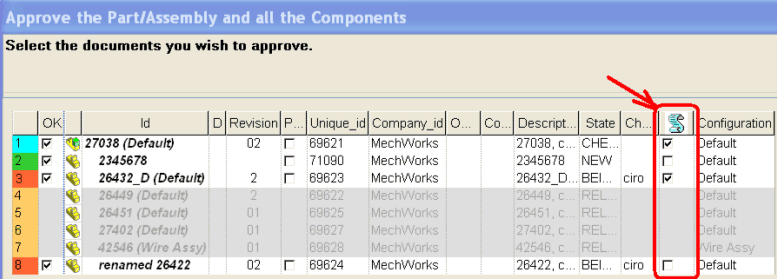
For the Multiple Approval functionalities, launched with RMB->Approve the Part/Assembly/Drawing and the Components, the followings scripts are executed when checking the script column in the Approval dialog:
OnValidateNotNullFieldsBeforeApprove.LST
OnApprove.LST
Please refer to the MechworksPDM scripting help for further reference on the commands and commented examples of scripting files.