Assigning a security level
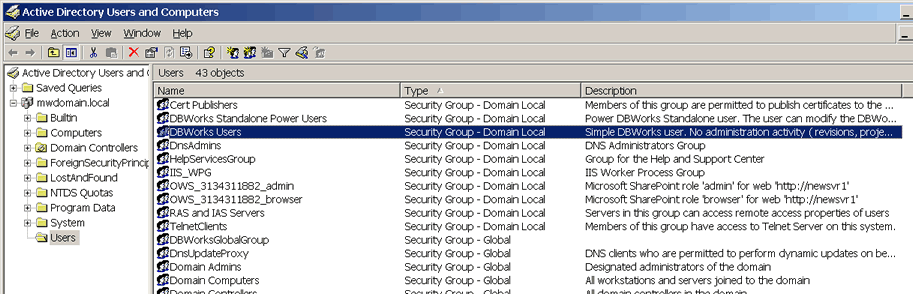
The security levels with MechworksPDM are managed in the Windows Active directory Users and Computers manager. To open it, restart the machine logging on with the Administrator's password, then click Start, Programs, Administrative Tools, Active directory Users and Computers.
After the first installation, the current user on the machine is registered as an Administrator and belongs to the Administrators group; most of the users, though, should not be granted administrator rights and must be moved to the DBWorks User Group.
The following procedure shows how to move a user to the DBWorks Users group, after which he/she will loose MechworksPDM administrator's rights in the integrated version. If you wish to re-enable MechworksPDM administrator's rights for a given user, delete his/her ID from the DBWorks Users group.
Any other assignment/deletion of a user to/from a group can be performed in the same way. Please adapt the example to your needs where necessary.
In Active directory Users and Computers double-click DBWorksUsers
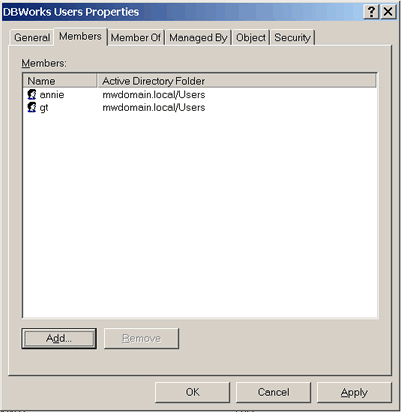
then click Add...
write the user name (optionally check for its correctness) and click OK
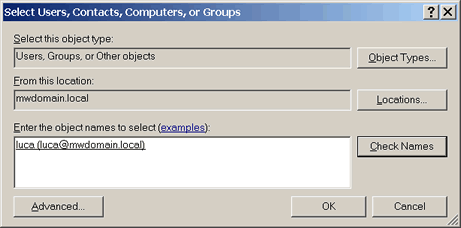
Confirm your choice clicking OK, close the Active directory Users and Computers and restart Windows logging on as the selected user.