Description
This command shows a popup window with a message of multiple line
Syntax
call DBWShell("ShowNotificationMessage from messageXsize Ysize delay [script1[script2[script3[script4]]]]"))
Parameters
from |
the user sender of the message |
|---|---|
message |
the message to be displayed in the window. It's possible to insert the new line command throught the "\n" keyword. |
Xsize |
the width size of the popup message |
Ysize |
the height size of the popup message |
delay |
the number of seconds after which the dialog disappears. if "0" it won't disappear |
script1...script4 |
Optional. Shows a button for each script (up to 4 buttons) in the lower side of the message. |
Remarks
This is an example of the dialog:
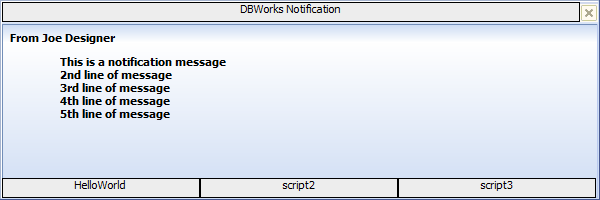
If you click the HelloWorld button, the script LST\PopUpScripts\HelloWorld.vbs is fired
If you click the Script2 button, the script LST\PopUpScripts\Script2.vbs is fired
If you click the Script3 button, the script LST\PopUpScripts\Script3.vbs is fired
See also
ShowNotificationMessage
ShowNotificationMessageToUser
Example
Sub main()
DBWInit(TRUE)
DBWShell("ShowNotificationMessage ""From Joe Designer"" ""This is a notification message\n2nd line of message\n3rd line of message\n4th line of message\n5th line of message"" 600 200 0 script1 script2 script3 script4")
End Sub