Standard parts
A section in Options->General handles the management of Standard Parts:
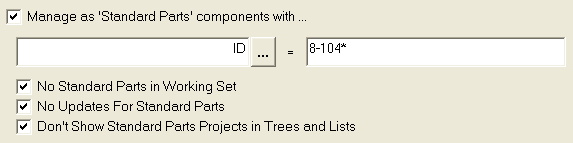
Define standard parts
Using this option you can define a pattern that identifies Standard Parts. The value that distinguish the standard parts can be matched against any available field.
Defining multiple conditions that identify standard parts
Manage as 'Standard Parts' comopnents with
The expression for defining the Standard Parts can contains OR conditions or AND conditions (never mixed, only ORs or ANDs), is defined as follows:
| (vertical bar character) defines an OR condition
& (ampersand character) defines an AND condition
Example 1:
Suppose you need to define as Standard Parts objects located in directory:
M:\Dir1
M:\StdPart1
Z:\OtherStandardParts
In this case you can write the definition as:
FILE_DIRECTORY=M:\Dir1|M:\StdPart1|Z:\OtherStandardParts
Example 2:
Suppose you need to define as Standard Parts objects where the field ID begins with the sequence 801-, but must end with the sequence -00:
In this case you can write the definition as:
ID=801-*&*-00
No Standard Parts in Working Set
When checked, the Working Sets never contain Standard Parts. Many times you don't define a Working Set explicitly indicating the items one by one and if you define working sets using queries of any kind, this options ensures that the following batch operations on the set are not performed on standard parts that are meant to remain to most users static documents.
No Updates for Standard Parts
When checked, any update operation (such as Editing or Re visioning) are denied for Standard Parts.
Same as above: since Standard Parts are to be considered static for most users, with this option you make sure the users don't edit those parts.
General → Don’t Show Standard Parts in Trees
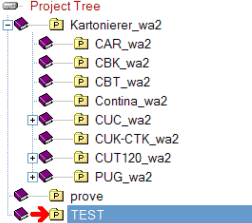
If checked, the Standard Parts (Projects and Documents) belonging to a project marked as STANDARD PARTS are not displayed in the Trees. This can lead to a significant performance improvement when many standard parts are inserted in the MechworksPDM database. Standard Parts can anyway be found using the many Search features of MechworksPDM.
Note that the Standard Parts administrators and designers must keep this option unchecked in order to work efficiently. Example:
[ ] Don’t Show Standard Parts in Trees unchecked
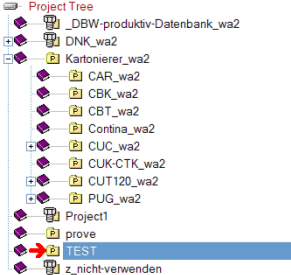
[ X ] Don’t Show Standard Parts in Trees checked
in Options → Revisions → Approval:

Accept parent approval if children are Standard Parts
When checked, assemblies are allowed to be approved even if containing Standard Parts are in NEW state.
Graphical feedback for Standard Parts:
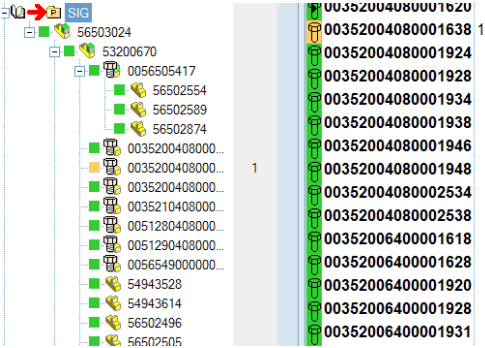
This is a typical scenario where Standard Parts are considered special documents and the fact that they are not in Check In state is not considered a problem. Normally when this option is enabled users are kept from editing Standard Parts using the option No Updates For Standard Parts. This way, the integrity of the assembly is preserved while leaving the option open for the Administrators to modify a Standard Parts exceptionally or occasionally without stopping the normal revision process. It is clear that if this option is selected it is left to the responsibility the Administrators to make sure that modifications to Standard Parts do not jeopardize the geometrical integrity of the assemblies already in production.