Custom buttons in Tree Page button area
Starting from R23 release, two buttons have been added to TreePage button area for associating custom scripts.
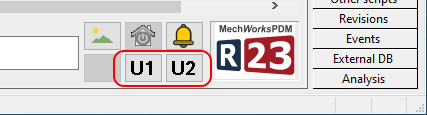
The scripts must be named
\LST\OnButtonBrowserCU1.lst
\LST\OnButtonBrowserCU2.lst
Customizable icons
Default icons are shown as "U1" and "U2", but they can be replaced with custom ones just making sure the name and icon dimensions are the same.
Icon names must be
\SCHEMA\IMG\DBW_BUTTON_BROWSER_CU1.ICO
\SCHEMA\IMG\DBW_BUTTON_BROWSER_CU2.ICO