Dynamic workflow
Introduction
The Dynamic Workflow mode is available on enteprise installation starting from R10 version
It allows the enabling/disabling of Workflow States from an already started Workflow Process.
This feature allows the rest of a Workflow to be processed based on the decision of some key user, responsible for routing the current Workflow process through specific states.
Specifics
Database tables
A table named DBW_WORKFLOW_EPDS must be added to the MAIN database (EPDS is Eco_idProcess_idDisabledStates ). Its structure:
DBW_WORKFLOW_EPDS |
|||
|---|---|---|---|
PK |
Field Name |
Data Type |
Allow Nulls |
ECO_ID |
nvarchar(50) |
|
|
PROCESS_ID |
nvarchar(50) |
|
|
DISABLED_PROCESS_STATES_INDEXES |
nvarchar(200) |
|
|


DBWorkFlowDef.TXT
The DBWORKFLOWDEF.TXT has been improved with the addition of the keyword
@STATE_CAN_BE_DYNAMICALLY_DISABLED
The new keyword identifies the STATEs of a PROCESS that can be dynamically disabled.
Example
;--------------------------------------------------------------
; DBWorkFlowDef.txt
;
; DBWorkflow Definition File
;
BEGIN_PROCESS ECO
STATE CHECKING
STATE DESIGN_REVIEW
MSG_PREVIOUS @NOTALLOWED@
STATE MANUFACTURING
@STATE_CAN_BE_DYNAMICALLY_DISABLED
STATE PURCHASING
MSG_PREVIOUS @NOTALLOWED@
@STATE_CAN_BE_DYNAMICALLY_DISABLED
STATE QUALITY_ASSURANCE
MSG_PREVIOUS @NOTALLOWED@
@STATE_CAN_BE_DYNAMICALLY_DISABLED
STATE DOC_CONTROL
MSG_PREVIOUS @NOTALLOWED@
SQL_CONDITION T IN ('A','P','D')
JUMP_FROM QUALITY_ASSURANCE
JUMP_TO DESIGN_REVIEW
JUMP_MSG Send back to DESIGN_REVIEW
JUMP_FROM PURCHASING
JUMP_TO DESIGN_REVIEW
JUMP_MSG Send back to DESIGN_REVIEW
JUMP_FROM CHECKING
JUMP_TO BEGIN
JUMP_MSG REJECT APPROVAL REQUEST
JUMP_FROM DESIGN_REVIEW
JUMP_TO BEGIN
JUMP_MSG REJECT APPROVAL REQUEST
END_PROCESS
Process explanation
On a NEXT STATE action, when the next state is among the states marked with the @STATE_CAN_BE_DYNAMICALLY_DISABLED, Mechworks PDM checks if there still is no entry in the DBW_WORKFLOW_EPDS table; if no entry is found for the CURRENT ECO_ID and for the CURRENT PROCESS_ID, it asks the user what states should be disabled.
The User assigns the states to be disabled, and the NEXT STATE action recalculates the real next state by skipping any state disabled by the User.
Example
As DBWorkFlowDef.TXT please refer to the above one.
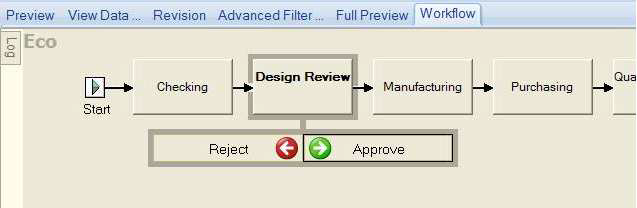
1.No special action is taken for the first two states, being both them not marked as dynamically disabled:
2.Now, on the next state action from the DESIGN_REVIEW state:
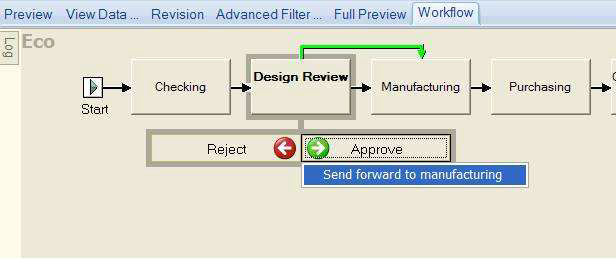
3.Being the next state one ot those marked with the @STATE_CAN_BE_DYNAMICALLY_DISABLED, Mechworks PDM asks for the states to be processed.
a.Initially all the states are marked as to be processed:
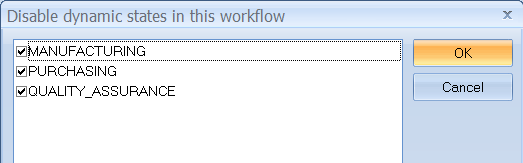
b.Assume we don't want this particular ECO_ID/PROCESS_ID will pass through the Manufacturing and Quality Assurance steps: we will disable the related Workflow states:
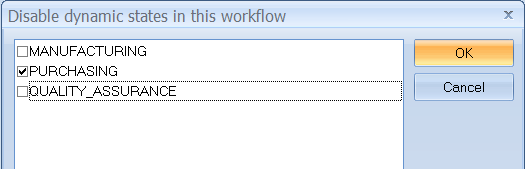
4.By pressing OK, the PDM will insert into the DBW_WORKFLOW_EPDS table a record as:

where "201" is the current ECO_ID, and ECO is the current PROCESS_ID.
2 and 4 are the Workflow Process indexes of the states MANUFACTURING and QUALITY_ASSURANCE, that have been marked as disabled.
5.Since of this setting, the next calculated state of this Workflow Process is now PURCHASING:
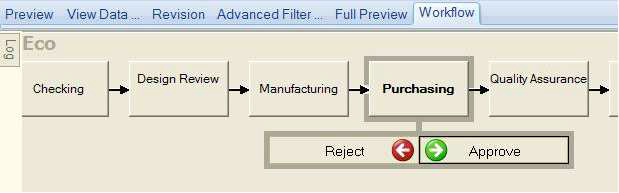
a.A NEXT STATE action performed now on the Purchasing state, being now also the QUALITY_ASSURANCE marked as disabled...
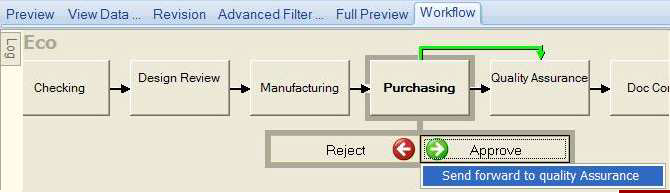
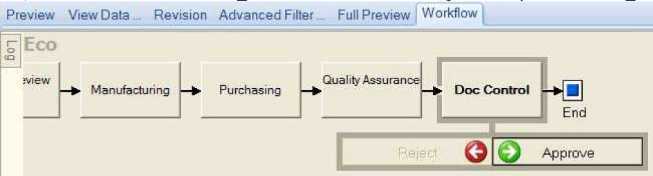
b.will SKIP the QUALITY_ASSURANCE state and go directly to the DOC_CONTROL state: