The DBWorkFlowDef.txt file: Technical Reference
This file contains the definition of the Workflow States and of the Workflow Processes available in DBWorks.
The file is a text file, editable with any text editor, and has the following structure (the RED fields are optional):
[Workflow States Section]
[Workflow Processes Section]
where:
[Workflow States Section]::=
[Workflow State definition]
[Workflow State definition]
….
[Workflow State definition]
[Workflow Processes Section]::=
[Workflow Process definition]
[Workflow Process definition]
…..
[Workflow Process definition]
where:
[Workflow State definition]::=
BEGIN_STATE |
<state name> |
|---|---|
DBWARM_GROUP |
<DBWArm defined group> |
DBWARM_GROUP |
<DBWArm defined group> |
…. |
|
USER |
<any user name with permissions on this state> |
USER |
<any user name with permissions on this state> |
…. |
|
END_STATE |
[Workflow Process definition]::=
BEGIN_PROCESS |
<process name> |
|---|---|
SQL_CONDITION |
|
STATE |
<any state name defined in the Workflow State section> |
MSG_NEXT |
the message that you want to display for the action of change to the next state |
MSG_PREVIOUS |
the message that you want to display for the action of change to the prev state or @NOTALLOWED@ |
STATE |
<any state name defined in the Workflow State section> |
MSG_NEXT |
the message that you want to display for the action of change to the next state |
MSG_PREVIOUS |
the message that you want to display for the action of change to the prev state or @NOTALLOWED@ |
…. |
|
JUMP_FROM |
<any state name defined in the Workflow State section, or "BEGIN", or "END"> |
JUMP_TO |
<any state name defined in the Workflow State section, or "BEGIN", or "END" > |
JUMP_FROM |
<any state name defined in the Workflow State section, or "BEGIN", or "END" > |
JUMP_TO |
<any state name defined in the Workflow State section, or "BEGIN", or "END" > |
…. |
|
END_PROCESS |
Custom label for a given process
In R16 release it has been added the ability to define a custom label for a given process.
The label is displayed in the Workflow Pane. The ability to set its value has been added in the Workflow Designer in the properties dialog of each process.
The SCHEMA\DBWorkflowDef.txt file supports for this the keyword MSG_PROCESS_LABEL:
BEGIN_PROCESS MODELS
...
MSG_PROCESS_LABEL <My custom label>
...
END_PROCESS
Example
...
BEGIN_PROCESS MODELS
PROCESS_TYPE ECO
MSG_PROCESS_LABEL MyCustomValue
SQL_CONDITION T='A' OR T='P'
;
STATE INTERMEDIATE_EVALUATION
MSG_NEXT submit to the Manager for Approval
...
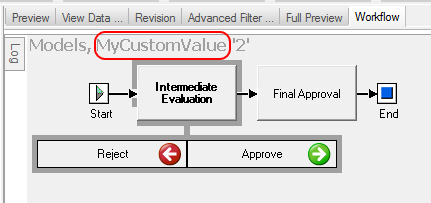 instead of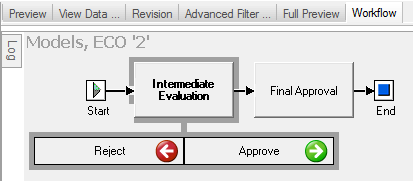
 Rules
Rules
1.The ; ( semi-column ) character define the rest of the row as comment
2.Any state listed in the BEGIN_PROCESS…END_PROCESS sections must be defined in the Workflow States section.
3."BEGIN" and "END" are reserved state names
4.MSG_NEXT and MSG_PREVIOUS always appear after a STATE definition
5.JUMP_FROM always preceed JUMP_TO and both are at the end of the process definition
6.If you want to inhibit the JUMP to the previous state, then the syntax is MSG_PREVIOUS @NOTALLOWED@. In this case you could define Jumps either to BEGIN for a total abort or to any of the other preceeding states to send back the document.
Example
;--------------------------------------------------------------
; DBWorkFlowDef.txt
;
; DBWorkflow Definition File
;
;--------------------------------------------------------------
; STATES
;--------------------------------------------------------------
BEGIN_STATE PRELIMINARY_EVALUATION_FOR_DRAWINGS
DBWARM_GROUP DBWorks Admin
DBWARM_GROUP DBWorks Designer
END_STATE
BEGIN_STATE PRELIMINARY_EVALUATION_FOR_DOCS
DBWARM_GROUP DBWorks Admin
DBWARM_GROUP DBWorks Designer
END_STATE
BEGIN_STATE INTERMEDIATE_EVALUATION
DBWARM_GROUP DBWorks Designer
DBWARM_GROUP DBWorks ProjectManager
END_STATE
BEGIN_STATE FINAL_APPROVAL
DBWARM_GROUP DBWorks Admin
DBWARM_GROUP DBWorks Designer
END_STATE
;--------------------------------------------------------------
; PROCESSES
;--------------------------------------------------------------
BEGIN_PROCESS MODELS
SQL_CONDITION T='A' OR T='P'
;
STATE INTERMEDIATE_EVALUATION
MSG_NEXT Create TIFF and submit to the Manager for Approval
MSG_PREVIOUS ABORT
;
STATE FINAL_APPROVAL
MSG_NEXT Definitively Approve
MSG_PREVIOUS Go back to the Intermediate Evaluation
;
JUMP_FROM FINAL_APPROVAL
JUMP_TO BEGIN
END_PROCESS
BEGIN_PROCESS DRAWINGS
SQL_CONDITION T='D'
;
STATE PRELIMINARY_EVALUATION_FOR_DRAWINGS
STATE INTERMEDIATE_EVALUATION
STATE FINAL_APPROVAL
END_PROCESS
BEGIN_PROCESS GENERICS_DOCS
SQL_CONDITION T='G' AND (FILE_NAME LIKE '%.DOC' OR FILE_NAME LIKE '%.TXT')
;
STATE PRELIMINARY_EVALUATION_FOR_DOCS
STATE FINAL_APPROVAL
END_PROCESS
BEGIN_PROCESS ALL_THE_OTHER_GENERICS
SQL_CONDITION T='G' AND NOT (FILE_NAME LIKE '%.DOC' OR FILE_NAME LIKE '%.TXT')
;
STATE FINAL_APPROVAL
END_PROCESS