a)Run on your local machine the MWCustomProductBuilder.exe.
b)Below is the login user interface. To login an internet connection must be available.
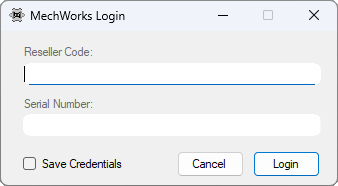
•Reseller code: the « R » + 3-digit Reseller code.
•Serial Number: Any 10-digits MechWorks valid serial number (the same credentials used by Resellers to login on to the MechWorks website reserved area. The application remembers the last used).
•Save Credentials flag: check it if you want to save the login credential on the local machine.
c)From the dropdown Menu select Edit:
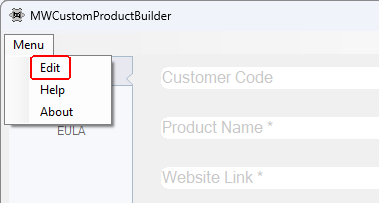
d)A File Selection Box appears. Select the folder containing the Customer’s customization and confirm with the OK button. The customer’s data are loaded, all the forms are filled out and ready for editing.