Auto-populate DBWORKS_USERS
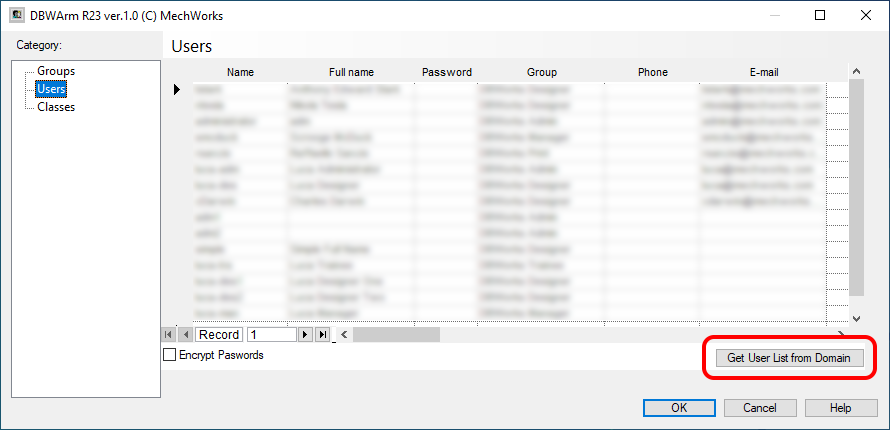
The list of MechworksPDM users can be automatically popuplated in the DBWARM User Rights Manager:
VERY IMPORTANT
We strongly suggest to have the same accounts between Windows system and DBWARM system.
If you log in Windows with a user that does not exist in the DBWARM table, the execution of MechworksPDM and its applications (for example DBWACLServer) will be seriously affected by this inconsistency.
Because of this fact, we strongly suggest to Auto-populate users grid with the Get user list from domain button, as first step.
The PDM has the ability to auto-populate the DBWORKS_USERS table whenever a new User logs in.
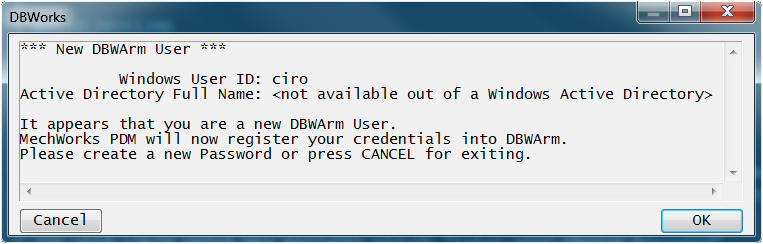
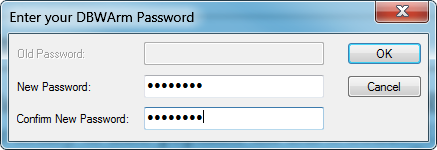
The Setup procedure automatically enables this DBWArm feature in new installations. When a new PDM User logs in for the first time into DBWArm, he is requested to create a new Password. If the Password creation is successful, then the new User ID is registered in the DBWORKS_USERS table.
DBWARM keeps aligned in an enhanced way the DBWORKS_USERS table when the button is pressed.
In particular:
1.if an Active Directory User is not existing in the DBWORKS_USERS table, it is added to the table (same as in R13)
2.if an Active Directory User is already existing in the DBWORKS_USERS table, no action is performed (enhanced in R14)
3.if a User in the DBWORKS_USERS table is no longer existing in the Active Directory Users list, the DBWORKS_USERS record for that user is deleted from the table (new feature in R14) -
If the User is a "DBWorks Admin" then he will never be removed from the table
It is also possible to filter the Users in specific Global Groups, by assigning the group names in the Dialog Box that appears after pressing the button:
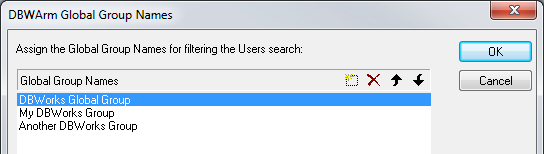
More, it is possible to invoke the DBWArm application in a batch way, passing the command line switch:
-updateUsersFromDomain
With the above option, DBWArm will execute the update of the Users table without any user interaction.
When using the DBWArm in a batch way, also the following parameters must be passed:
-user:"<DBWorks Admin personality User ID>"
-password:"<password>"
For filtering only some Global Groups, the option:
-groups:"<globalGroup1>[,<globalGroup2>[,<globalGroup3>]]"
can be used.
When more than one group should be considered, the group names must be separated by the comma character, like in:
-groups:"DBWorks Global Group,My DBWorks Group,Another DBWorks Group"
This feature can be used together with the Windows Task Scheduler for periodically and silently keeping the DBWORKS_USERS table updated with the Active Directory content.
Noting that any new "not administrative" user is added with the "DBWorks Designer" Group as default, it may be easy for an Administrator to find what users have been added automatically during a scheduled update.
Note: when running the utility with Windows Server 2012, in order to add any users outside the Administrators group, the following two steps must be executed:
1.Log in as "Administrator"
2.Disable the UAC setting "Run All Administrators in Admin Approval Mode"
Example
C:\>DBWArm.exe -updateUsersFromDomain -user:"JoeAdmin" -password:"joePass" -groups:"DBWorks Users"
INITIALS and ABBREVIATED NAMES in the DBWORKS_USERS table
It's possible to express the user name in an alternative way, such as through initials or short (abbreviated) name instead of the full user name. 2 specific fields are present in the DBWORKS_USERS table to reference such alternative names:
•DBWORKS_USERS.INITIALS varchar(10), nullable
•DBWORKS_USERS.ABBREV_NAME varchar(128), nullable
When these field are valued, MechWorksPDM can create special File Properties with the value of the User Initials or Abbreviated Name. The followings UserInitials@ and UserAbbrev_Name@ prefixes are available in the SCHEMA\BomTitle.txt for declaring Property Names to be filled with the INITIALS / ABBREVIATED NAME value.
Example
Suppose to have this user in the DBWORKS_USERS table:
USER_ID |
FULLNAME |
PASSWORD |
GROUP_ID |
PHONE |
PIN |
LOCKED |
TRUSTED_DOMAIN |
INITIALS |
ABBREV_NAME |
|
|---|---|---|---|---|---|---|---|---|---|---|
ntesla |
Nikola Tesla |
•••••••• |
DBWorks Designer |
NULL |
NULL |
NULL |
NULL |
N.T. |
N.Tesla |
Suppose to have these entries in the BOMTITLE.TXT:
...
CREATED_BY "UserAbbrev_Name@CreatedByInitials"
LAST_MODIFIED_BY "UserAbbrev_Name@LastModifiedByInitials"
_R01_APPROVED_BY "UserInitials@_R01_ApprovedByInitials"
_R02_APPROVED_BY "UserInitials@_R02_ApprovedByInitials"
_R03_APPROVED_BY "UserInitials@_R03_ApprovedByInitials"
...
In the above example:
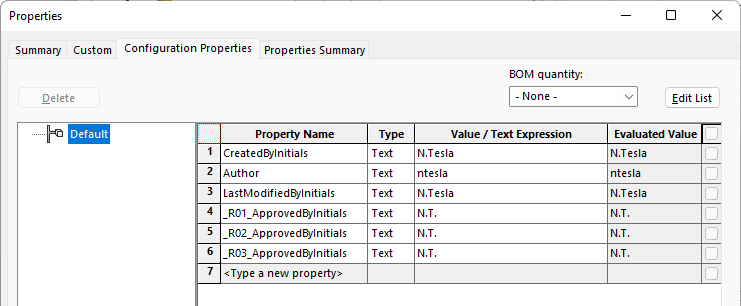
1.the ABREVIATED NAME of the User whose name is in the CREATED_BY database field is mapped into the File Property "CreatedByInitials"
2.the ABREVIATED NAME of the User whose name is in the LAST_MODIFIED_BY database field is mapped into the File Property "LastModifiedByInitials"
3.the INITIALS of the Users whose names are in the _Rxx_APPROVED_BY automatically generated Properties are mapped into the File Properties "_Rxx_ApprovedByInitials"
The result (writing only the BomTitle.txt defined Properties) is as follows: