Interface
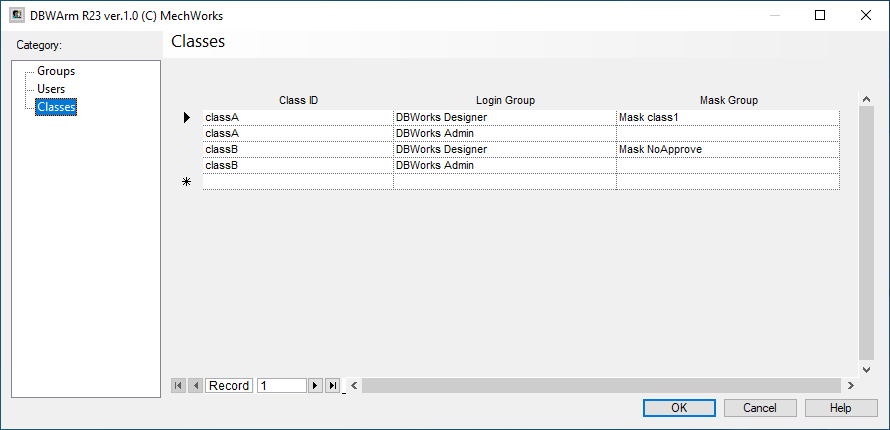
The grid shows the behaviour of the user managing some kind (classes) of documents.
Classes are a particular kind of category you can set for single documents; that allows a categorization not based on users but on set of documents.
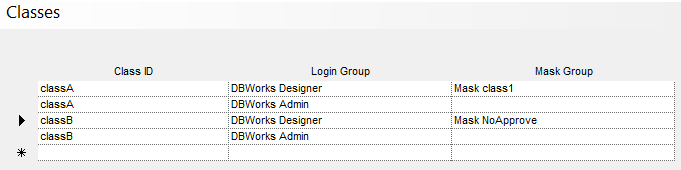
See in details what is the meaning of above picture settings:
Documents can be marked as belonging to class "ClassA" or "ClassB" (or none of them).
Mask groups have already been set in Groups creation (refer to Groups category for more details)
The above settings mean that when a user logged as Designer encounters a document marked as ClassA, he has to obey to restrictions set for Designer type user PLUS restriction set in Mask Class1. In the second row, the Administrator has no mask set for ClassA documents: it means that no restriction are added with masks. He hasn't restrictions at all.
The third row shows that Manager users have to obey to their restrictions plus MaskNoApprove restriction (in this case is inhibited only the approval).
Again the fourth row let the Administrator free of changing ClassB documents.
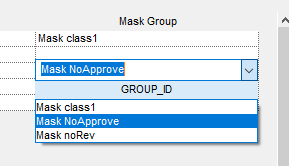
When creating a new Class, you have to provide a name for it, to choose a category of user (taken from Users Categroy) and to set the mask for that class (taken from Users Category too).
Any document with a DBWARM_CLASS denying the View data feature will also have the Document Preview being denied;
in the special case of Projects, the visibility in any Tree is denied too.