Interface
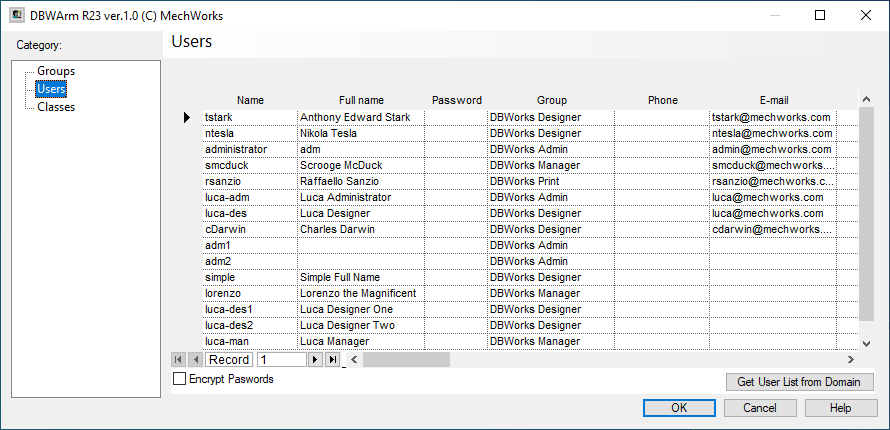
This section contains the list of declared (and so valid) users in DBWorks.
The list must be filled manually by the Mechworks Administrator.
Please note the columns widths assigned in the USERS Grid are persistent across multiple sessions since the data is stored in the shared USERS\DBWARM path
The group column, when clicked, shows a drop-down list containing the currently available groups.
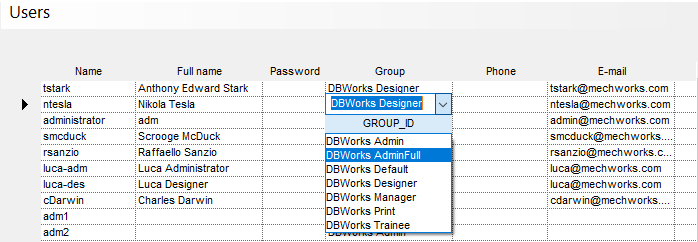
Here are explained the grid columns:
Name |
user name to type at the login dialog |
|---|---|
Full name |
the complete user name |
Password |
the password for the login dialog |
Group |
user group according to category Group settings |
Phone |
|
PIN |
a code required to start the last Workflow state. |
Locked |
internal use flag (after missing several time the pin, the user account become locked) |
TRUSTED_DOMAIN |
|
Initials |
The user's initials, to be used when allowed. |
Buttons
Get User List from Domain
This button allows to populate the users list starting from domain user names.
See specific topic for further information: Auto-populate users.
Encrypt password
This check makes the writing of the password value as encrypted in the database table of DBWARM.
It must checked accordingly to the option Environment→DBWARM→ Encrypt passwords.