Description
This script is fired when pressing the  Save Wizard button in the toolbar or when pressing the
  button on an unregistered file.
Location
LST folder
Activation
Options→Open/Save→Save as  Use DataEntr.LST data entry scripts on PDM 'Save as...'
or
Options→Rename Use DataEntr.LST on 'Rename'
or
Options→Environment→Configurations Use DataEntr.LST on 'Add configuration' event
Chose a topic for the script DataEntr.LST:
•Support for creating IGS, STEP, TIFF files from SolidWorks
•Support for Linked Database Tables
•Case Insert into new parts (e.g. cutlists)
Case: Save as...
Input
@CONTEXT |
SAVE_AS |
|---|---|
@DOCUMENT_TYPE |
".SLDPRT" | ".SLDASM" | ".SLDDRW" (for Solidworks users) |
@DOCUMENT_UNIQUE_ID |
|
@DOCUMENT_OWNER_UNIQUE_ID |
returns the unique id of the parent document (for example when inserting a new component from within an assembly) |
@PROJECT1 |
|
@PROJECT2 |
|
... |
|
@PROJECTN |
|
@CURRENT_PROJECT |
|
@SELECTED_PROJECT |
Case: the parent is a DRAWING and option UsePartIdForDrawingOnSaveAs = TRUE
@DRAWING_FNAME |
|
|---|---|
@DRAWING_FDIR |
@DOCUMENT_PATHNAME |
|
|---|---|
@DOCUMENT_FNAME |
|
@DOCUMENT_FEXT |
|
@DOCUMENT_FDIR |
|
@DOCUMENT_CONFIGURATION |
Output
If no DBWOutput is executed in Dataentr.LST
exit procedure (user pressed CANCEL in the Dataentr.LST form)
Mandatory
DBWLookUp("NAME_FIELD_FILE_NAME")
DBWLookUp("NAME_FIELD_FILE_DIRECTORY")
Optional
list of all remaining fields |
|
|---|---|
@OKDATA |
if "1" DBWorks standard data form is not displayed |
@CURRENT_PROJECT |
|
@CURRENT_INPUT_FORM_TAB |
|
@DISABLE_PROJECTS |
|
@NO_SAVE_ALL_CONFIGURATIONS |
if "1" DBWorks will avoid to save all the configurations automatically, even if the relative option is set |
After the "Save as..." action, in the DOCUMENT table it is written data about the document that has been saved as.
These specific fields (localized in each langauge) represent the ID and the UNIQUE_ID of the document you have "saved as" the current from.
COPIED_FROM_UNIQUE_ID
COPIED_FROM_ID
Case: Save as linked drawing
Input
@DOCUMENT_TYPE |
|
|---|---|
@DOCUMENT_UNIQUE_ID |
|
@DOCUMENT_OWNER_UNIQUE_ID=0 |
|
@CONTEXT |
SAVE_AS_LINKED_DRAWING |
@CURRENT_PROJECT |
|
@DRAWING_FNAME |
|
@DRAWING_FDIR |
|
@DOCUMENT_PATHNAME |
|
@DOCUMENT_FNAME |
|
@DOCUMENT_FEXT |
|
@DOCUMENT_FDIR |
|
@DOCUMENT_CONFIGURATION |
|
@CONTEXT |
SAVE_AS |
@DOCUMENT_TYPE |
".SLDPRT" | ".SLDASM" | ".SLDDRW" (for SolidWorks users) |
@DOCUMENT_UNIQUE_ID |
|
@DOCUMENT_OWNER_UNIQUE_ID |
|
@PROJECT1 |
|
@PROJECT2 |
|
... |
|
@PROJECTN |
|
@CURRENT_PROJECT |
|
@SELECTED_PROJECT |
Case: the parent is a DRAWING and option UsePartIdForDrawingOnSaveAs = TRUE
@DRAWING_FNAME |
|
|---|---|
@DRAWING_FDIR |
@DOCUMENT_PATHNAME |
|
|---|---|
@DOCUMENT_FNAME |
|
@DOCUMENT_FEXT |
|
@DOCUMENT_FDIR |
|
@DOCUMENT_CONFIGURATION |
Output
If no DBWOutput is executed in Dataentr.LST
exit procedure (user pressed CANCEL in the Dataentr.LST form)
Mandatory
DBWLookUp("NAME_FIELD_FILE_NAME")
DBWLookUp("NAME_FIELD_FILE_DIRECTORY")
Optional
list of all remaining fields |
|
|---|---|
@OKDATA |
if "1" DBWorks standard data form is not displayed |
@CURRENT_PROJECT |
|
@CURRENT_INPUT_FORM_TAB |
|
@DISABLE_PROJECTS |
|
@NO_SAVE_ALL_CONFIGURATIONS |
if "1" DBWorks will avoid to save all the configurations automatically, even if the relative option is set |
After the "Save as..." action, in the DOCUMENT table it is written data about the document that has been saved as.
These specific fields (localized in each langauge) represent the ID and the UNIQUE_ID of the document you have "saved as" the current from.
COPIED_FROM_UNIQUE_ID
COPIED_FROM_ID
Case: Rename
Input
@DOCUMENT_TYPE |
|
|---|---|
@DOCUMENT_UNIQUE_ID |
Case: Rename a Drawing
@CONTEXT |
RENAME_DRAWING |
|---|---|
@PART_UNIQUE_ID |
|
@PART_OLD_ID |
|
@PART_OLD_PATH_NAME |
Case: Rename Part/Assembly
@CONTEXT |
RENAME |
|||
|---|---|---|---|---|
@PROJECT1 |
if the option Projects→ |
|||
@PROJECT2 |
||||
... |
||||
@PROJECTN |
||||
@CURRENT_PROJECT |
||||

Output
Mandatory
DBWLookUp("NAME_FIELD_FILE_NAME")
DBWLookUp("NAME_FIELD_FILE_DIRECTORY")
Optional
DBWLookUp("NAME_FIELD_ID") |
|
|---|---|
list of all remaining fields |
|
@OKDATA |
if "1" MechworksPDM standard data form is not displayed |
@CURRENT_INPUT_FORM_TAB |
|
@DISABLE_PROJECTS |
|
@OK_EDIT_AFTER_RENAME |
Remarks
This script can be used to assign the correct part number to a new configuration created in a CHECKED-OUT opened model.
It is also responsable of the assigning of correct part number; in case (special) of the file name is the same as the one received as input parameter, DBWorks recognizes that this is an intentionally request of creating a new part number for an already existing configured file. Because of this, DBWorks will create a new configured record, properly aligned with all the needed revisions, before displaying the standard “Save As…” input form, that is shown in YELLOW color.
Pressing the CANCEL button will remove the pre-inserted configured record.
Summary
For a correct output action, please refer to the below table:
value |
action |
|---|---|
no output at all |
ESC from the script |
@OKDATA=0 |
Valid file name returned; Modal Input Form being displayed. DBWLookUp("NAME_FIELD_FILE_NAME") DBWLookUp("NAME_FIELD_FILE_DIRECTORY") |
@OKDATA=1 |
Valid file name returned; no Input Form being displayed. DBWLookUp("NAME_FIELD_FILE_NAME") DBWLookUp("NAME_FIELD_FILE_DIRECTORY") |
Support for creating IGS, STEP, TIFF files from SolidWorks
while keeping checked the option:
DBWorks → Options → Environment |
|
|---|---|
|
Always use DBWorks SaveAs |
A @SWSAVEASCONTEXT parameter is passed to the standard LST\DATAENTR.LST Save Wizard script, allowing the script to understand if it is possible or not to select an export type file name.
@SWSAVEASCONTEXT |
1: it means that the user executed the SW→File→SaveAs function, so normally having the full set of file types on which to saveAs. |
For export type file name it is meant any file format different from the native .SLDPRT,.SLDASM,.SLDDRW ones, like .IGS, .STEP, .TIFF
Example
In order to support files export, the DATAENTR.LST script must be adapted in a way similar to the following example:
.VBSCRIPT
Sub Main()
DBWinit(TRUE)
context = DBWInput("@CONTEXT")
swSaveAsContext = DBWInput("@SWSAVEASCONTEXT")
' suppose that myDataEntrForm is the object managing the
' input of the file name
if swSaveAsContext = 1 then
' here in the DataEntry form you can display an option for exporting files
' in formats like IGS, STEP, ...
myDataEntrForm.allowFileExportSelection = true
end if
myFileName = myDataEntrForm.resultFileName
' if swSaveContext = 1, myFileName can be also of type .IGS, .STEP, .TIFF, etc.
DBWOutput "FILE_NAME",myFileName,ForWriting
DBWOutput "FILE_DIRECTORY","E:\temp\",ForAppending
End Sub
'Add Configuration' event
When checked the option
DBWorks → Options → Environment → Configurations |
|
|---|---|
|
Use 'DataEntr.LST' on 'Add Configuration' event |
Input
@CONTEXT |
ADD_CONFIGURATION |
|---|---|
@CONFIGURED_BROTHER_UNIQUE_ID |
related to one of the existing configured records |
@CONFIGURATION_NAME |
|
@CONFIGURATION_ALTERNATE_NAME |
|
@CONFIGURATION_COMMENT |
|
@CONFIGURATION_DESCRIPTION |
|
@DOCUMENT_TYPE |
"A" | "D" | "P" |
@DOCUMENT_FNAME |
|
@DOCUMENT_FEXT |
|
@DOCUMENT_FDIR |
|
@DOCUMENT_CONFIGURATION |
|
@IS_DERIVED_CONFIGURATION |
to understand if the current configuration is a derived configuration or not. |

Output
SolidWorks@ConfigurationProperty@Name |
|
|---|---|
SolidWorks@ConfigurationProperty@Description |
|
SolidWorks@ConfigurationProperty@Comment |
|
SolidWorks@ConfigurationProperty@AlternateName |
DBWorks will apply the corresponding parameter to the current configuration of the current model being saved.
Example
Sub main()
...
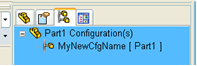
DBWOutput "SolidWorks@ConfigurationProperty@Name","MyNewCfgName",ForAppending
...
End sub
The current configuration will be renamed as
Remarks
NOTE: since of limitations in the SW API, the configurationDescription is returned equal to the configurationName for parts/assemblies with configurations created using a DESIGN TABLE ( Excel ).
Since the FILE_NAME and FILE_DIRECTORY are already pre-defined, being the same of all the other existing configured records, they must NOT be output by the script.
Example
Suppose we want to input the new ID and to automatically fill the DESCRIPTION and NOTES fields of the new configured record being created; a sample of DATAENTR.LST could be the following:
.VBSCRIPT
Sub Main()
DBWinit(TRUE)
context = DBWInput("@CONTEXT")
if context = "ADD_CONFIGURATION" then
configurationName = DBWInput("@CONFIGURATION_NAME")
configurationAlternateName = DBWInput("@CONFIGURATION_ALTERNATE_NAME")
configurationComment = DBWInput("@CONFIGURATION_COMMENT")
configurationDescription = DBWInput("@CONFIGURATION_DESCRIPTION")
configuredBrotherUid = DBWInput("@CONFIGURED_BROTHER_UNIQUE_ID")
docType = DBWInput("@DOCUMENT_TYPE")
docFName = DBWInput("@DOCUMENT_FNAME")
docFExt = DBWInput("@DOCUMENT_FEXT")
docFDir = DBWInput("@DOCUMENT_FDIR")
docConfiguration = DBWInput("@DOCUMENT_CONFIGURATION")
myid = InputBox("Assign the new ID for the configuration " & docConfiguration & " :")
'
' Dont output any FILE_NAME or FILE_DIRECTORY, since they are not changed,
' being this the case of a new configuration added
'
DBWOutput "ID","(" & myid & ")",ForWriting
DBWOutput "DESCRIPTION",configurationDescription, ForAppending
DBWOutput "NOTES",configurationComment, ForAppending
end if
End Sub
Support for Linked Database Tables
From Dataentr.LST script it is possible to DBWOutput a field for a Linked Table with the format:
DBWOutput "<linked_table_name>.<linked_table_field_name>,…
Example
.VBSCRIPT
Sub Main()
DBWinit(TRUE)
…
DBWOutput "ERP_DATA.TYPE", myTypeValue, ForAppending
DBWOutput "ERP_DATA.TYPE_DESCRIPTION", myTypeDescription, ForAppending
…
End Sub
Create new BOM item
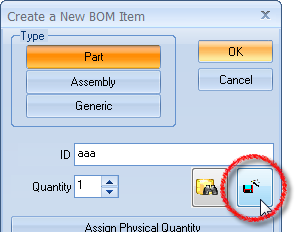
This context is called when the Savewizard button is pressed from the Create New BOM Item dialog
Input
@DOCUMENT_TYPE |
the extension of the fake document to create: .SLDPRT | .SLDASM | .TXT |
|---|---|
@CONTEXT |
NEW_BOM_ITEM |
@CURRENT_PROJECT |
The current project |
Other context related issue
@CONTEXT |
GET_FILENAME_BEFORE_SAVEAS: passed to DataEntr.lst when saving from the CAD (using CAD events) |
|---|---|
@CONTEXT |
GET_FILENAME_BEFORE_DROP: passed to DataEntr.lst before a drop event of a toolbox component on a Solidworks assembly; see Options→Environment→ |
@SWSAVEASCONTEXT |
it's 1 if saving from the Solidworks/Inventor SaveAs |
@TEMPLATE_FILE_NAME |
passed by DBInventor when a new component has to be added to the current assembly. |
Case Insert into new parts (e.g. cutlists)
This case is for Solidworks users only
Input
@PARENT_DOCUMENT_UNIQUE_ID |
the UniqueID of the Document from which the command started |
|---|---|
@PARENT_DOCUMENT_PATH_NAME |
the full path name of the parent Document |
@PARENT_DOCUMENT_CONFIGURATION |
the Configuration of the parent Document |
from build: 20160322 |
Bypass file properties import
This directive can be outputted for bypassing any File Properties import due to existing custprop.txt or custprop_insert.txt definition files
Output
@SKIP_CUSTPROP_IMPORT |
if 1 it avoids the import of the file properties |
Supported @CONTEXT values
•GET_FILENAME_BEFORE_SAVEAS
•GET_FILENAME_BEFORE_DROP
•GET_FILENAME_AFTER_ADD_TUBE (SE only)
•GET_FILENAME_AFTER_ADD_PIPE (SE only)
•GET_FILENAME_AFTER_ADD_MIRROR (SE only)
•GET_FILENAME_BEFORE_SAVE_VIRTUAL_COMPONENT_EXTERNALLY (SW only)
•RENAME
•RENAME_DRAWING
•RENAME_CONFIGURATION
•ADD_CONFIGURATION
•NEW_BOM_ITEM
•SAVE_AS
•SAVE_AS_LINKED_DRAWING