DBWAclServer and scripting
Here below is explained a process flow during a scripting action on files
1.Client: issues a FileDelete/FileCopy command
2.Server: it executes the FileDelete/FileCopy command
3.In this exact time, Client's Windows Explorer has no notification about the no more existing or just created file – any script command like "if file exist then" or "SolidWorks → Open" the files will fail
4.the Client's Windows Explorer waits a fixed amount of time before REFRESHING its file cache – this time is by default 10 seconds
5.After such delay the file appears on the Client's side, so allowing any further processing based on the file status
Since Mechworks PDM cannot know if the script wants to check if the file exists or not, if the script wants to open the file or not, etc., starting from R14sp2.2 the application WAITS until the file status is SYNCHRONIZED with the Client's Window Explorer.
For further information about the topic you can read the Microsoft technical article SMB2 Client Redirector Caches Explained
In order to modify the WAIT TIMEs for such synchronization, on each client you can:
access the registry and create the DWORD values in the following key
HKEY_LOCAL_MACHINE\System\CurrentControlSet\Services\Lanmanworkstation\Parameters
with following values:
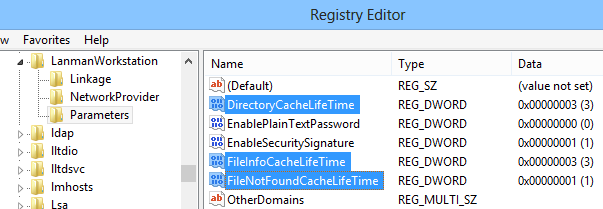
•W7 settings
DirectoryCacheLifetime |
3 |
|---|---|
FileInfoCacheLifetime |
3 |
FileNotFoundCacheLifetime |
1 |
so to obtain these settings:
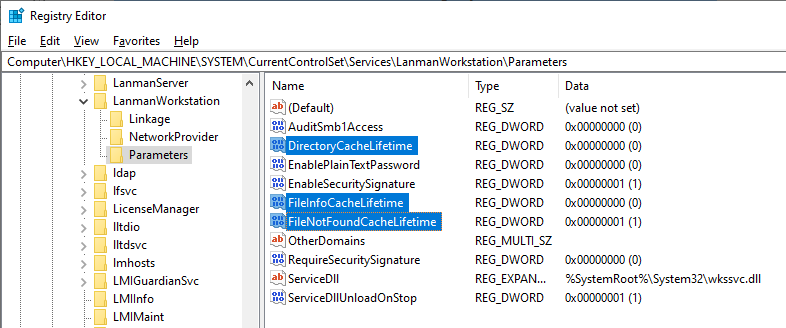
•W10 settings
DirectoryCacheLifetime |
0 |
|---|---|
FileInfoCacheLifetime |
0 |
FileNotFoundCacheLifetime |
1 |
so to obtain these settings:
Thanks to such settings, the TIME that Mechworks PDM needs to wait (under special circumstances) after a server file operation for synching the client Windows Explorer file cache has been greatly reduced from about 5 seconds (the default value of the FileNotFoundCacheLifeTime) to 1 second .
As explained in the article notes at the bottom:
[...]
Disabling the File information cache can have significant effect on client performance and show an increase in the number of metadata requests that are sent to the server
[...]
so our suggestion is avoiding to set the values to ZERO, leaving a bit of time to wait before refreshing the cache.