Use DBWAclServer protected File Transfer
Starting from DBWACL* version 13.2.x, when the option
Environment→Remote Access→ Use DBWAclServer protected File Transfer
is enabled, the actual Remote Access File Transfer operations, as well as any operation that would access any Remote Server file (like just checking the File Existence on a Remote Server) are executed using the DBWAclServer personality.
This means that the currently logged in User can work without any direct access to any Remote Server.
The logged DBWAclServer personality must be able to access any Remote Server.
In order to have this functionality working, the following prerequisites are necessary:
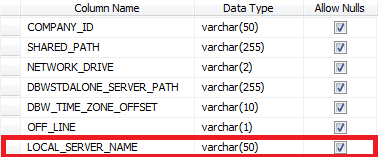
1.A new field named LOCAL_SERVER_NAME in the DBW_COMPANY_INFO table
The LOCAL_SERVER_NAME must contain the name of the Local Server ( LAN ) where the DBWAclServer is running.
There can exist multiple rows in the DBW_COMPANY_INFO if multiple Local Servers are used in the installation.
The LOCAL_SERVER_NAME field must be of type varchar(...).
Example
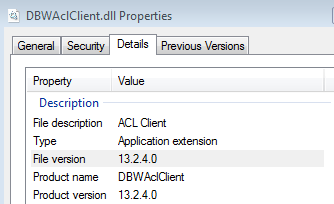
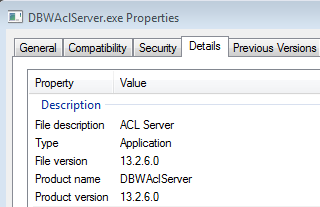
2.The DBWAclClient and DBWAclServer must be of version R13.2.xx or newer:
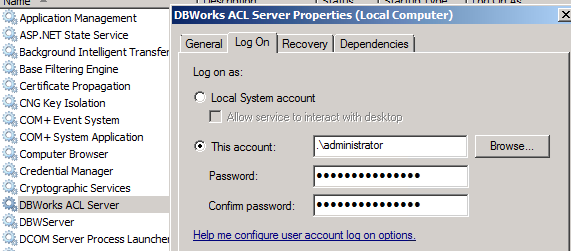
3.The DBWAclServer must be logged as a service with an account that can access, with Full Permissions, any Remote Server folder containing files managed by Mechworks PDM:
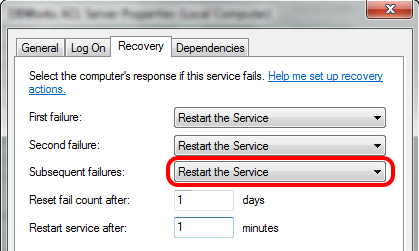
4.In the service properties make sure the Recovery is set on restarting the service:
Please note that by default the DBWAclServer starts with the SYSTEM account, that of course is not able to access any Remote Folder.
DBWAclServer supports in its startup parameters the options -user: and -password:
Example
DBWAclServer -install -user:DBWorksAdministrator -password:xxxxx