Dirty revisions
Definition
Since one of the basic rule of MechworksPDM about revisions is that all the components of an assembly should be approved before it, the dirty status is the case where the components is newer (or newly modified) than the containing assembly.
The revision of a record is dirty if, since last approval, one of its components have been modified.
Interface
When the related option about dirty flag visualization User Interface→Tree→ Highlight 'dirty' revision documents in the Tree (and Grids) is enabled, a colored border appears to highlight both the record whom revision is to be considered dirty (brown border) and the record that makes such record dirty (purple border):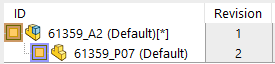
In the Grids the dirty status is shown with a slightly darker color: 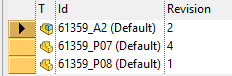
A sub-option named User Interface→Tree→ Even for documents in CHECKED-IN/CHECKED-OUT state allows to highlight dirty status also when checking in and out: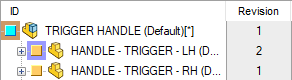
Possible dirty status:
• Dirty released/approved record
• Dirty checkedin record
• Dirty checkedout record
• Released/approved record that makes its parent dirty
• Checkedin record that makes its parent dirty
• Checkedout record that makes its parent dirty
Parent-Child Dirty status
In R17 release a field named PARENT_CHILD_REVISION_DIRTY_STATUS has been added in the database structure (PARENT_CHILD table). When such field is declared MechWorksPDM checks for such parent-child value for determining what Child component is invalidating its Parent document (so displaying it with a purple border): 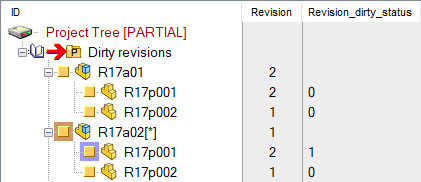
For performance reasons, the Undo Checkin of a document or the approval on a previous revision does not clear any DIRTY_REVISION_FLAG of its parents;
for a proper procedure, in facts, all the children of the parents should be queried for verifying if any other child is currently invalidating a parent.
Dirty revision flag in Release Database Mode
If Release Database Mode is active, the dirty revision flag has a slightly different meaning since it is used to mark those components that result APPROVED in the RELEASED database but that have been initialized for a new revision cycle in the PRODUCTION database.
Dirty revision flag in Remote Access Mode
If Remote Access is enabled, dirty revision flag is not set/reset anymore on foreign documents in order to avoid conflicts during the replication process.