Introduction
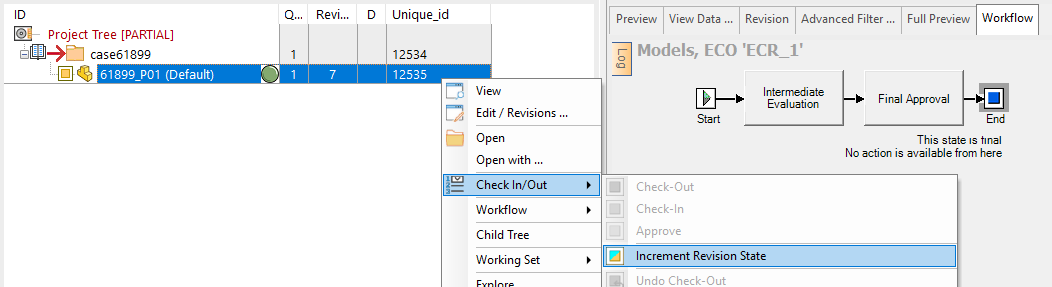
With this new feature it is possible to avoid the creation of new versions of released documents without the approval from a Workflow process.
An initial support is also provided for managing the raise of change requests, that will be collected in the table DBW_WORKFLOW_ECR
A typical sequence of actions is:
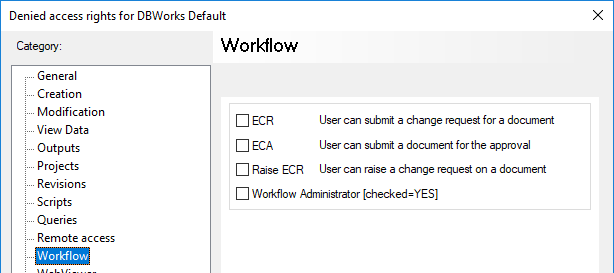
a.users with the DBWArm_workflow_raise_ecr priviledge will raise ECRs on selected documents
b.a user with the DBWArm_workflow_ecr priviledge will then review the available ECRs and submit them to the Workflow, for the selected documents
c.the Workflow will proceed normally, rejecting or approving the change request; while the documents have any request in the workflow, no other requests can be raised or submitted on the same document
•if rejected, the document is then free, and new requests raising or submissions are accepted
•if approved, the document can now have its revision incremented; MechworksPDM will mark the new revision with the ECR_ID that was submitted to the workflow
in order to differentiate the ECR codes from the ECO/ECA codes, the ECR codes generated by the adapted OnSubmitToWorkflow.LST script will be further processed by MechworksPDM, by prefixing the string ECR_ to any code; if the generated ECR code is, for example, 1234, the registered ECO_ID in the DBW_WORKFLOW table will be ECR_1234
Prerequisites
1.The database table REVISIONS must have the field ECR_ID varchar(50)
after the ECR has been approved, MechworksPDM updates this field for the new revision being created
A database table DBW_WORKFLOW_ECR must be created with the following structure:
DBW_WORKFLOW_ECR |
|||
|---|---|---|---|
PK |
Field Name |
Data Type |
Allow Nulls |
DOCUMENT_UNIQUE_ID |
int |
|
|
ECR_ID |
int |
|
|
ECR_DESCRIPTION |
varchar(255) |
|
|
ECR_STATE |
varchar(50) |
|
|

Any additional field is allowed.
This table, as well as the DBW_WORKFLOW_ECO table, is completely managed by the script OnSubmitToWorkflow.lst, so it depends only from the script how it is accessed or updated.
2.The SCHEMA\RevDentr2.TXT form definition file should include the ECR_ID field
This field, of the last approved revision, is filled by the Workflow when the ECR will be approved
3.DBWArm is required; the Workflow rights page appears now as:
Enabling the ECR support
Environment→Workflow→ Enable the ECR Workflow
Workflow definition changes
The Workflow definition file SCHEMA\DBWorkFlowDef.TXT should be adapted in order to separate the processes based on their life-cycle state.
Even if not mandatory, this best-practice is strongly recommended.
As an example, the standard MODELS process should be splitted into two processed, one for the ECR case (state="RELEASED") and the other for the ECA case (state="CHECKED_IN")
Example
[...]
;--------------------------------------------------------------
; PROCESSES
;--------------------------------------------------------------
BEGIN_PROCESS ECR_MODELS
SQL_CONDITION (( T='A' OR T='P' ) AND STATE='RELEASED' )
;
STATE FINAL_APPROVAL
;
JUMP_FROM FINAL_APPROVAL
JUMP_TO BEGIN
JUMP_MSG ABORT
END_PROCESS
BEGIN_PROCESS MODELS
SQL_CONDITION (( T='A' OR T='P' ) AND STATE='CHECKED_IN')
;
STATE INTERMEDIATE_EVALUATION
MSG_NEXT submit to the Manager for Approval
STATE FINAL_APPROVAL
MSG_PREVIOUS Go back to the Intermediate Evaluation
;
JUMP_FROM FINAL_APPROVAL
JUMP_TO BEGIN
JUMP_MSG ABORT
END_PROCESS
Script changes
The OnSubmitToWorkflow.LST script receives the input parameter @WORKFLOW_ACTION with values RAISE_ECR, ECR or ECA if invoked before submitting the documents for a change request or for the approval; the script needs to be adapted to this new case; the distributed LST\DEMO_LST\OnSubmitToWorkflow_ECR.lst is a template showing how to manage the three cases.
Example
Here is a demo ECR process performed with distributed scripts;
please note the file LST\OnSubmitToWorkflow_ECR.lst has been renamed as LST\OnSubmitToWorkflow.lst to be enabled.
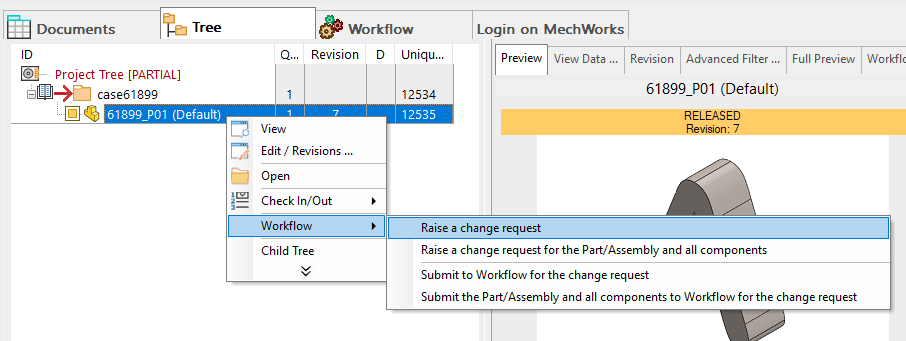
1.The Designer raises a request for a change:
2.The user has to choose an ECR ID
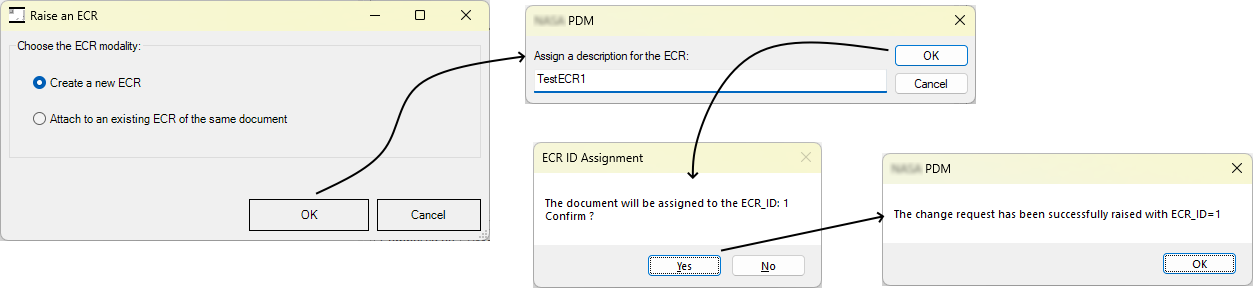
after that an entry in the DBW_WORKFLOW_ECR hase been created:

Please note that differently from the ECO process, the ECR process doesn't start the WF automatically, so the RAISE action is just an insert to the DBW_WORKFLOW_ECR table.
Of course this has to be considered as an example, that can be customized accordingly to the company needs.
3.Now the designer submits the document to the workflow to increment the revision state:
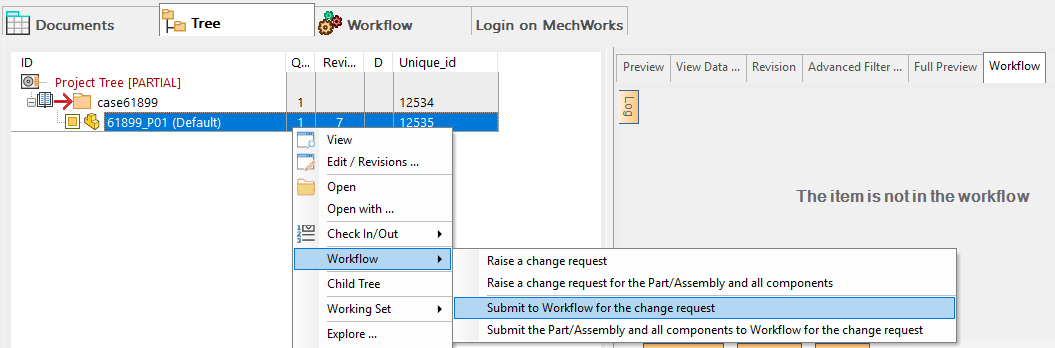
then the user has to choose a ECR ID, so to be submitted to WF:
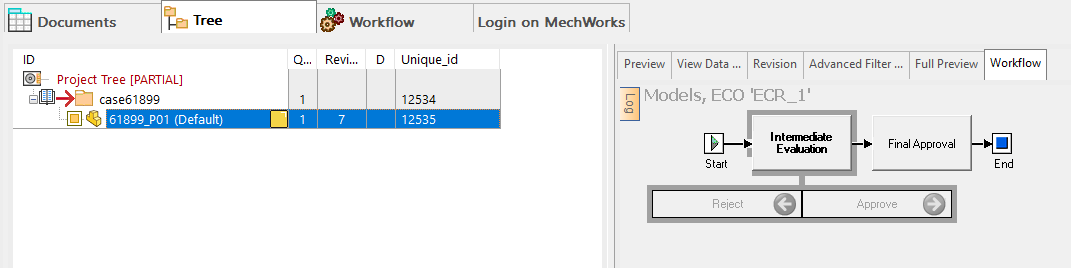
Once done, the Designer must wait a manager to be validated.
4.On the other side an Admin approves the request:
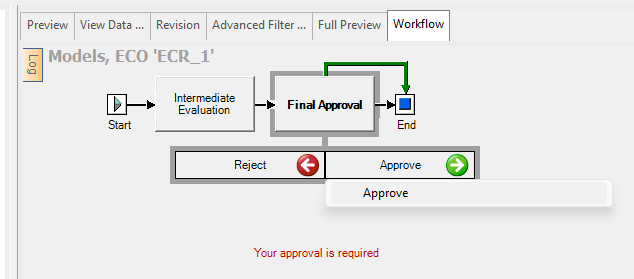
5.Finally the Designer completed the document's WF so he's now able to increment the revision state: