Local Checkout mode
When this mode is active, both checkin and checkout use a local copy of the files creating three file locations: one in share on the server for released documents, one intermediate for work-in-progress being shared only in the designing team and one on the designer machine for editing.
This working mode separates neatly the released versions of the documents from the work-in-progress, separating both the documents meant as files on the disk and the database. In plain words, when this mode is active it is possible to make sure that the standalone versions display only released versions, which could be handy for keeping a reference for the personnel not involved in designing and modeling.
To correctly operate in this mode, MechworksPDM needs to reassign the File Locations options of SolidWorks.
Before enabling Local Checkout Mode on Autodesk Inventor please read this topic
Pre-requisites
All the file names must be unique in all the archives; so this mode cannot work if you have parts with the same file names in different directories and with different content.
How the local checkout mode works
Schema
The local checkout mode architecture needs 3 archive levels (from the bottom):
1.Local Checked-out archive
files in this archive are visible only to the designer who is modeling them
2.Shared Checked-in archive
the files in this archive are shared among the designers but are not visible to the viewers outside the designing team
3.Shared Released archive
these files are released and are visible to everybody in the company as a reference of the items in production
The following image shows this architecture: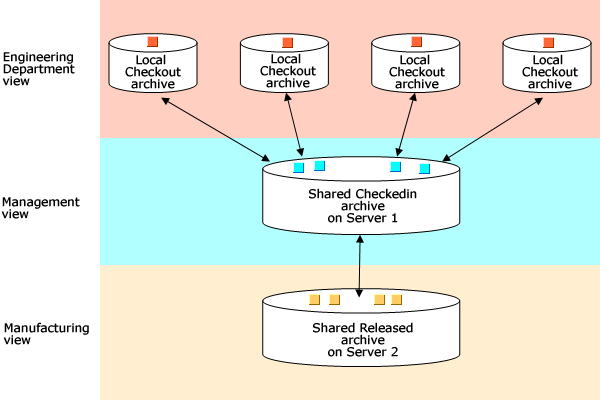
The logic for a new document
The standard logic for a new file creation is that the new file is saved into the released folder first, then copied to the shared checkin folder (check in), then again copied to the local checkout folder (check out).
In MechworksPDM the designer can choose to avoid publishing the new file until checked-in for the first time; in this case MechworksPDM will ask the designer for the location folder where the new file will be created (the absolute secured released directory), and a record in the database is created with this explicit file location.
When this option is enabled, the file name is assigned as per a 'save as...', so if a Wizard is enabled via the script dataentr.LST, it will run at each save of a new file.
Eventually MechworksPDM will directly create the new file in the Local Checkout Directory. With this logic, the file is not accessable by any other designer (the file does not exists in the shared folders yet) until it's checked-in for the first time.
Example
From released to checkin  →
→ 
suppose you have a part P1.SLDPRT released and available on the Shared Released Archive server Server 2
at the beginning the archives situation will be as follows:
1) No files on the Local Checked-Out Archive
2) No files on the Shared Checked-In Archive
3) The file P1.SLDPRT available on the Shared Released Archive
Suppose you want to modify the part:
you create a new revision and put it in Checked-in state;
the file P1.SLDPRT is copied from the Shared Released Archive to the Shared Checked-In Archive
in this moment there are two copies of the file:
1) No files on the Local Checked-Out Archive
2) One copy on the checked-in archive, read-only
3) The original copy on the released archive, read-only
Local checkout → 
Now you checkout the part:
the file P1.SLDPRT is copied from the Shared Checked-In Archive to the Local
Checked-Out Archive on the workstation
in this moment there are three copies of the file:
4) One on the local machine, writeable
5) The other on the checked-in archive, read-only
6) The original copy on the released archive, read-only
SolidWorks is programmed so as to look first in the local archive, then in the checked-in archive and lastly in the released
archive; you can therefore open a released assembly and check that your modifications are correct also from the point of view of
the mates and of the collisions in the assembly.
Checking the document back in →
Suppose now you check in the part:
the file is copied to the Shared Checked-In Archive and removed from the Local Checked-Out Archive.
Towards approval
In this moment there will be two copies of the file:
7) No files on the Local Checked-Out Archive
8) One copy on the checked-in archive, read-only, to approve
9) The original copy on the released archive, read-only
The management can now take a look at the copy on the Shared Checked-In Archive, compare it with the original copy in the Shared Released Archive, and decide whether to approve it or not.
Final approval: new released version →
In case of approval, the file in the Shared Checked-In Archive is copied definetively into the Shared Released Archive.
If the option to update a separate released mirror database is checked, the released database is then updated with the data and the structures of the last approved document.
How to activate the Local Checkout Mode
In the Options → Environment → Local Checkout Mode page check the related option and assign the paths for the three levels. The Local
Checked-Out and Shared Checked-In Archives are automatically assigned by MechworksPDM if empty.
MechworksPDM reprograms the File Locations option of SolidWorks on the assigned path. Please check the
correctness of the assignment before proceeding.
CTRL+Refresh for Local Checkout Mode
If the Refresh toolbar button is pressed together with the CTRL key, MechworksPDM/DBInventor, beyond saving the structure of the current active checked-out document in the database and updating the Shared CheckedIn Directory copy of the file, also updates the Shared CheckedIn Directory copies of the first level components of the current document; the database structures for the checked-out components are updated as well.
Use Local Checkout Mode together with Remote Access
To set up properly an environment with both LCM and Remote Access, all the remote sites must have the same shared checkin path.