Revisions of projects
Revisions of projects need to be enabled manually before becoming active.
Activation
The activation of this feature is the options Projects→ Enable revisions for projects
The concept of 'state' for a project
The state of a project as well as the concept of revision differ from those you are used to for other documents.
There are only two states for a project:
•check in, where you can add and subtract documents from the project
•released, where the project as a container is locked and nothing cna be added/subtracted.
MechworksPDM doesn't keep track of previous revisions for projects: if you approved revision 3 of a project you can't roll back to revision 1 or reactivate it to see what the project used to contain, say, six months ago. In simple words, the concept of revision for projects is functional only as far as locking is concerned.
Changing the state of a project
To create a new revision for a Project, select it in the MechworksPDM browser, right click it and in the popup menu select Edit/Revisions… and press the button Create a new revision as usual: confirming all the dialogs, the project state will go in CHECKED_IN, as expected.
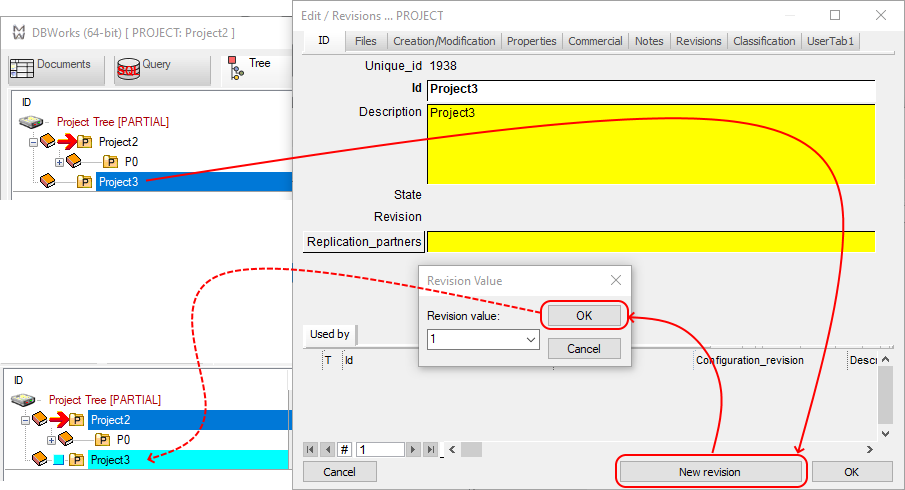
A project in CHECKED_IN state is modifyable; this because projects does not have the CHECKED_OUT state.
To approve the project, select it in the MechworksPDM browser, right click it and in the popup menu select Edit/Revisions… and press the button Approve as usual: confirming all the dialogs, the project state goes to RELEASED, as expected.
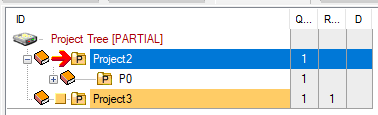
The projects in RELEASED state:
•is displayed with a gold background color in the Project Tree
•is not displayed in any combo box for Project selection, so as to avoid to store any document in a released project
•cannot have documents added or removed using the standard Add/Remove functionalities of the projects
•cannot have new sub-projects after released
Released projects, however, still allow modifications of the child documents as when you edit a component or associate a non CAD document to it; this because the same child could belong to other projects not released, and so this could prevent any operations on those.