Open Drawing
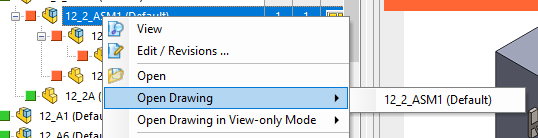
If for a document there are drawings available, you can open them right clicking the document and selecting Open Drawing or open them in view only mode with the command Open Drawing in View-only mode.
|
<< Click to Display Table of Contents >> Navigation: User Interface > The Bar Menu > Active Document > Open drawing |
If for a document there are drawings available, you can open them right clicking the document and selecting Open Drawing or open them in view only mode with the command Open Drawing in View-only mode.