Remote Access Mode: Server-side file transfer for the Transfer ownership and Download functionalities
Introduction
It is possible to delegate to a server process the transfer of the files managed by the Transfer ownership and Download functionalities.
The architecture assumes that on each server a Standalone Client is installed and running.
The modality can be activated (on clients only) through the option:
Options→Environment→Remote Access→Use Server side File Transfer
StandaloneClient and CADClients must have different parameters (so different GPP in the registry that indexes to different DBWAPP.PAR):
•CADClients → Use Server side File Transfer
•StandaloneClients → Use Server side File Transfer
Prerequisites
•DBW_COMPANY_INFO table: it must contain the field DBWSTDALONE_SERVER_PATH (type varchar(256));
the field must be filled with valid UNC paths addressing, on each server, a full permission directory, visible under the USERS path on the local DBWorks Standalone server:

This will be the ONLY folder that must be visible and accessible on each file server.
In this folder (that's the common USER folder for the standaloneClient) the CADclients write the command files to be executed, so this folder must be at least writeable (usually is fullcontrol by everyone) by all the CADclients involved in the environment.
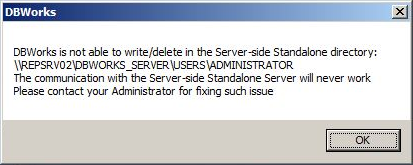
A warning message -ad PDM startup- will inform you if such folder is not writeable:
•Mechworks Standalone Client running on each server
•Each server can access, through UNC addresses, the SHARED_PATH and DBWSTDALONE_SERVER_PATH of any other server
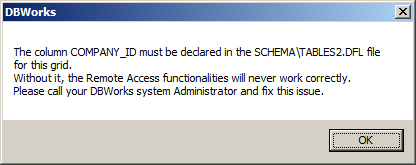
•COMPANY_ID field must be visible in grids you perform a RMB→RemoteAccess→Download action from.
Even in this case, if the field is missing, a message informs you just after invoked the Download command:
Processes
The picture below shows in details the processes involved in the Transfer Ownership functionality, assuming that the two companies defined above will share their data through the Transfer Ownership functionality:
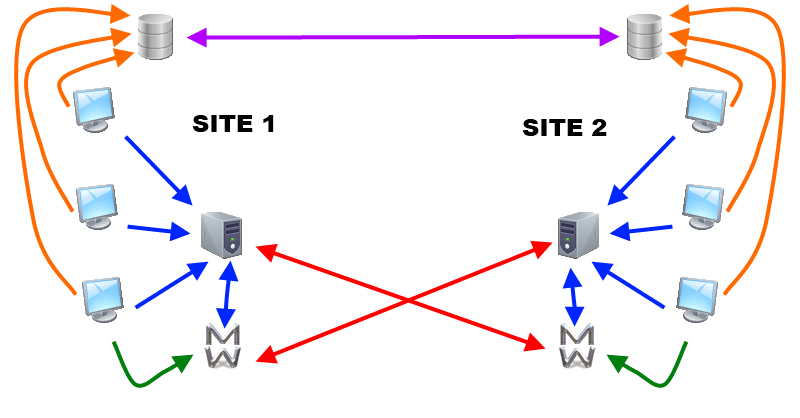
SITE1 clients exchange data with SITE2 clients only through Mechworks Standalone client. No direct connection is performed between clients and other company's server.
|
The clients and Mechworks Standalone are directly connected with their SITE server only. |
|---|---|
|
The clients and Mechworks Standalone are directly connected with their DB server only |
|
The databases are replicated through SQLServer specific procedures |
|
Every client sends command to its standalone client to be executed (both transfer and take actions) |
|
Mechworks Standalone executes take/transfer action directly to/from other site location |
Implementation details
The sequence of actions are:
action |
where |
|---|---|
Transfer Ownership |
on the client |
ExecuteFileTransfer send |
on the local server |
ExecuteFileTransfer receive |
on the remote server |
See actions in detail:
•Transfer Ownership
The DBWorks Client sends to the Local DBWorks Standalone server a !COMMAND.!!! for executing the DBWShell(“ExecuteFileTransfer”) command.
See details on ExecuteFileTransfer shell command.
After having executed the command, the Local DBWorks Standalone server shows the following files in its Login USERS directory:
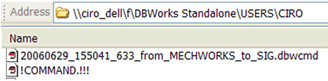
The .DBWCMD file has the following naming convention:
<date>_<time>_<millisecs>_from_<local company>_to_<remote company>.DBWCMD
Please note that the <time> is expressed in GMT time, in order to be independent from the client time zone.
•ExecuteFileTransfer send
The Local DBWorks Standalone Server executes the !COMMAND.!!! sent by the client by zipping into one file the document files and DBWorks command files needed to the remove server for rebuilding the file structure, copying the files and assigning the proper ACL attributes on the remote system.
At the end of this process, it sends to the destination DBWorks Standalone server a .ZIP file named as follows:

The naming convention used for the .ZIP file is the following:
!COMMAND.!!!. <date>_<time>_<millisecs>_from_<local company>_to_<remote company>.ZIP
Please note that the <time> is expressed in GMT time, in order to be independent from the client time zone.
•ExecuteFileTransfer receive
The Remote DBWorks Standalone Server executes the !COMMAND.!!! sent by the Local DBWorks Standalone Server by unzipping into a sub-folder created in its local USERS directory the content of the .ZIP file:
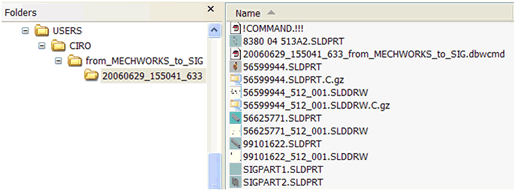
It then applies the sequence of File Transfer commands contained in the unpacked .DBWCMD file, applying any ACL attributes when needed.
It is highly recommeded to make extensive tests before using this functionality in a production environment, since of the many actors and parameters that may influence the result.