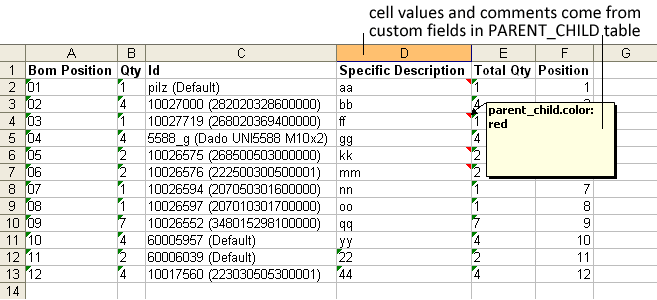
Custom PARENT_CHILD fields in the EXCEL BOM
Excel BOM support custom fields added to the PARENT_CHILD table.
What's relevant in the values of these fields is that since they are defined in the Parent Child link between a document and its child components those values are specific for that couple. Using custom fields in the PARENT_CHILD table, you can, for instance, specify a description that indicates how the component fits in that assembly and that could not be maintained valid for the component as a document in general.
Note that these field values cannot be used to fill cells in the header section, because the information displayed in the header concerns the assembly as a document per se and not a link between the assembly and one of its parents.
How to specify custom PARENT_CHILD fields in the Designer
In the Excel BOM designer, when you add a new field or edit an existing one, select the table name first and pull down the drop down lists of the defined fields:
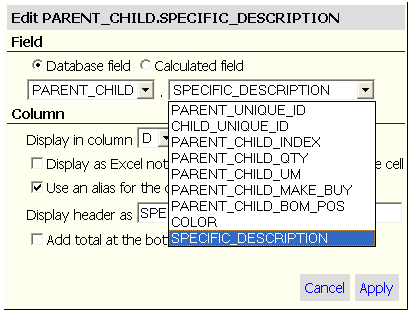
the rest of the settings work as usual. Please refer to the specific topic for the details.
Once you have set one or more fields, in the Designer you should see a representation of the Excel BOM such as the following:
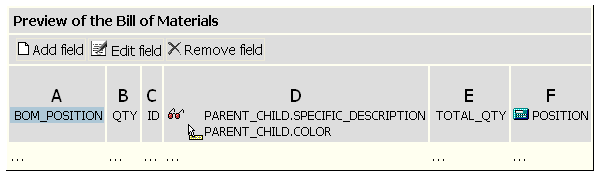
Note that the original name tends to be quite long so it is preferred to define a shorter alias for the column header. By default the alias specifies only the field name and not the table name.
Once you create a BOM using the modified template, the results are filled correctly: