Filter by projects selection
Filter by projects selection
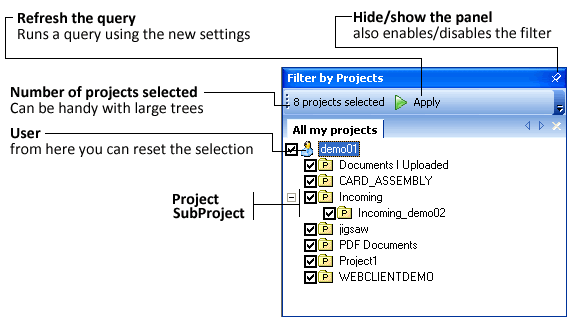
You can use the Filter by Projects panel to filter the query results.
All the projects are selected or none is then no filter applies, but if some are and some are not then the query returns only the documents belonging directly to one of the selected projects.
To disable the filter, hide the panel
Batch selections
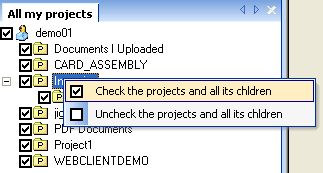
To do a hierarchical batch selection of the type 'the parent and all the children', right click what is intended to be the parent.
A batch selection starting from the tree root (the user), is performed on the entire tree.
Large selections
If you have been assigned a large number of projects, exceeding 300, then you must consider that queries filtered by a large number of projects are very heavy on the data server
To avoid an overload of the Data Server that would affect also other users, the number of projects on which you can filter is limited to 300. If you exceed that number the query will not be requested. We suggest that if you need to look for a document on a large number of projects either you look in the entire database or you select/deselect branches of the tree before the search in order to maintain the number of selected projects under 300. The number of projects currently selected is always visible in the panel.