Projects assignment in the Web Client
Projects assignment
The project assignment is done directly in DBWorks, either the StandAlone or the Integrated version, provided you have the necessary rights. Please read the related help page for further information on the subject. What is important from the Web Client point of view, is that the project assignment is respected and is made more strict, in the sense that while in DBWorks if you haven't been assigned any project that means that no restriction is applied and you can see all the projects, in the WebViewer it is the opposite, so if no project has been assigned to you, you won't see any project and hence any information.
Queries and projects assignment
Users can be assigned projects to work on. The assignment they have in DBWorks is the same they have in Web Client and is done using Administrative tools provided with the Stand Alone version also on the server.
As in DBWorks, if the user is assigned no projects then implicitly he's assigned all the projects and hence has no limitations on the documents he/she has access to, as far as projects are concerned. This is the default situation in a new installation or in an installation where projects assignment is not used.
How do the limitations work?
Basically when you run a query you'll be able to find documents also outside the projects you have been assigned, but then if they don't belong to one of your projects, directly or indirectly, you won't be able to perform any action on them.
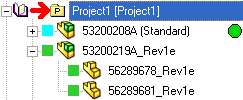
Let's see what this means exactly using a DBWorks screenshot to help us
The assembly 53200208A clearly belongs to Project1, but the parts underneath it could or could not belong directly to it. We can say that also if they don't have a direct link to Project1, which is not always the case, at least they have an indirect link to it through the assembly.
DBWorks provides an option to guarantee that the direct link to the project is inherited by children components but by default the option is turned off and once you activate it it will act only on the assemblies saved from that moment on.

Security is enforced making sure that if you have found and selected a document not belonging to one of the assigned projects, then you can't download it, view it with eDrawings, view the record, etc... you can only see a small picture of the document to have an idea of what it looks like.
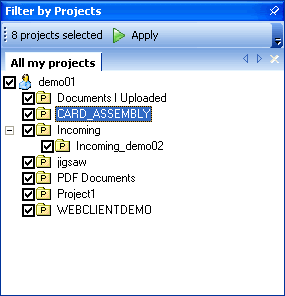
As a user, you can see the projects that have been assigned to you in the 'Filter By Projects' panel. If a project has not been assigned to you then you won't see it in the tree. The tree can be used to filter the documents returned by the queries. In this case the filter would limit the query results so that only documents belonging directly to the projects would be visible in the query results.
By default, if you had a new user to any group, the user has full access to all the projects. This is also the default behaviour of DBWorks but if you prefer to overrride this potentially unsafe setting you can optionally.
To make sure that a user with no projects assigned cannot login in the Web Client, open the file on the web server named \program files\dbworks stand alone\WebViewer\WebViewerOptions.txt and add the following line:
ALLOW_LOGIN_ONLY_IF_PROJECTS_ASSIGNED
You needn't restart the web server or the COM Plus components and the setting becomes immediately active for new logins. When this option is active if a user with no projects assigned tries to login he/she gets a clear message and advised to get in touch with the Administrator.
By default, Web Client will also display parents that do not belong to your projects, but in this case you wouldn't be able to view them or view their record
In order to avoid displating parents that do not belong to any of your projects specify in the options file WebViewerOptions.txt the string
PROTECT_PARENT_NAVIGATION 1
The performances will be slightly affected by this option.
Special cases
There are some installations where many documents are simply registered into the database, especially generic documents, without assigning them to any project.
It is clear that if the restrictions apply, these documents are not accessible by anybody except administrators.
To grant make these documents accessible you have 2 solutions: remove the restrictions based on the projects or treat these documents as special cases.
To enable this working mode, you need to open the file ...\program files\dbworks stand alone\WebViewer\WebViewerOptions.txt and add the following line:
allow_projects_not_assigned
If this line is found then the projects do not affect the security of the application and every document can be freely downloaded.