DBWARM Rights
DBWARM rights concerning the WebViewer
DBWorks-like operations
The commands like View Record, edit Record, check in/out, increment revision state are under the control of DBWARM as for DBWorks.
In particular the revision commands (check in/out, increment revision) have been implemented as custom server side scripts and on those the control applies twice: if you are not denied the ability to check out in DBWARM but you are in the parametric file that defines the custom menu elements you won't be able to check out a document.
This choice is justified by the fact that a web environment is simply not the company's environment and it makes sense to state that a user can freely checkout files while in the office but that he shouldn't be able to do the same from home.
So, if you expect to be able to, say, check out a document in WebViewer but you don't see the menu appear check the DBWARM settings first, but then don't forget to check also the file on the server ...\CustomMenus.xml.
Refer to the detailed description of security for custom scripts to learn more on the subject.
Web Client custom section in DBWARM
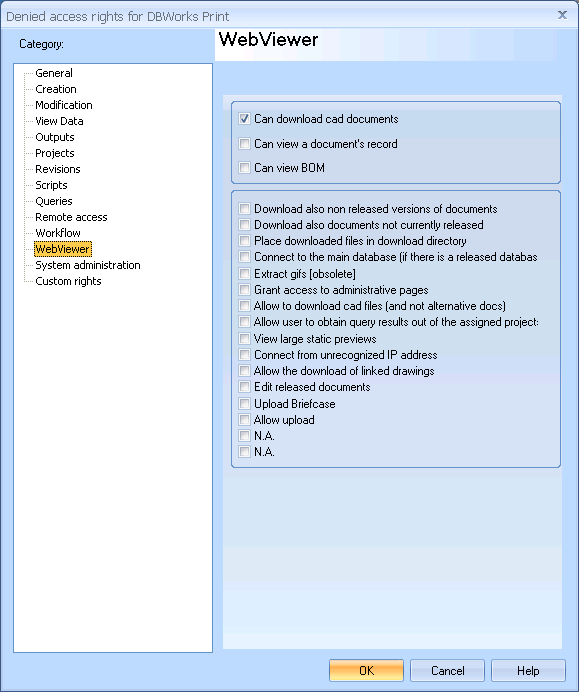
DBWARM controls the rights of the most common operations available in WebViewer. Here's a brief explanation for the main commands
Download also non released versions of documents
When active, the user previews and download only the last released version of the document.
This option makes sure that people out of the designers team can download and view only released versions.
Note that the record, the tree structure and the data in general come from the work in progress database, so for instance the tree structure he sees for an assembly might not correspond to the tree structure of the assembly he can download, possibly because a new part, never validated, has been added since last approval.
This inconvenience can be avoided setting up a second database and enabling the Released Database Mode, while the current option can be considered a fair compromise for smaller companies that want to provide the entire company with the ability to have access to the documents without having to set up a second database. A case where this option is handy is, for instance, when workers in the warehouse need to print released drawings without minding the current state of the work in progress versions.
Download also documents not currently released
When active, the user can download only documents currently in state 'RELEASED'
Place downloaded files in Download Directory
When active, the user can download the documents but their location will not be known, as for any file downloaded implicitly by Internet explorer, for instance a pdf file being viewed inside the browser.
Connect to the main database
When this option is active and there's a released database this user has access only to the released database.
Extract gifs
When this option is active the user cannot extract preview images from the cad files, though he can preview existing ones.
Grant access to administrative pages
Allows the user to see the user currently connected and to disconnect them
Allow to download cad files (and not alternative docs)
Not implemented yet. Whemn active, the user will load alternative files for cad documents, for instance pdf or tiffs instead of drawings
Read more here
Show documents beloging to not assigned projects
When active, the user receives query results containing only the documents directly belonging to one of the assigned projects. Normally the user receives query results including also other documents bu then we can't do anything with them beside knowing that they exist and seeing a small preview.
View large static previews
If you check this option you deny the user the ability to see large previews. The small preview panel remains still visible.
Connect from unrecognized IP address
If you check this option you oblige the user to connect from an IP address that has been specified in a list.
Allow the download of linked drawings
If you check this option you deny the user the ability to download the linked drawing from the contextual menu.
Allow upload
If you check this option you deny the user the ability to upload local files or to synchronize files that are in state NEW. If the user is able to check out the documents he will still be able to upload them before checking them in