Alternative documents
This is essentially a strict security settings that concerns the rights of a user to download the CAD documents.
When this restriction is active, the user is unable to download the CAD documents or the eDrawings previews and can only download an alternative file instead.
A typical case is allowing the users in the Print Group to download only the pdfs or the tiffs generated from the drawings, but not the drawings themselves.
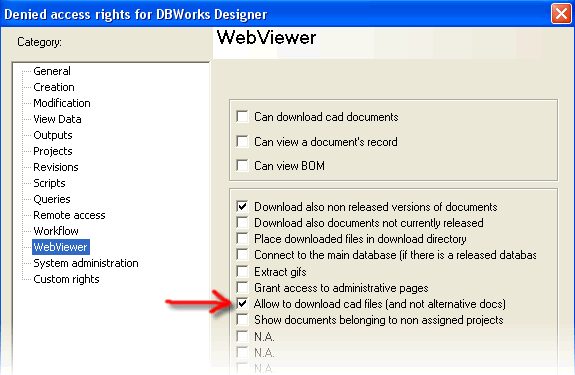
The restriction must be enabled in DBWARM as in the image.
This is certainly a security setting, but since normally pdfs and tiffs are smaller than drawing files it could be seen also as a performance improvements
By default the extensions considered are .pdf, .tif, .tiff but you can set your own list. In the file program files\DBWorks Stand Alone\WebViewer\WebViewerOptions.txt set as many extensions as you need in the form:
optional_alt_doc_extension "pdf"
optional_alt_doc_extension ".tiff"
optional_alt_doc_extension ".tif"
optional_alt_doc_extension ".gif"
The alternative files can be located in the same directory as the original file and their name is the same as the original followed by the alternative extension, so if you have a cad file named myAssembly.slddrw an alternative file would be named myAssembly.slddrw.pdf or myAssembly.slddrw.tif.
It is possible to define a set of directories where you can put the alternative files.
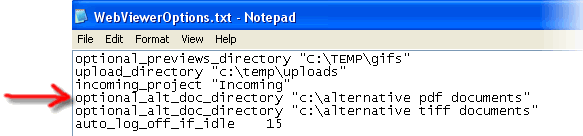
These directories must be enlisted in the file program files\DBWorks Stand Alone\WebViewer\WebViewerOptions.txt on the Web Server
Indicate the directories each in a separate line starting with 'optional_alt_doc_directory' as in the image.
Suppose you want to put alternative documents on a separate drive or directories tree that reflect the original file system of the DBWorks managed files.
For instance you have your drawings in m:\documents\drawings and a ramification of directories underneath.
You want to put all the alternative documents to \\other_server\documents\drawings and maintain underneath the same file system structure of directories as for the drawings.
Then on the web server, in the directory ...\program files\DBWorks Stand Alone\WebViewer you must define a text files called driveMappingsAltDocs.txt.
This file would be formatted like the file driveMappings.txt.
You would have to ad this single line to the file driveMappingsAltDocs.txt
M \\other_server
If on the other hand you are mapping a local drive to another local drive path (for instance c:\ -> d:\) this is the correct mapping that should be added:
C D:
How does this work?
When the system looks for an alternative documents it reads the location of the original document, then tries to remap it using first the mapping defined in driveMappingsAltDocs.txt . If no mapping is available there, then it falls back on the mappings defined in driveMappings.txt .
As a result you needn-t redefine in driveMappingsAltDocs.txt all the mappings, but only those that differ from the mappings defined in driveMappings.txt .
Suppose that you have a drawing named myDrawing.SLDDRW currently in revision 4
For each allowed extension and for each directory allowed, the file name being searched in the directory where the drawing is (in this case for the extension pdf):
myDrawing.SLDDRW.4.pdf
myDrawing.SLDDRW_4.pdf
myDrawing.4.pdf
myDrawing.pdf
You can include in the batch download file dialog also the alternative documents for the preious revisions, if available
To activate this behavior, in the file located in %program files(x86)%\DBWorks\WebViewer\WebViewerOptions.txt add the following line:
alt_doc_all_revisions
The direct download of cad documents is denied. Also the download and visualization of preview files in eDrawings is denied. The history menu that would provide access to previous revisions is denied.
For generic documents, as for instance Word documents, if the alternative file is found, then only the download of the alternative document is allowed, otherwise it remains possible to download the original file.
No, it is left to you to create those files when needed. The approval is certainly a good time when these files can be created automatically by DBWorks, but it is ultimately left to you to decide when and if those files should be created or updated.
Consider that for users to which this restriction applies it's either the download of an alternative document or nothing.
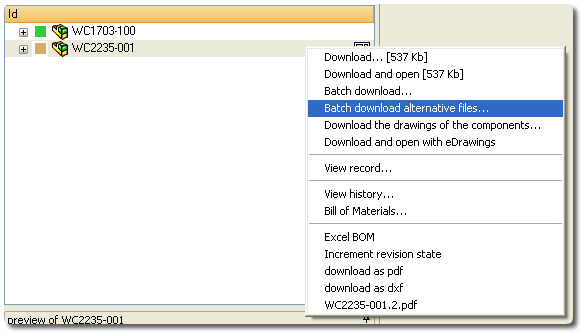
The menu indicates the neame of the alternative document available. The file is downloaded in the Download Directory on the client (or in %tmp% if the option has not been set) and opened automatically at the end of the download with the application associated to the file extension.
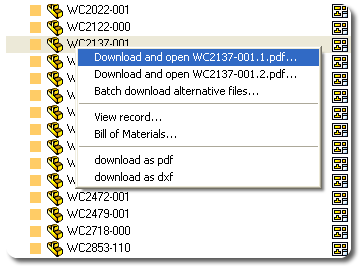
You can also download the entire tree structure of alternative documents from an assembly, a drawing or a project. In this case you are first presented with the list of files available allowing you to select the ones to be downloaded.